Customizing Email Templates for Workflow Notification | Community
Skip to main content
Leela-Pavan-Kumar
September 5, 2022
Solved

Customizing Email Templates for Workflow Notification

  • September 5, 2022
  • 3 replies
  • 3043 views

I need to customize the OOTB Email Template which is located in "/libs/settings/workflow/notification/email/default/en.txt" for Workflow Email Notification in a Participant Step.


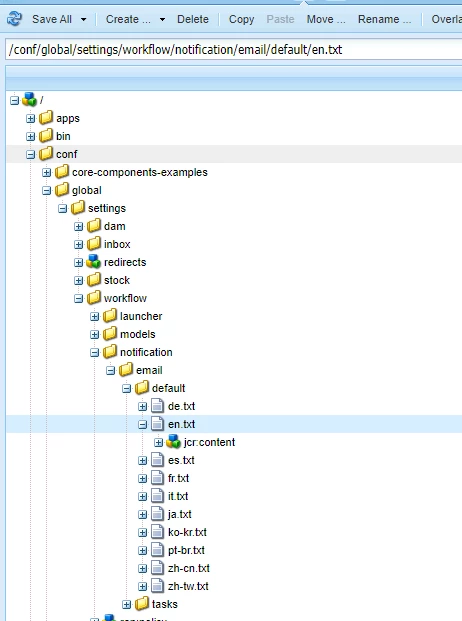
I tried overlay it to /conf but changes are not reflecting. Even after restarting the bundles and instances.


As per the  Adobe documentation they are suggesting to change the OOTB template which is under /libs.


Is it ok to customize directly in /libs ? If not how to resolve this issue.


Please help me on this.



This post is no longer active and is closed to new replies. Need help? Start a new post to ask your question.
Best answer by Leela-Pavan-Kumar


Here is the solution that worked for me!


The default email template for participant step is 

/libs/settings/workflow/notification/email/default/en.txt


Overlay it to this path and make the required changes here

/apps/settings/workflow/notification/email/default/en.txt


Restart the bundles/instance to reflect workflow notification template changes, since from AEM 6.4.0 all the templates moved inside the bundle.


3 replies

arunpatidar
Community Advisor
Community Advisor
September 5, 2022

Try to overlay at /conf/global/settings/workflow/notification/email 

Arun Patidar
Leela-Pavan-Kumar
September 5, 2022

Did the same thing, but its not picking up for Email Notification.


Restarted the bundle and instance after making these changes but still its not picking this

arunpatidar
Community Advisor
Community Advisor
September 5, 2022

If your requirement/solution/design allow then you can create custom workflow step for notification

example - https://aemlab.blogspot.com/2019/06/aem-custom-templated-email.html 

Arun Patidar
Leela-Pavan-Kumar
Leela-Pavan-KumarAuthorAccepted solution
September 5, 2022


Here is the solution that worked for me!


The default email template for participant step is 

/libs/settings/workflow/notification/email/default/en.txt


Overlay it to this path and make the required changes here

/apps/settings/workflow/notification/email/default/en.txt


Restart the bundles/instance to reflect workflow notification template changes, since from AEM 6.4.0 all the templates moved inside the bundle.


November 18, 2024

In AEM 6.5.20 the class com.day.cq.workflow.impl.email.EMailNotificationService tries to find the email templates first here:


String templateLocation = "/etc/workflow/notification/email/default";


 If this location does not exist, it takes '/libs/settings/workflow/notification/email/default' as default path.


So for overlaying the email templates to create custom emails, you can copy '/libs/settings/workflow/notification/email/default' to '/etc/workflow/notification/email/default' and adjust it there.
No service restarts required.

In AEM 6.5.20 this worked. For lower AEM versions please try on your own.

November 19, 2024

"No service restarts required." is not correct. The folders are read during service activation. So the service/instance needs a restart.
Enabling a debug log for com.day.cq.workflow.impl.email.EMailNotificationService shows which folder is used during service activation.