Customize / Overlay AEM 6.4 Inbox screen | Community
Skip to main content
Level 2
October 19, 2018
Solved

Customize / Overlay AEM 6.4 Inbox screen

  • October 19, 2018
  • 2 replies
  • 2840 views

In the inbox screen (/aem/inbox) of AEM 6.4, only the title of the workflow item is visible.

To get a better user experience, it would be great to show the title of the page in the screen as well.

With an overlay of the inbox, this would be possible, indeed. But since the content classification in AEM 6.4, it is not recommended anymore to overlay this node.
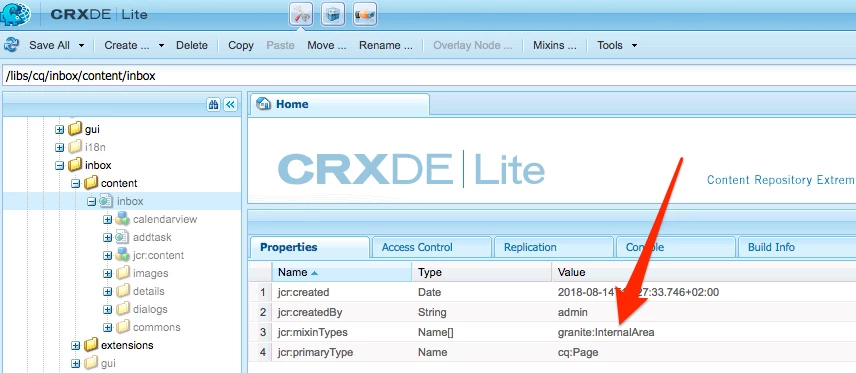
Are there any recommendations?

This post is no longer active and is closed to new replies. Need help? Start a new post to ask your question.
Best answer by Peter_Puzanovs

Dear Reto,

Following Adobe documentation it says that "Internal (granite:InternalArea) - Defines a node as internal. Nodes classified as internal cannot be overlaid, inherited, or used directly. These nodes are meant only for internal functionality of AEM" [0]. This means that you should not modify areas that your product vendor has marked as InternalArea. This has been done to ease Upgrade for your client, this path should not be overlaid.

[0] https://helpx.adobe.com/experience-manager/6-4/sites/deploying/using/sustainable-upgrades.html

  1. Best, would probably be to raise DayCare ticket and request feature as per your client requirements to deliver this 'very important' capability to all AEM customers.
  2. Or you could simply remove the mixin via CRX/De interface, see Mixin button. Then you can overlay in exactly same way as you did in 6.3(Notice jcr:mixinTypes array is empty here)

  3. Create your own inbox component, which would not rely on AEM codebase and would not get impacted by AEM upgrades.
  4. Create your custom clientlib with specific namespace to inject into aem/inbox and add your custom data to the screen.

Best action here, likely is no action and let Adobe work on improving their own InternalArea. As by doing this extension you are creating yourself more work.

Regards,

Peter

2 replies

Peter_Puzanovs
Community Advisor
Peter_PuzanovsCommunity AdvisorAccepted solution
Community Advisor
October 19, 2018

Dear Reto,

Following Adobe documentation it says that "Internal (granite:InternalArea) - Defines a node as internal. Nodes classified as internal cannot be overlaid, inherited, or used directly. These nodes are meant only for internal functionality of AEM" [0]. This means that you should not modify areas that your product vendor has marked as InternalArea. This has been done to ease Upgrade for your client, this path should not be overlaid.

[0] https://helpx.adobe.com/experience-manager/6-4/sites/deploying/using/sustainable-upgrades.html

  1. Best, would probably be to raise DayCare ticket and request feature as per your client requirements to deliver this 'very important' capability to all AEM customers.
  2. Or you could simply remove the mixin via CRX/De interface, see Mixin button. Then you can overlay in exactly same way as you did in 6.3(Notice jcr:mixinTypes array is empty here)

  3. Create your own inbox component, which would not rely on AEM codebase and would not get impacted by AEM upgrades.
  4. Create your custom clientlib with specific namespace to inject into aem/inbox and add your custom data to the screen.

Best action here, likely is no action and let Adobe work on improving their own InternalArea. As by doing this extension you are creating yourself more work.

Regards,

Peter

Level 2
October 19, 2018

Hi Peter

Thanks a lot for your worthful response. I totally agree that this should be addressed via CR at Adobe. The downside of this will be the time. If Adobe accepts the change, it will take quite a time, until it will be available. And as it is a CR, it might be possible that they only will introduce the new feature in the upcoming (minor) release.

We'll see how important this feature will be for our customer and then decide, wich option we'll choose.

Regards,

Reto