custom Workflow instance are in running state even after completion of workflow | Community
Skip to main content
Level 2
May 30, 2019
Solved

custom Workflow instance are in running state even after completion of workflow

  • May 30, 2019
  • 9 replies
  • 4855 views

Hi,

I have custom workflow that is launched on asset creation. Though the workflow is completed i could still see it in instances.

When i open the history i could see that the workflow is completed.
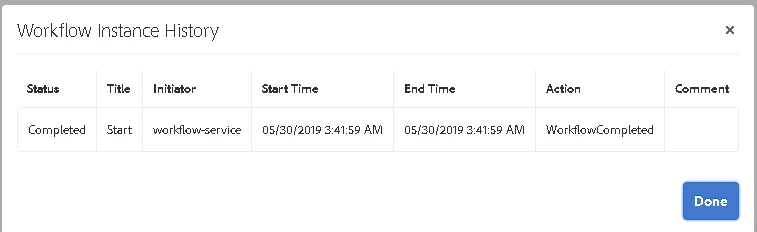
Can you please let me know why is the workflow instance still in running status? Do i need to manually terminate them or do i need to include termination related code in custom workflow?

Arun Patidar​ / smacdonald2008​ Can you please help me out on this ? I'm using AEM 6.4 version.
This post is no longer active and is closed to new replies. Need help? Start a new post to ask your question.
Best answer by user05162

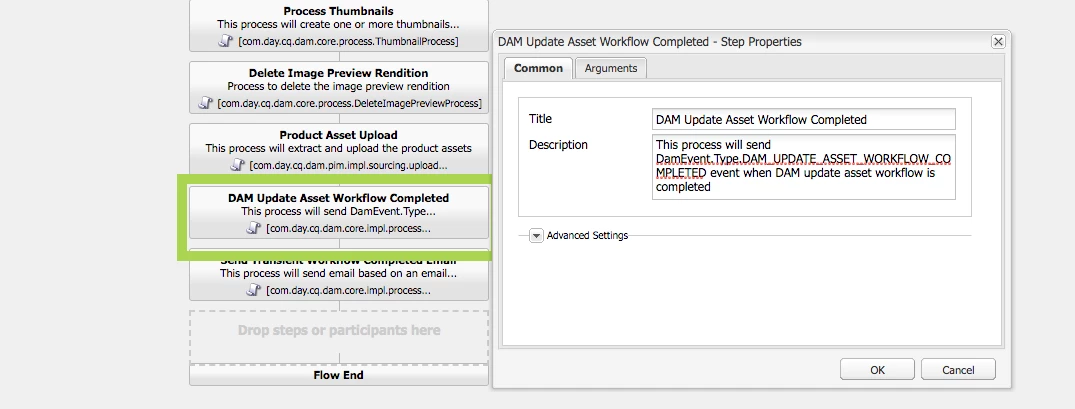
Did you include the Workflow completed step as the last step?

9 replies

user05162Adobe EmployeeAccepted solution
Adobe Employee
May 30, 2019

Did you include the Workflow completed step as the last step?

Level 2
May 31, 2019

Hi @jbrar,

Do i need to add this step as the last step in my custom workflow ?

If so i have added it and it makes no difference.

Can you please let me know how to add completion step to custom workflow?

Level 2
May 31, 2019

Hi Experts,

Can someone please guide me on this issue?

arunpatidar
Community Advisor
Community Advisor
May 31, 2019

Hi,

could you please share your workflow model?

Did you try to add DAM Update asset workflow completed step

you can get the step reference from http://localhost:4502/cf#/etc/workflow/models/dam/update_asset.html

Arun Patidar
Level 2
May 31, 2019

hi Arun,

In custom workflow , in the process step there is a check box named advance handler. i have checked it and now the workflow is not available in instances after completion.

Arun Patidar

Level 2
May 31, 2019

Hi Arun Patidar,

I'm now facing a different issue.

I have a metadata field name status, based on some conditions im changing the status value in the custom workflow code.

The workflow is not able to update the value of the field if rule set on field is disable edit.

I dont want user to manually edit this value, so i'm disabling it . Only workflow should be able to update the value.

What am i missing here?  If the field is in editable state the workflow is able to edit the value.

Can you please let me know what am i missing here?

arunpatidar
Community Advisor
Community Advisor
May 31, 2019

check below ECMA reference code:

var workflowData = workItem.getWorkflowData();

if (workflowData.getPayloadType() == "JCR_PATH") {

    var path = workflowData.getPayload().toString();

    var jcrsession = workflowSession.getSession();

    var node = jcrsession.getNode(path);

    if (node.hasProperty("status")){

            node.setProperty("status", "new Status");

            node.save();

         }

}

Arun Patidar
Level 2
June 4, 2019

Thank you for ur input Arun Patidar

I have already written the code to update the value. My question is

Since Status field value gets changed only by the workflow and shouldnot edited manually by the user i have added "disable edit" rule on the field. But now the workflow is not able to update the value. How do i make this field readonly in the UI but editable byt the workflow?

arunpatidar
Community Advisor
Community Advisor
June 4, 2019

Hi,

Javascript would help.

Example -

$('input.status').attr('readonly', 'readonly');

Arun Patidar
