custom validation for coral text filed | Community
Skip to main content
Level 4
November 20, 2020
Solved

custom validation for coral text filed

  • November 20, 2020
  • 2 replies
  • 4472 views

Hi all,

I am using below code for validation for text field in dialog.

(function(document, $, Coral) {
var $doc = $(document);
$doc.on('foundation-contentloaded', function(e) {
$(window).adaptTo("foundation-registry").register("foundation.validation.validator", {
selector: "[data-validation=txt-validate]",
validate: function(el) {
var maxlength = parseInt(el.getAttribute("data-myapp-maxlength"), 10);

if (isNaN(maxlength)) {
return;
}

var length = el.value.length;

if (length > maxlength) {
return "The field needs to be maximum " + maxlength + " characters. It currently has a length of " + length + ".";
}
}
});
});
})(document, Granite.$, Coral);


some how this code is not working.

Please help me to resolve the issue.
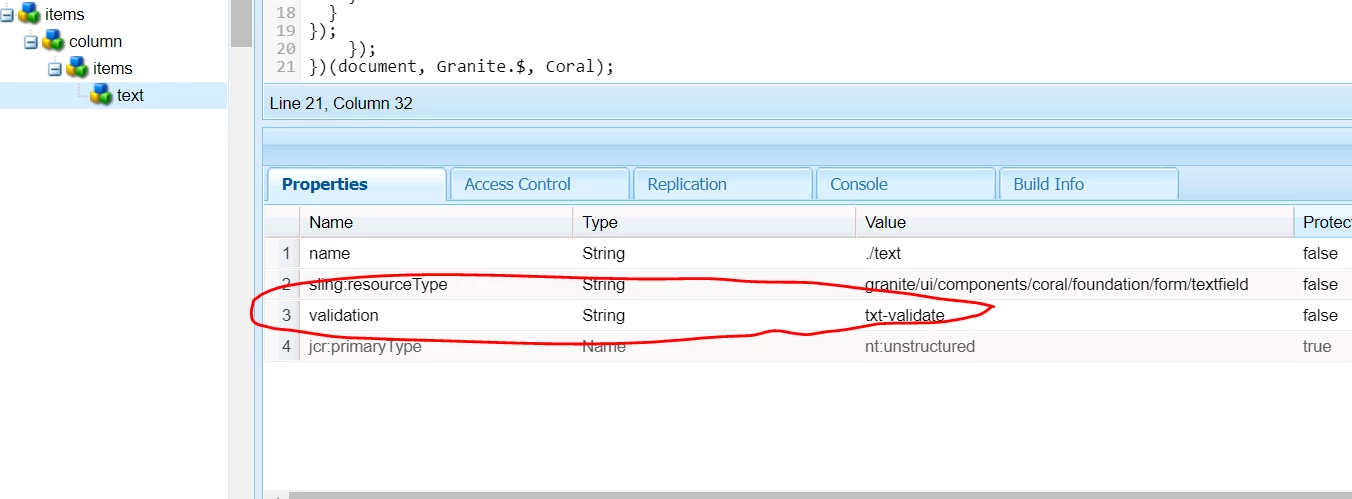
 

@arunpatidar 


Thanks,

Sandeep.

This post is no longer active and is closed to new replies. Need help? Start a new post to ask your question.
Best answer by BrianKasingli

@sandeep6,

It looks like you are trying to add a maxLength validation field to the granite UI components, known as Touch UI. You can achieve this without any custom code.


<textfield-example jcr:primaryType="nt:unstructured" sling:resourceType="granite/ui/components/coral/foundation/form/textfield" fieldLabel="Text Field Example" name="./example" maxlength="{Long}100"/>

Your custom validation code which using the Jquery validation library implementation looks incorrect, try this:
https://sourcedcode.com/blog/aem/touch-ui/aem-richtext-max-characters-length-validation

The code below adds a custom validation for the richText granite UI component:

;(function (window, $) { 'use strict'; /** * Rich-Text Editor Max Length Validation * * @class RichTextMaxLengthValidation * @classdesc registers a new validator to the foundation-registry service focused on the * cq/gui/components/authoring/dialog/richtext component. * * Usage: the attribute maxlength to the richtext component, example: maxlength="100" */ var RichTextMaxLengthValidation= function () { var CONST = { TARGET_GRANITE_UI: '.coral-RichText-editable', ERROR_MESSAGE: 'Your text length is {0} but character limit is {1}!', }; /** * Initializes the RichTextMaxLengthValidation */ function init() { // register the validator which includes the validate algorithm $(window).adaptTo('foundation-registry').register('foundation.validation.validator', { selector: CONST.TARGET_GRANITE_UI, validate: function (el) { var $rteField = $(el); var $field = $rteField.closest('.richtext-container').find('input.coral-Form-field'); var maxLength = $field.data('maxlength'); var textLength = $rteField.text().trim().length; if (maxLength && textLength > maxLength) { return Granite.I18n.get(CONST.ERROR_MESSAGE, [textLength, maxLength]); } return null; } }); // execute Jquery Validation onKeyUp $(document).on('keyup', CONST.TARGET_GRANITE_UI, function (e) { executeJqueryValidation($(this)); }); } /** * Execute foundation.validation.validator's validate algorithm. */ function executeJqueryValidation(el) { var validationApi = el.adaptTo('foundation-validation'); if (validationApi) { validationApi.checkValidity(); validationApi.updateUI(); } } return { init: init } }(); RichTextMaxLengthValidation.init(); })(window, Granite.$);


2 replies

BrianKasingli
Community Advisor and Adobe Champion
BrianKasingliCommunity Advisor and Adobe ChampionAccepted solution
Community Advisor and Adobe Champion
November 20, 2020

@sandeep6,

It looks like you are trying to add a maxLength validation field to the granite UI components, known as Touch UI. You can achieve this without any custom code.


<textfield-example jcr:primaryType="nt:unstructured" sling:resourceType="granite/ui/components/coral/foundation/form/textfield" fieldLabel="Text Field Example" name="./example" maxlength="{Long}100"/>

Your custom validation code which using the Jquery validation library implementation looks incorrect, try this:
https://sourcedcode.com/blog/aem/touch-ui/aem-richtext-max-characters-length-validation

The code below adds a custom validation for the richText granite UI component:

;(function (window, $) { 'use strict'; /** * Rich-Text Editor Max Length Validation * * @class RichTextMaxLengthValidation * @classdesc registers a new validator to the foundation-registry service focused on the * cq/gui/components/authoring/dialog/richtext component. * * Usage: the attribute maxlength to the richtext component, example: maxlength="100" */ var RichTextMaxLengthValidation= function () { var CONST = { TARGET_GRANITE_UI: '.coral-RichText-editable', ERROR_MESSAGE: 'Your text length is {0} but character limit is {1}!', }; /** * Initializes the RichTextMaxLengthValidation */ function init() { // register the validator which includes the validate algorithm $(window).adaptTo('foundation-registry').register('foundation.validation.validator', { selector: CONST.TARGET_GRANITE_UI, validate: function (el) { var $rteField = $(el); var $field = $rteField.closest('.richtext-container').find('input.coral-Form-field'); var maxLength = $field.data('maxlength'); var textLength = $rteField.text().trim().length; if (maxLength && textLength > maxLength) { return Granite.I18n.get(CONST.ERROR_MESSAGE, [textLength, maxLength]); } return null; } }); // execute Jquery Validation onKeyUp $(document).on('keyup', CONST.TARGET_GRANITE_UI, function (e) { executeJqueryValidation($(this)); }); } /** * Execute foundation.validation.validator's validate algorithm. */ function executeJqueryValidation(el) { var validationApi = el.adaptTo('foundation-validation'); if (validationApi) { validationApi.checkValidity(); validationApi.updateUI(); } } return { init: init } }(); RichTextMaxLengthValidation.init(); })(window, Granite.$);


Sandeep6Author
Level 4
November 20, 2020

I know this, but I have to show alert after reaching limit.Please provide me some reference to achieve using js.

Anudeep_Garnepudi
Community Advisor
Community Advisor
November 20, 2020

Hi @sandeep6 

Add granite:class property to text field and update selector in js. 

property: granite:class (String) txt-validate

Validation JS:

$(window).adaptTo("foundation-registry").register("foundation.validation.validator", {
selector: ".txt-validate",
validate: function(el) {

...

}

This will work.

AG

Sandeep6Author
Level 4
November 20, 2020
var maxlength = parseInt(el.getAttribute("data-myapp-maxlength"), 10); this value is not coming

