Custom rte plugin like dropdown. [AEM as cloud] | Community
Skip to main content
February 7, 2022

Custom rte plugin like dropdown. [AEM as cloud]

  • February 7, 2022
  • 2 replies
  • 3287 views

Hi Team,
I would like to create a richText inside Multifield and need to create a custom rte plugin where i can set up two dropdown fields to the plugin for rich text.
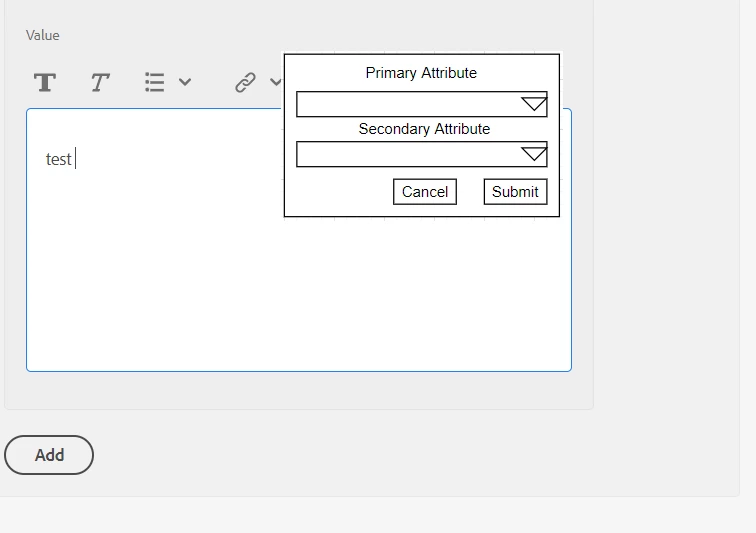
 

indise Primary Attribute dropdown we have some values like : PrimaryAttribute1, PrimaryAttribute2 , PrimaryAttribute3, PrimaryAttribute4

and  Secondary Attribute dropdown we have some values like: SecondaryAttribute1, SecondaryAttribute2 and SecondaryAttribute3.


The scenaro here is: 

In the dialog we need to add richtext. This richtext should have all the RTE plugins. Along with this we need to create a new RTE plugin.
This RTE plugin will contain 2 tagfields using which author could select a primary attribute and a secondary attribute. Once the primary and secondary attributes are chosen, these attributes will be included in the text like “##<primary-attibute>,<secondary-attribute>@@”.

  1. Example value of text: “This is the product title ##primaryattribute:product-attributes,secondaryayytibute:product-attributes@@“.

  2. Author can choose primary and secondary attributes multiple times in this rich text.

  3. Default html tag that should surround richtext val should be “div“. In the para format RTE Plugin the first item should be div.


@arunpatidar  @vijayalakshmi_s   @theo_pendle   @kautuk_sahni  @briankasingli 

This post is no longer active and is closed to new replies. Need help? Start a new post to ask your question.

2 replies

BrianKasingli
Community Advisor and Adobe Champion
February 8, 2022

It looks like these are standard tags that you would like to flag text in your RTE (cq/gui/components/authoring/dialog/richtext). Unless if you have a more custom usecase.


There are two plugins RTE that you can try to use:
1. paraformat

2. styles


1. Paraformat example:

<paraformat
jcr:primaryType="nt:unstructured"
features="*">
<formats jcr:primaryType="nt:unstructured">
<default_p
jcr:primaryType="nt:unstructured"
description="Paragraph"
tag="p"/>
<default_h1
jcr:primaryType="nt:unstructured"
description="Heading 1"
tag="h1"/>
<default_h2
jcr:primaryType="nt:unstructured"
description="Heading 2"
tag="h2"/>
<default_h3
jcr:primaryType="nt:unstructured"
description="Heading 3"
tag="h3"/>
<default_h4
jcr:primaryType="nt:unstructured"
description="Heading 4"
tag="h4"/>
<default_h5
jcr:primaryType="nt:unstructured"
description="Heading 5"
tag="h5"/>
<default_h6
jcr:primaryType="nt:unstructured"
description="Heading 6"
tag="h6"/>
</formats>
</paraformat>


2. Styles


<styles
    jcr:primaryType="nt:unstructured"
    features="*">
    <styles jcr:primaryType="nt:unstructured">
        <product1
            jcr:primaryType="nt:unstructured"
            cssName="product-1"
            text="Product 1"/>
        <product2
            jcr:primaryType="nt:unstructured"
            cssName="product-2"
            text="Product 2"/>
        <product3
            jcr:primaryType="nt:unstructured"
            cssName="product-3"
            text="Product 3"/>
</styles>


Example Usage:


<?xml version="1.0" encoding="UTF-8"?> <jcr:root xmlns:sling="http://sling.apache.org/jcr/sling/1.0" xmlns:granite="http://www.adobe.com/jcr/granite/1.0" xmlns:cq="http://www.day.com/jcr/cq/1.0" xmlns:jcr="http://www.jcp.org/jcr/1.0" xmlns:nt="http://www.jcp.org/jcr/nt/1.0" jcr:primaryType="nt:unstructured" jcr:title="Text" sling:resourceType="cq/gui/components/authoring/dialog"> <content jcr:primaryType="nt:unstructured" sling:resourceType="granite/ui/components/coral/foundation/container"> <items jcr:primaryType="nt:unstructured"> <tabs jcr:primaryType="nt:unstructured" sling:resourceType="granite/ui/components/coral/foundation/tabs" maximized="{Boolean}true"> <items jcr:primaryType="nt:unstructured"> <properties jcr:primaryType="nt:unstructured" jcr:title="Properties" sling:resourceType="granite/ui/components/coral/foundation/container" margin="{Boolean}true"> <items jcr:primaryType="nt:unstructured"> <columns jcr:primaryType="nt:unstructured" sling:resourceType="granite/ui/components/coral/foundation/fixedcolumns" margin="{Boolean}true"> <items jcr:primaryType="nt:unstructured"> <column granite:class="cq-RichText-FixedColumn-column" jcr:primaryType="nt:unstructured" sling:resourceType="granite/ui/components/coral/foundation/container"> <items jcr:primaryType="nt:unstructured"> <text jcr:primaryType="nt:unstructured" sling:resourceType="cq/gui/components/authoring/dialog/richtext" name="./text" useFixedInlineToolbar="{Boolean}true"> <rtePlugins jcr:primaryType="nt:unstructured"> <format jcr:primaryType="nt:unstructured" features="*"/> <justify jcr:primaryType="nt:unstructured" features="*"/> <lists jcr:primaryType="nt:unstructured" features="*"/> <paraformat jcr:primaryType="nt:unstructured" features="*"> <formats jcr:primaryType="nt:unstructured"> <default_p jcr:primaryType="nt:unstructured" description="Paragraph" tag="p"/> <default_h1 jcr:primaryType="nt:unstructured" description="Heading 1" tag="h1"/> <default_h2 jcr:primaryType="nt:unstructured" description="Heading 2" tag="h2"/> <default_h3 jcr:primaryType="nt:unstructured" description="Heading 3" tag="h3"/> <default_h4 jcr:primaryType="nt:unstructured" description="Heading 4" tag="h4"/> <default_h5 jcr:primaryType="nt:unstructured" description="Heading 5" tag="h5"/> <default_h6 jcr:primaryType="nt:unstructured" description="Heading 6" tag="h6"/> </formats> </paraformat> <links jcr:primaryType="nt:unstructured" features="*"/> <image jcr:primaryType="nt:unstructured" features="*"/> <findreplace jcr:primaryType="nt:unstructured" features="*"/> <subsuperscript jcr:primaryType="nt:unstructured" features="*"/> <spellcheck jcr:primaryType="nt:unstructured" features="*"/> <misctools jcr:primaryType="nt:unstructured" features="*"> <specialCharsConfig jcr:primaryType="nt:unstructured"> <chars jcr:primaryType="nt:unstructured"> <copyright jcr:primaryType="nt:unstructured" entity="&amp;#169;"/> <trademark jcr:primaryType="nt:unstructured" entity="&amp;#8482;"/> <registered jcr:primaryType="nt:unstructured" entity="&amp;#174;"/> <emDash jcr:primaryType="nt:unstructured" entity="&amp;#8212;"/> <pound jcr:primaryType="nt:unstructured" entity="&amp;#163;"/> <nbsp jcr:primaryType="nt:unstructured" entity="&amp;#160;"/> </chars> </specialCharsConfig> </misctools> <styles jcr:primaryType="nt:unstructured" features="*"> <styles jcr:primaryType="nt:unstructured"> <product1 jcr:primaryType="nt:unstructured" cssName="product-1" text="Product 1"/> <product2 jcr:primaryType="nt:unstructured" cssName="product-2" text="Product 2"/> <product3 jcr:primaryType="nt:unstructured" cssName="product-3" text="Product 3"/> </styles> <table jcr:primaryType="nt:unstructured" features="*"/> </rtePlugins> <uiSettings jcr:primaryType="nt:unstructured"> <cui jcr:primaryType="nt:unstructured"> <inline jcr:primaryType="nt:unstructured" toolbar="[format#bold,format#italic,format#underline,#justify,#lists,subsuperscript#subscript,subsuperscript#superscript,links#modifylink,links#unlink,links#anchor,#image,findreplace#find,findreplace#replace,spellcheck#checktext,misctools#specialchars,misctools#sourceedit,#styles,#paraformat,table#table]"> <popovers jcr:primaryType="nt:unstructured"> <justify jcr:primaryType="nt:unstructured" items="[justify#justifyleft,justify#justifycenter,justify#justifyright]" ref="justify"/> <lists jcr:primaryType="nt:unstructured" items="[lists#unordered,lists#ordered,lists#outdent,lists#indent]" ref="lists"/> <paraformat jcr:primaryType="nt:unstructured" items="paraformat:getFormats:paraformat-pulldown" ref="paraformat"/> <styles jcr:primaryType="nt:unstructured" items="styles:getStyles:styles-pulldown" ref="styles"/> </popovers> </inline> <dialogFullScreen jcr:primaryType="nt:unstructured" toolbar="[format#bold,format#italic,format#underline,#justify,#lists,subsuperscript#subscript,subsuperscript#superscript,links#modifylink,links#unlink,links#anchor,#image,findreplace#find,findreplace#replace,spellcheck#checktext,misctools#specialchars,misctools#sourceedit,#styles,#paraformat,table#table]"> <popovers jcr:primaryType="nt:unstructured"> <paraformat jcr:primaryType="nt:unstructured" items="paraformat:getFormats:paraformat-pulldown" ref="paraformat"/> </popovers> </dialogFullScreen> <tableEditOptions jcr:primaryType="nt:unstructured" toolbar="[table#insertcolumn-before,table#insertcolumn-after,table#removecolumn,-,table#insertrow-before,table#insertrow-after,table#removerow,-,table#mergecells-right,table#mergecells-down,table#mergecells,table#splitcell-horizontal,table#splitcell-vertical,-,table#selectrow,table#selectcolumn,-,table#ensureparagraph,-,table#modifytableandcell,table#removetable,-,undo#undo,undo#redo,-,table#exitTableEditing,-]"/> </cui> </uiSettings> </text> </items> </column> </items> </columns> </items> </properties> </items> </tabs> </items> </content> </jcr:root>


February 8, 2022

Hi @briankasingli 
Thanks for response, It is a custom plugin. I have updated the usecase in the above question.

I have used paraformat for the heading, but here we have to create a custom plugin which can be used multiple times in a richtext.
Could you please check the updated usecase.

Vijayalakshmi_S
February 8, 2022

@tushaarsrivastava 

Could you please let know

  • If the attributes are to be populated to any text selection or is it expected on the enclosing div of RTE content
  • the expected HTML markup upon choosing the attributes. 
February 8, 2022

Hi @vijayalakshmi_s 

  • If the attributes are to be populated to any text selection or is it expected on the enclosing div of RTE content :: scenario here is let say if we select primary attribute or secondary attribute dropdown value the we can see those value on enclosing div of RTE e.g. This is the product title ##project:product-Primaryattributes/ProductData/Title,project:product-Secondaryattributes/productData/Desc@@
    • here from primary attribute dropdown we have selected value : project:product-Primaryattributes/ProductData/Title
    • and from secondary attribute dropdown we have selected value : project:product-Secondaryattributes/productData/Desc
  • So here for choosing the markup is like we are providing further values to text string that we are entering over richtext
