Custom publish page button next to Edit in Edit mode | Community
Skip to main content
Level 4
March 16, 2023
Solved

Custom publish page button next to Edit in Edit mode

  • March 16, 2023
  • 3 replies
  • 1691 views

Hi, 

I would like to add a Publish Page button next to the Edit Button on top right side of the header in Edit mode of a page. 
Can this be achieved by overriding? 

This post is no longer active and is closed to new replies. Need help? Start a new post to ask your question.
Best answer by SivakumarKanoori

@shibani06 : You can achieve this by overlay.


Go to this path :

/libs/wcm/core/content/editor/jcr:content/content/items/content/header/items/headerbar/items/pageinfopopover

under this items/list/items you can see publish node. You can copy the publish node to parallell to parent node pageinfopopover.


then go to the publish node and right click and select overlay node. once its overlayed under the /apps/ just go to publish node and add property align , variant and granite:class as below.
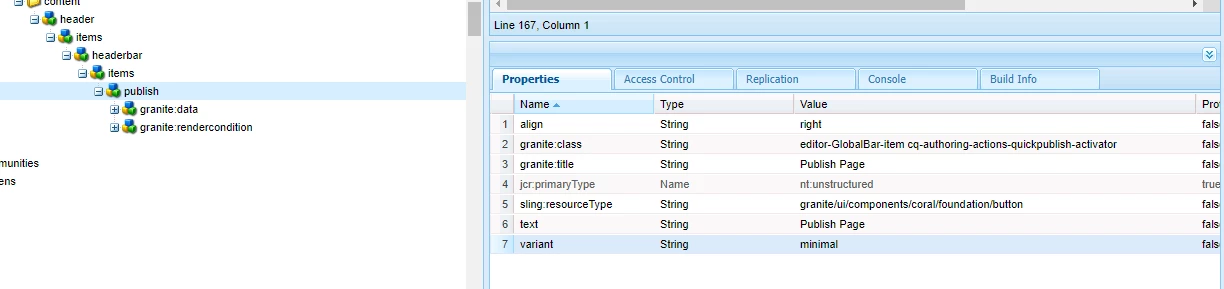


then it shows the publish page option and which is publishing properly when click on that .



Thanks,

Siva


3 replies

arunpatidar
Community Advisor
Community Advisor
March 16, 2023

Yes, this can be achieved with overlay

Arun Patidar
SHIBANI06Author
Level 4
March 17, 2023

Can we do it for Rollout as well ? Could you pls let me know the steps if possible as the overlaid rollout is not showing up in my editor page.

Parusharam
Level 2
March 16, 2023

You can achieve this by overlaying  /libs/wcm/core/content/sites/actions/publish.

SivakumarKanoori
Community Advisor
SivakumarKanooriCommunity AdvisorAccepted solution
Community Advisor
March 17, 2023

@shibani06 : You can achieve this by overlay.


Go to this path :

/libs/wcm/core/content/editor/jcr:content/content/items/content/header/items/headerbar/items/pageinfopopover

under this items/list/items you can see publish node. You can copy the publish node to parallell to parent node pageinfopopover.


then go to the publish node and right click and select overlay node. once its overlayed under the /apps/ just go to publish node and add property align , variant and granite:class as below.


then it shows the publish page option and which is publishing properly when click on that .


Thanks,

Siva


Thanks,Siva
SHIBANI06Author
Level 4
March 17, 2023

Thanks for the detailed explanation. This should work for custom project pages as well right? Im not sure why it isn't working for me.
Is this correct? Also before overlaying, we have to copy the publish node and paste under this path ? 
/libs/wcm/core/content/editor/jcr:content/content/items/content/header/items/headerbar/items/pageinfopopover


SHIBANI06Author
Level 4
March 17, 2023

It worked !!! Thank you !