Custom Fonts in AEM Sites | Community
Skip to main content
March 4, 2019
Solved

Custom Fonts in AEM Sites

  • March 4, 2019
  • 3 replies
  • 5806 views

Hello All,

I have created one maven arche type project in AEM 6.4

but now I am trying to import my custom fonts but it is not visible in my site

This is my folder structure
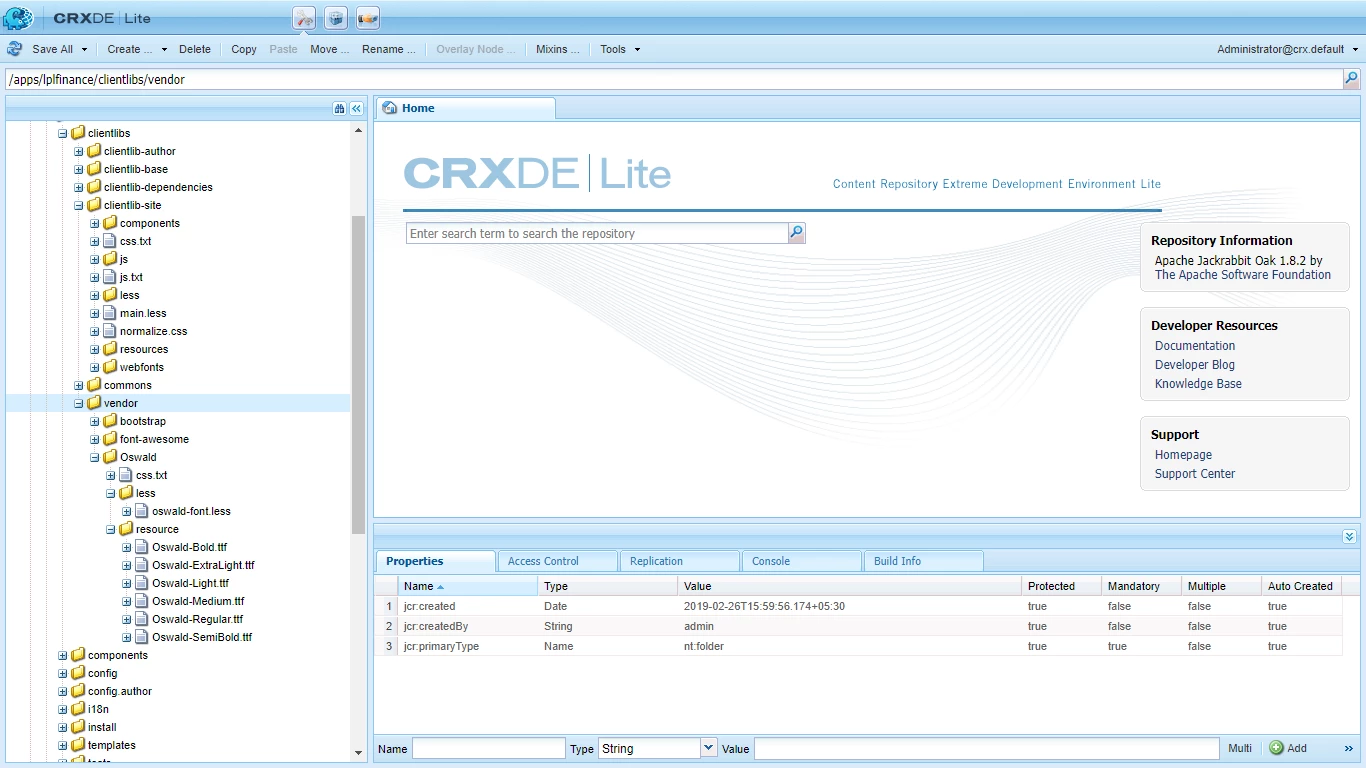
and Inside main.less I have import oswal-font.less file

Please, Help me with this

Thank you :-)

This post is no longer active and is closed to new replies. Need help? Start a new post to ask your question.
Best answer by Gaurav-Behl

Did you specify correct path in main.less?

check WKND/We-Retail code for reference -

/apps/wknd/clientlibs/clientlib-site/less/wkndicons.less -

     @icon-font-path:          "../resources/";    // 'resource' in your case at parent level

     src: url('@{icon-font-path}@{app-icon-font-name}.eot');

Getting Started with AEM Sites Chapter 3 - Client-Side Libraries and Responsive Grid

3 replies

Gaurav-Behl
Gaurav-BehlAccepted solution
Level 10
March 4, 2019

Did you specify correct path in main.less?

check WKND/We-Retail code for reference -

/apps/wknd/clientlibs/clientlib-site/less/wkndicons.less -

     @icon-font-path:          "../resources/";    // 'resource' in your case at parent level

     src: url('@{icon-font-path}@{app-icon-font-name}.eot');

Getting Started with AEM Sites Chapter 3 - Client-Side Libraries and Responsive Grid

Level 2
September 25, 2019

Hi, I'm using Aem 6.5 version and I'm trying to add customs fonts, I created a cq:clientLibraryFolder as said in 3 - Client-Side Libraries

but i can't see my fonts on the page, how can i add the fonts on my project?

BrianKasingli
Community Advisor and Adobe Champion
September 29, 2020

@15116516,

Check out this article here, where there topic is Embed Font via AEM Client Library Static Asset, https://sourcedcode.com/blog/aem/3-different-ways-to-embed-custom-fonts-in-aem-sites#embed-custom-font-static-asset