custom experience fragment template does not show up during XF creation in 6.5.6 | Community
Skip to main content
jayv25585659
Level 8
March 29, 2021
Solved

custom experience fragment template does not show up during XF creation in 6.5.6

  • March 29, 2021
  • 2 replies
  • 1706 views

The problems happens on 2 AMS-hosted environments (sandbox and UAT). I haven't tried in our 6.5.6 prod environment yet as it was just given to us last week and I'm in the process of setting it up.


some notes/info:

  1. Only the built-in one shows up (in my case it's called Experience Fragment - screens variation). I know AMS has hidden some of the other built-in ones (example: Facebook, Pinterest and etc) but I do not know where they are hidden. But I do know the nodes exists (example: this /libs/cq/experience-fragments/components/xffacebook shows up CRXDE)

  2. I've looked at the logs and nothing shows up. The logs only show that I've accessed the create page.

  3. This experience fragment shows up fine in my local AEM running 6.5.6.

  4. This experience fragment shows up in our AMS-hosted UAT/prod environments running 6.4.x.

  5. This is the definition of the node

    <?xml version="1.0" encoding="UTF-8"?>
        <jcr:root xmlns:sling="http://sling.apache.org/jcr/sling/1.0" xmlns:cq="http://www.day.com/jcr/cq/1.0" xmlns:jcr="http://www.jcp.org/jcr/1.0"
           jcr:description="Page with specific components for Experience Fragments web variations"
           jcr:primaryType="cq:Component"
           jcr:title="Experience Fragment Web Variation Page"
           sling:resourceSuperType="cq/experience-fragments/components/xfpage/>
  6. I changed sling:resourceSuperType to sling:resourceType and still does not show up.

Any ideas on how to fix/where to look?
This post is no longer active and is closed to new replies. Need help? Start a new post to ask your question.
Best answer by Asutosh_Jena_

Hi @jayv25585659 

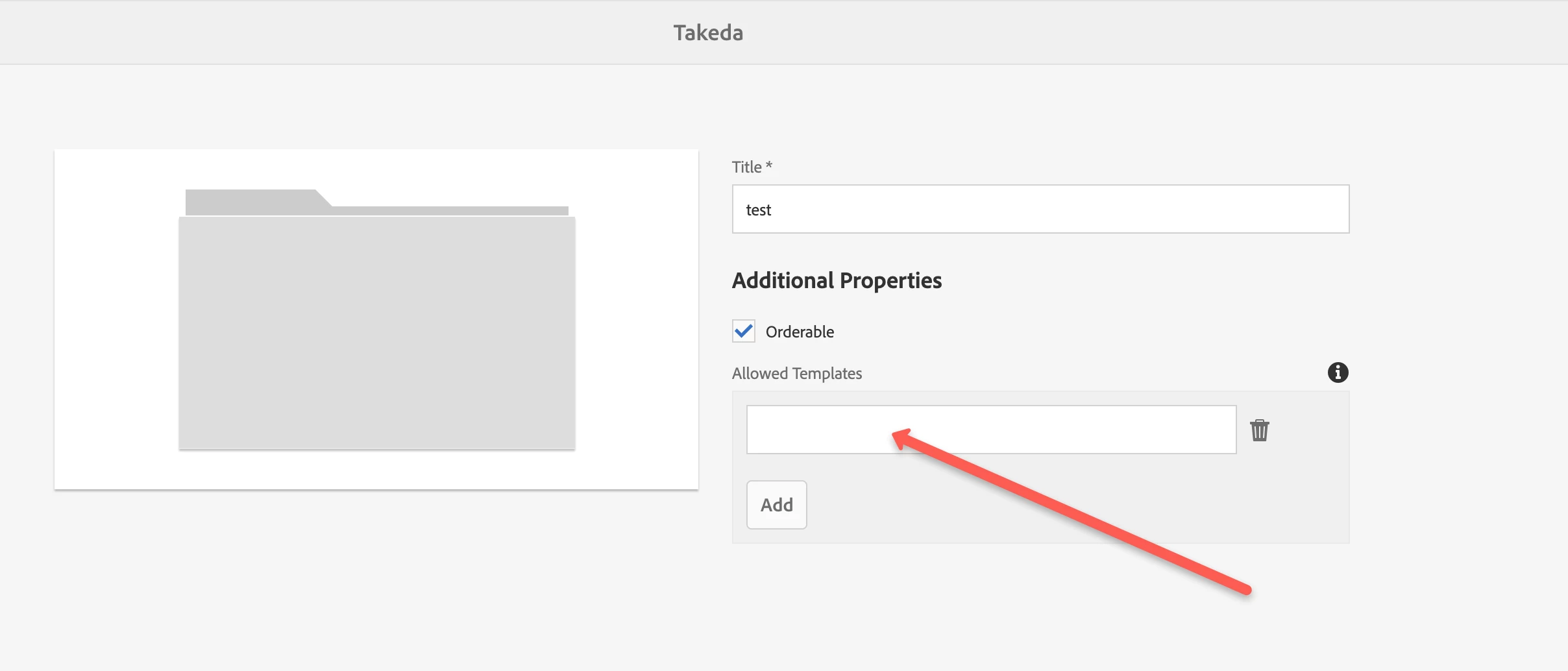
You will need to add your template in the allowed template property. Please follow the below steps:

  1. Please navigate to the required Experience Fragments folder.
  2. Select the folder, and then Properties.
  3. Specify the regular expression for retrieving the required templates in the Allowed Templates field.
    e.g. /conf/(.*)/settings/wcm/templates/experience-fragment(.*)? OR the experience fragment template path. (screenshot below)


Please refer the adobe link for more details:
https://experienceleague.adobe.com/docs/experience-manager-64/authoring/authoring/experience-fragments.html?lang=en#creating-an-experience-fragment


Hope this helps!

Thanks!

2 replies

Asutosh_Jena_
Community Advisor
Asutosh_Jena_Community AdvisorAccepted solution
Community Advisor
March 29, 2021

Hi @jayv25585659 

You will need to add your template in the allowed template property. Please follow the below steps:

  1. Please navigate to the required Experience Fragments folder.
  2. Select the folder, and then Properties.
  3. Specify the regular expression for retrieving the required templates in the Allowed Templates field.
    e.g. /conf/(.*)/settings/wcm/templates/experience-fragment(.*)? OR the experience fragment template path. (screenshot below)


Please refer the adobe link for more details:
https://experienceleague.adobe.com/docs/experience-manager-64/authoring/authoring/experience-fragments.html?lang=en#creating-an-experience-fragment


Hope this helps!

Thanks!

VeenaVikraman
Community Advisor
Community Advisor
March 29, 2021

Please follow @asutosh_jena_ steps. It should solve your issue. 


Thanks

Veena