Solved
Custom Content fragment model showing extra input field (edited XML)
Hi all,
I have created a content fragment model and added a multifield via XML. The issue is I'm getting an additional input field which is not needed(also not added intentionally).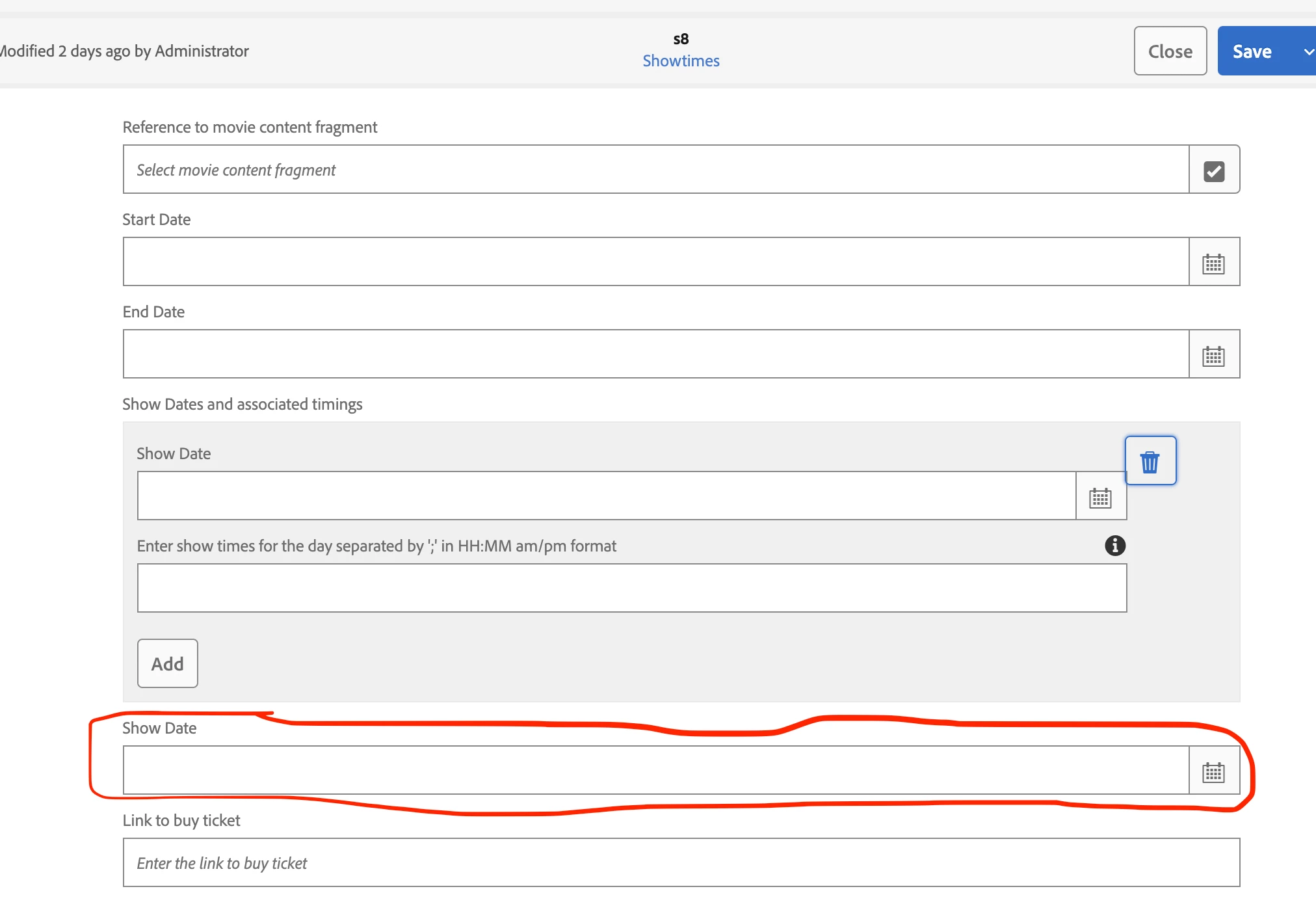
Here's the content.xml :
<?xml version="1.0" encoding="UTF-8"?>
<jcr:root xmlns:sling="http://sling.apache.org/jcr/sling/1.0" xmlns:granite="http://www.adobe.com/jcr/granite/1.0" xmlns:cq="http://www.day.com/jcr/cq/1.0" xmlns:jcr="http://www.jcp.org/jcr/1.0" xmlns:nt="http://www.jcp.org/jcr/nt/1.0"
    jcr:primaryType="cq:Template"
    allowedPaths="[/content/entities(/.*)?]"
    ranking="{Long}100">
    <jcr:content
        cq:scaffolding="/conf/mycompany/settings/dam/cfm/models/showtimes/jcr:content/model"
        cq:templateType="/libs/settings/dam/cfm/model-types/fragment"
        jcr:primaryType="cq:PageContent"
        jcr:title="Showtimes"
        sling:resourceSuperType="dam/cfm/models/console/components/data/entity"
        sling:resourceType="dam/cfm/models/console/components/data/entity/default"
        status="enabled">
        <metadata jcr:primaryType="nt:unstructured">
            <graphQL
                jcr:primaryType="nt:unstructured"
                apiName="ShowtimesModel"
                queryFieldMultiple="showtimesList"
                queryFieldSingle="showtimesByPath"/>
        </metadata>
        <model
            cq:targetPath="/content/entities"
            jcr:primaryType="cq:PageContent"
            sling:resourceType="wcm/scaffolding/components/scaffolding"
            dataTypesConfig="/mnt/overlay/settings/dam/cfm/models/formbuilderconfig/datatypes"
            maxGeneratedOrder="20">
            <cq:dialog
                jcr:primaryType="nt:unstructured"
                sling:resourceType="cq/gui/components/authoring/dialog">
                <content
                    jcr:primaryType="nt:unstructured"
                    sling:resourceType="granite/ui/components/coral/foundation/fixedcolumns">
                    <items
                        jcr:primaryType="nt:unstructured"
                        maxGeneratedOrder="20">
                        <referenceToMovieContentFragment
                            jcr:primaryType="nt:unstructured"
                            sling:resourceType="dam/cfm/models/editor/components/fragmentreference"
                            allowNew="{Boolean}false"
                            emptyText="Select movie content fragment"
                            fieldLabel="Reference to movie content fragment"
                            filter="hierarchy"
                            fragmentmodelreference="/conf/mycompany/settings/dam/cfm/models/movie"
                            listOrder="9"
                            metaType="fragment-reference"
                            name="referenceToMovieContentFragment"
                            nameSuffix="contentReference"
                            renderReadOnly="false"
                            showEmptyInReadOnly="true"
                            valueType="string/content-fragment">
                            <field jcr:primaryType="nt:unstructured"/>
                            <granite:data jcr:primaryType="nt:unstructured"/>
                        </referenceToMovieContentFragment>
                        <startDate
                            jcr:primaryType="nt:unstructured"
                            sling:resourceType="dam/cfm/models/editor/components/datatypes/datepicker"
                            displayedFormat="YYYY-MM-DD"
                            fieldLabel="Start Date"
                            listOrder="5"
                            metaType="date"
                            name="startDate"
                            renderReadOnly="false"
                            showEmptyInReadOnly="true"
                            type="date"
                            valueFormat="YYYY-MM-DD"
                            valueType="calendar/date">
                            <granite:data
                                jcr:primaryType="nt:unstructured"
                                typeHint="Date"/>
                        </startDate>
                        <endDate
                            jcr:primaryType="nt:unstructured"
                            sling:resourceType="dam/cfm/models/editor/components/datatypes/datepicker"
                            displayedFormat="YYYY-MM-DD"
                            fieldLabel="End Date"
                            listOrder="5"
                            metaType="date"
                            name="endDate"
                            renderReadOnly="false"
                            showEmptyInReadOnly="true"
                            type="date"
                            valueFormat="YYYY-MM-DD"
                            valueType="calendar/date">
                            <granite:data
                                jcr:primaryType="nt:unstructured"
                                typeHint="Date"/>
                        </endDate>
                        <showDatesAndAssociatedTimings
                            jcr:primaryType="nt:unstructured"
                            sling:resourceType="granite/ui/components/coral/foundation/form/multifield"
                            composite="{Boolean}true"
                            emptyText="Enter show dates and associated timings"
                            fieldLabel="Show Dates and associated timings"
                            listOrder="1"
                            maxlength="255"
                            metaType="text-single"
                            name="showDatesAndAssociatedTimings"
                            renderReadOnly="false"
                            showEmptyInReadOnly="true"
                            valueType="string[]">
                            <field
                                jcr:primaryType="nt:unstructured"
                                sling:resourceType="granite/ui/components/coral/foundation/container"
                                name="./showDatesAndAssociatedTimings">
                                <items jcr:primaryType="nt:unstructured">
                                    <column
                                        jcr:primaryType="nt:unstructured"
                                        sling:resourceType="granite/ui/components/coral/foundation/container">
                                        <items jcr:primaryType="nt:unstructured">
                                            <showDate
                                                jcr:primaryType="nt:unstructured"
                                                sling:resourceType="dam/cfm/models/editor/components/datatypes/datepicker"
                                                displayedFormat="YYYY-MM-DD"
                                                fieldLabel="Show Date"
                                                metaType="date"
                                                name="showDate"
                                                renderReadOnly="false"
                                                showEmptyInReadOnly="true"
                                                type="date"
                                                valueFormat="YYYY-MM-DD"
                                                valueType="calendar/date">
                                                <granite:data
                                                    jcr:primaryType="nt:unstructured"
                                                    typeHint="Date"/>
                                            </showDate>
                                            <timings
                                                jcr:primaryType="nt:unstructured"
                                                sling:resourceType="granite/ui/components/coral/foundation/form/textfield"
                                                fieldDescription="e.g. 9:30 am;12:30 pm;"
                                                fieldLabel="Enter show times for the day separated by ';' in HH:MM am/pm format"
                                                maxlength="255"
                                                name="timings"
                                                renderReadOnly="false"
                                                validation="cfm.validation.custom">
                                                <granite:data
                                                    jcr:primaryType="nt:unstructured"
                                                    validationRegex="(\\d\\d:\\d\\d\\s\\w\\w;)"/>
                                            </timings>
                                        </items>
                                    </column>
                                </items>
                            </field>
                            <granite:data jcr:primaryType="nt:unstructured"/>
                        </showDatesAndAssociatedTimings>
                        <linkToBuyTicket
                            jcr:primaryType="nt:unstructured"
                            sling:resourceType="granite/ui/components/coral/foundation/form/textfield"
                            emptyText="Enter the link to buy ticket"
                            fieldLabel="Link to buy ticket"
                            listOrder="1"
                            maxlength="255"
                            metaType="text-single"
                            name="linkToBuyTicket"
                            renderReadOnly="false"
                            showEmptyInReadOnly="true"
                            valueType="string">
                            <granite:data jcr:primaryType="nt:unstructured"/>
                        </linkToBuyTicket>
                    </items>
                </content>
            </cq:dialog>
        </model>
    </jcr:content>
</jcr:root>