Custom asset metadata property for a particular application/dam-folder in AEM6.4? | Community
Skip to main content
Level 2
December 3, 2018
Solved

Custom asset metadata property for a particular application/dam-folder in AEM6.4?

  • December 3, 2018
  • 8 replies
  • 3500 views

Hi All,

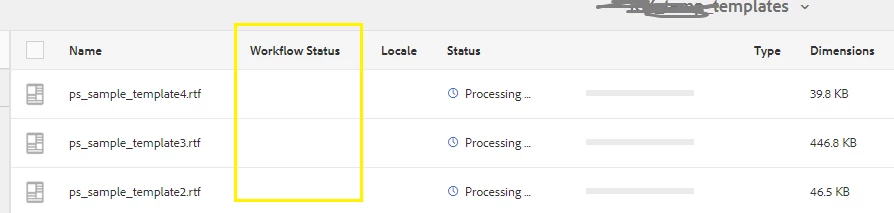
I'm using AEM6.4 and for a particular case I have to display custom information for assets under dam probably in list view(refer screenshot below) for a specific folder/application.

I have a couple of doubts also not sure if this is the best approach to implement it. Hence, seeking appropriate references.

I have introduced a custom property in the default schema(refer screenshot below).

    • Challenge 01: Its applied across all application and I'm not sure if I can restrict it to a particular folder(application) in the dam as its done in default schema?
    • Challenge 02: Even if I create a new tab in the default schema can it be restricted only to an application/dam folder..?

Or Do I need to create a new schema itself I want to display custom properties on the home screen of list view(as in below image)?

If Yes, then need some reference. Can I make a copy of an existing/default schema and remove/add tabs according to my needs?

Also,

Please suggest If there's a better approach altogether to achieve the same?
This post is no longer active and is closed to new replies. Need help? Start a new post to ask your question.
Best answer by Indra_Gurjar

Hi,

Metadata Schema doesn't add any custom property to asset. It just displays values from mapped existing properties at asset metadata page. So I don't think you can use Metadata Schema for adding/displaying custom properties.

Metadata Profiles can be used to create a new custom property(with default value) on all the assets in subtree of a folder.

However the scope of a metadata profile applied on a folder is all the assets in subtree not just child assets.

If you want to limit the scope  to a specific folder only(not it's subfolders) then it's tricky.

follow these steps to limit a profile to a specific folder only:

1. Create a new schema and add you custom property to it with some default value.

2. Apply it to specific folder.

3. Create a new profile and don't add any property to it.

4. Apply this profile to all the subfolders of the specified folder.

8 replies

smacdonald2008
Level 10
December 3, 2018

Checking with the team.

Level 2
December 3, 2018

Thanks for the update..!

Alternatively, I was wondering If its possible to use the -'Status' field show for dam assets(refer image below) available in the default schema itself to overwrite with my custom status values..?

Hence, I don't need to create/updating any application-specific schema or property and rather would overwrite this existing field only programmatically for a particular application/dam-folder assets.

Please review and advise on this as well.

-Thanks In Advance

Level 2
December 4, 2018

Hi @smacdonald2008

Is there any update on this from your team..?

Regards,

smacdonald2008
Level 10
December 4, 2018

I followed up with the team.

smacdonald2008
Level 10
December 5, 2018

I still have not heard back from this team. I will keep trying here.

Level 2
December 10, 2018

Did you get any updates in this regard..?

-Regards,

Mani_kumar_
Community Advisor
Community Advisor
December 11, 2018

Hi Singh,

if understood correctly you want custom properties for you dam folder which should be should applied to specific folder.

If so you can actually create new metadata schema and apply that to specific folder where you require it

please find the below link for the same.

http://www.aemcq5tutorials.com/tutorials/create-metadata-schema-form-for-custom-mime-types/

Indra_GurjarAdobe EmployeeAccepted solution
Adobe Employee
December 12, 2018

Hi,

Metadata Schema doesn't add any custom property to asset. It just displays values from mapped existing properties at asset metadata page. So I don't think you can use Metadata Schema for adding/displaying custom properties.

Metadata Profiles can be used to create a new custom property(with default value) on all the assets in subtree of a folder.

However the scope of a metadata profile applied on a folder is all the assets in subtree not just child assets.

If you want to limit the scope  to a specific folder only(not it's subfolders) then it's tricky.

follow these steps to limit a profile to a specific folder only:

1. Create a new schema and add you custom property to it with some default value.

2. Apply it to specific folder.

3. Create a new profile and don't add any property to it.

4. Apply this profile to all the subfolders of the specified folder.