Current Project Don't have UI Front-end model | Community
Skip to main content
Level 2
March 13, 2024
Solved

Current Project Don't have UI Front-end model

  • March 13, 2024
  • 4 replies
  • 1942 views

Hi,


In the current project I don't have a front-end model in AEM how can we create a front model in an existing project in AEM 6.5?


if you have an idea please share. how to achieve this


This post is no longer active and is closed to new replies. Need help? Start a new post to ask your question.

4 replies

Raja_Reddy
Community Advisor
Community Advisor
March 13, 2024

Hi @naveen_27_05 

To create a front-end model in an existing AEM 6.5 project, you can follow these steps:

1. Create a new folder in your project's `clientlibs` folder to hold your front-end model files.
you could create a folder called `models`.

2. Inside the `models` folder, create a new JavaScript file to define your front-end model.
For example, you could create a file called `myModel.js`.

3. In the `myModel.js` file, define your front-end model using JavaScript.

var myModel = {
title: "My Page Title",
description: "This is a description of my page."
};

4. Save the `myModel.js` file.

5. In your Sightly template or other front-end code, include the `myModel.js` file using a `script` tag.

<script src="/etc.clientlibs/myproject/models/myModel.js"></script>

6. Use the `data-sly-use` attribute to include the front-end model in your Sightly template.

<h1>${myModel.title}</h1>
<p>${myModel.description}</p>

arunpatidar
Community Advisor
Community Advisor
March 13, 2024

Hi @naveen_27_05 
You can copy ui.frontend from another project and adjust for your project.

you have to do it manually.

Arun Patidar
Level 2
March 13, 2024

Hi @arunpatidar 


Thanks for the response 


Small dought example I have copied UI.frontend from another project what are things I need to take care of? Any guide do you have?

arunpatidar
Community Advisor
arunpatidarCommunity AdvisorAccepted solution
Community Advisor
March 13, 2024
AsifChowdhury
Community Advisor
Community Advisor
March 13, 2024

Hi @naveen_27_05 


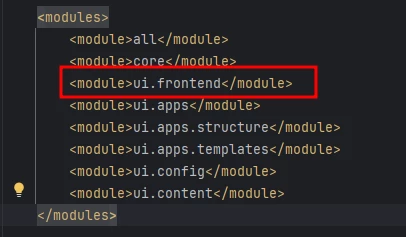
Step 1: You can copy the "ui.frontend" module from any other project and adjust according to your project.

Step 2: Add the module in the main pom file in the modules section.


What to adjust: The pom file of the module needs to adjust. The FE build process can be different. There are some different build process like webpack, nc-febuild, etc. So you should test and may need to modify according to your project because it has some configurations itself.


Asif Chowdhury

kautuk_sahni
Community Manager
Community Manager
March 14, 2024

@naveen_27_05 Did you find the suggestions from users helpful? Please let us know if more information is required. Otherwise, please mark the answer as correct for posterity. If you have found out solution yourself, please share it with the community.

Kautuk Sahni
Level 2
March 20, 2024

Hi @kautuk_sahni 


Still issue is not resolved I have tried all the above options