Curl Command to setup SSL in AEM 6.5 | Community
Skip to main content
Level 5
August 30, 2023

Curl Command to setup SSL in AEM 6.5

  • August 30, 2023
  • 4 replies
  • 2113 views

Hi Team ,


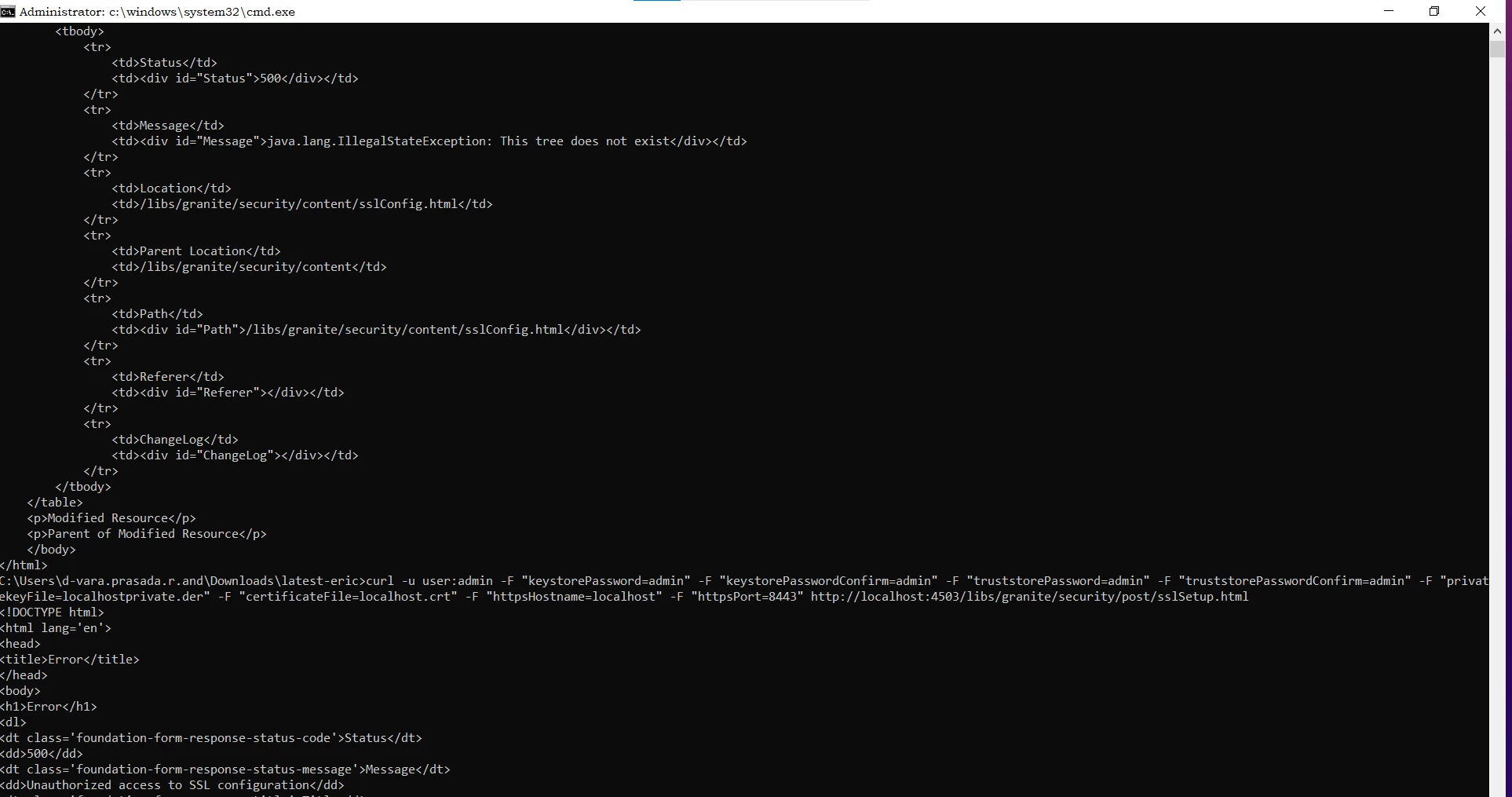
I need to install the SSL Certificate using the  Curl command both author and publish without accessing the admin console of author and admin but getting following error . please help here 


Author commands:
curl -u user:admin -F "keystorePassword=admin" -F "keystorePasswordConfirm=admin" -F "truststorePassword=admin" -F "truststorePasswordConfirm=admin" -F "privatekeyFile=localhostprivate.der" -F "certificateFile=localhost.crt" -F "httpsHostname=localhost" -F "httpsPort=8443" http://localhost:4503/libs/granite/security/content/sslConfig.html


curl -u user:admin -F "keystorePassword=admin" -F "keystorePasswordConfirm=admin" -F "truststorePassword=admin" -F "truststorePasswordConfirm=admin" -F "privatekeyFile=localhostprivate.der" -F "certificateFile=localhost.crt" -F "httpsHostname=localhost" -F "httpsPort=8443" http://localhost:4503/libs/granite/security/post/sslSetup.html


Issue :

No error ,nothing doing while run the above commands

Publish commands:

curl -u user:admin -F "keystorePassword=admin" -F "keystorePasswordConfirm=admin" -F "truststorePassword=admin" -F "truststorePasswordConfirm=admin" -F "privatekeyFile=localhostprivate.der" -F "certificateFile=localhost.crt" -F "httpsHostname=localhost" -F "httpsPort=8443" http://localhost:4502/libs/granite/security/post/sslSetup.html


curl -u user:admin -F "keystorePassword=admin" -F "keystorePasswordConfirm=admin" -F "truststorePassword=admin" -F "truststorePasswordConfirm=admin" -F "privatekeyFile=localhostprivate.der" -F "certificateFile=localhost.crt" -F "httpsHostname=localhost" -F "httpsPort=8443" http://localhost:4502/libs/granite/security/content/sslConfig.html

Getting 500 error while running command at publish instance 
 

This post is no longer active and is closed to new replies. Need help? Start a new post to ask your question.

4 replies

sherinregi-1
Community Advisor
Community Advisor
August 31, 2023

Hi @varaande 

Can you try using the commands with admin:admin instead of 

curl -u <user>:<password> 

curl -u user:admin(admin:admin) -F "keystorePassword=admin" -F "keystorePasswordConfirm=admin" -F "truststorePassword=admin" -F "truststorePasswordConfirm=admin" -F "privatekeyFile=localhostprivate.der" -F "certificateFile=localhost.crt" -F "httpsHostname=localhost" -F "httpsPort=8443" http://localhost:4502/libs/granite/security/content/sslConfig.html


varaandeAuthor
Level 5
August 31, 2023

I tried . getting same 500 status error message :(java.lang.IllegalArgumentException: Value for key keystorePassword can&apos;t be put into node: admin)


Thank you

Vara


Adobe Employee
August 31, 2023

Can you try putting "@" before the filename.


Like below.


curl -u admin:admin -F "keystorePassword=admin" -F "keystorePasswordConfirm=admin" -F "truststorePassword=admin" -F "truststorePasswordConfirm=admin" -F privatekeyFile=@"localhostprivate.der" -F certificateFile=@"localhost.crt" -F "httpsHostname=localhost" -F "httpsPort=8443" http://localhost:4503/libs/granite/security/content/sslConfig.html


varaandeAuthor
Level 5
August 31, 2023

Getting Syntax error


Adobe Employee
August 31, 2023

make sure that the files are in the same folder from where you are executing the curl command. Else provide the correct absolute or relative path.

Sudheer_Sundalam
Community Advisor
Community Advisor
August 31, 2023

@varaande ,


Check if you are able to login into your local publish instance using the http://localhost:4503/libs/granite/core/content/login.html with admin/admin credentials.


Give this a try.

curl -u "admin:admin" -F "keystorePassword=admin" -F "keystorePasswordConfirm=admin" -F "truststorePassword=admin" -F "truststorePasswordConfirm=admin" -F privatekeyFile=@"localhostprivate.der" -F certificateFile=@"localhost.crt" -F "httpsHostname=localhost" -F "httpsPort=8443" http://localhost:4503/libs/granite/security/content/sslConfig.html


apurvg6618346
October 5, 2023

Hello Sudheer,

I tried the same command but getting the below error not sure whether its working for others or not.

<html>
<head>
<title>Error while processing /libs/granite/security/content/sslConfig</title>
</head>
<body>
<h1>Error while processing /libs/granite/security/content/sslConfig</h1>
<table>
<tbody>
<tr>
<td>Status</td>
<td><div id="Status">500</div></td>
</tr>
<tr>
<td>Message</td>
<td><div id="Message">java.lang.IllegalArgumentException: Value for key keystorePassword can&apos;t be put into node: admin</div></td>
</tr>
<tr>
<td>Location</td>
<td><a href="/libs/granite/security/content/sslConfig" id="Location">/libs/granite/security/content/sslConfig</a></td>
</tr>
<tr>
<td>Parent Location</td>
<td><a href="/libs/granite/security/content" id="ParentLocation">/libs/granite/security/content</a></td>
</tr>
<tr>
<td>Path</td>
<td><div id="Path">/libs/granite/security/content/sslConfig</div></td>
</tr>
<tr>
<td>Referer</td>
<td><div id="Referer"></div></td>
</tr>
<tr>
<td>ChangeLog</td>
<td><div id="ChangeLog"></div></td>
</tr>
</tbody>
</table>
<p><a href="/libs/granite/security/content/sslConfig">Modified Resource</a></p>
<p><a href="/libs/granite/security/content">Parent of Modified Resource</a></p>
</body>
</html>

apurvg6618346
October 5, 2023

curl -u admin:admin -F "keystorePassword=password" -F "keystorePasswordConfirm=password" -F "truststorePassword=password" -F "truststorePasswordConfirm=password" -F "privatekeyFile=@localhostprivate.der" -F "certificateFile=@localhost.crt" -F "httpsHostname=localhost" -F "httpsPort=8443" https://localhost:4502/libs/granite/security/post/sslSetup.html


this one is working use this

RitendraS11
Level 4
November 21, 2024

@varaande  - were you able to resolve the issue? If yes, please share the fix you applied.