Creating a trust store - SAML 2.0 Authentication | Community
Skip to main content
Prabhat_Jain
Level 2
September 14, 2018
Solved

Creating a trust store - SAML 2.0 Authentication

  • September 14, 2018
  • 10 replies
  • 10169 views

Hi ,

Integrating SAML with Adobe Experience Manager

I am going through this tutorial to setup SAML 2.0 Authentication but not able to see create trust store in account settings.
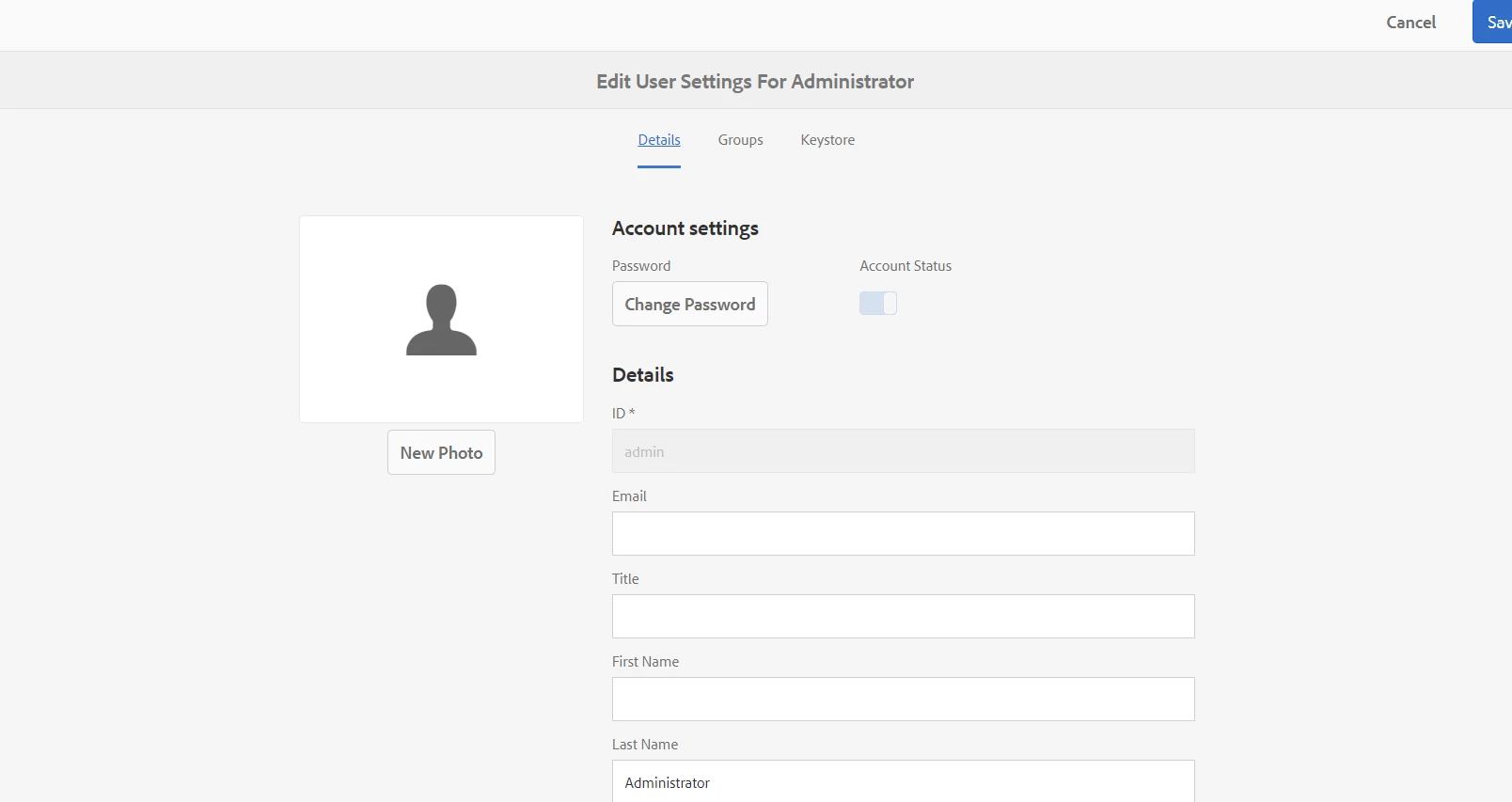
Creating a trust store

To create a Trust Store, perform these tasks:

1. Go to: http://localhost:4503/crx/de/index.jsp and login with admin credentials.

2. Go to: http://localhost:4503/libs/granite/security/content/useradmin.html.

3. Click on any of the users in the list. (for demo purposes, select the administrator user).

4. Go under Account Settings and press the Create TrustStore link.

5. Enter the password for the TrustStore and click Save. For the demo purpose, you can use admin as the password.

After creating the trust store, you need the IdP certificate so that the SAML Request and Response can be validated against that certificate. This would be provided by the IdP provider. However, you can use the certificate added into the zip for demo purpose.
This post is no longer active and is closed to new replies. Need help? Start a new post to ask your question.
Best answer by Techaspect_Solu

Hi,

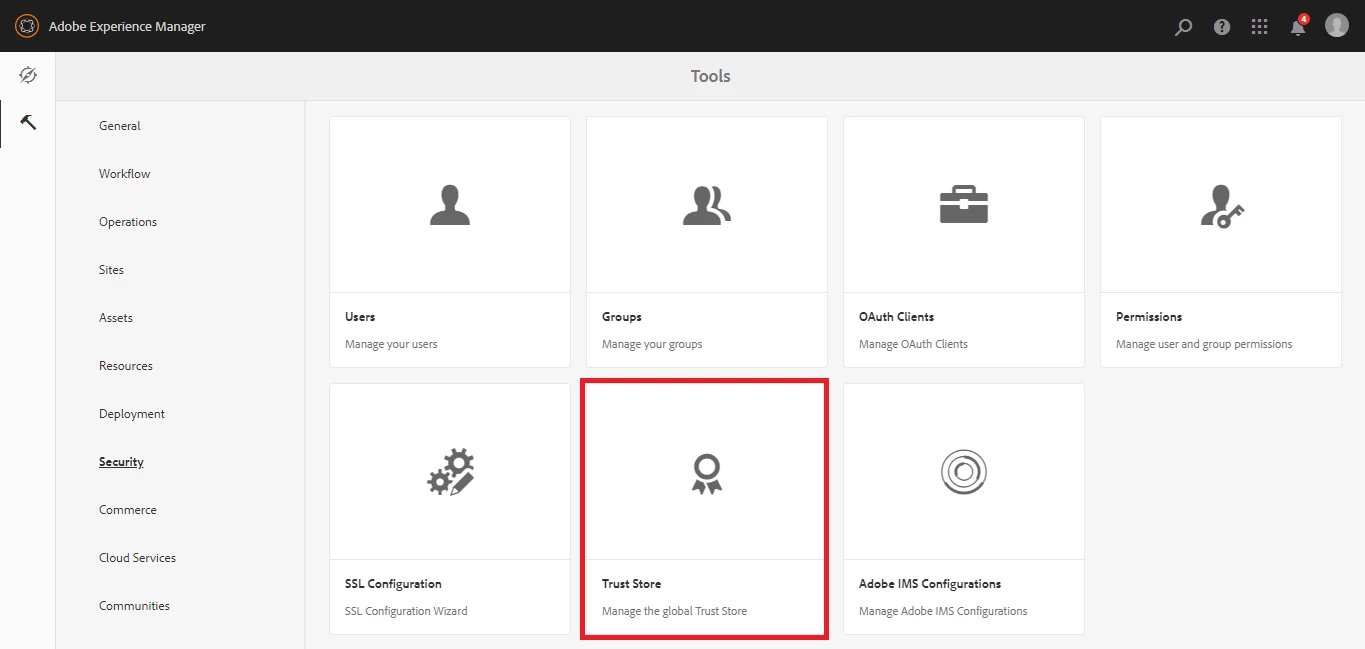
In AEM 6.4 instead of setting the TrustStore in the User Settings you can set a global TrustStore by navigating to Tools > Security > TrustStore or go to

http://<host>:<port>/libs/granite/security/content/truststore.html in your instance.

Here you can set the TrustStore username and password and upload the certificate file as you would do for 6.3 (as directed in the Adobe documentation) and you can obtain the certificate alias. You can then follow the steps as given in the document i.e. configuring the required fields in the User Security settings for setting the Keystore and further steps as per your requirement.

Here are the links that can help you with the steps after creating the TrustStore:

1.https://helpx.adobe.com/experience-manager/6-4/sites/administering/using/saml-2-0-authenticationhandler.html

2.https://helpx.adobe.com/experience-manager/using/aem63_saml.html

Here is a screenshot for better understanding.

Regards,

Techaspect Solutions

10 replies

smacdonald2008
Level 10
September 14, 2018

WHat version of AEM are you using?

On 6.3 - this UI appears...

Prabhat_Jain
Level 2
September 21, 2018

Hi smacdonald2008​,

I am trying with AEM 6.4

Techaspect_Solu
Techaspect_SoluAccepted solution
Level 7
September 21, 2018

Hi,

In AEM 6.4 instead of setting the TrustStore in the User Settings you can set a global TrustStore by navigating to Tools > Security > TrustStore or go to

http://<host>:<port>/libs/granite/security/content/truststore.html in your instance.

Here you can set the TrustStore username and password and upload the certificate file as you would do for 6.3 (as directed in the Adobe documentation) and you can obtain the certificate alias. You can then follow the steps as given in the document i.e. configuring the required fields in the User Security settings for setting the Keystore and further steps as per your requirement.

Here are the links that can help you with the steps after creating the TrustStore:

1.https://helpx.adobe.com/experience-manager/6-4/sites/administering/using/saml-2-0-authenticationhandler.html

2.https://helpx.adobe.com/experience-manager/using/aem63_saml.html

Here is a screenshot for better understanding.

Regards,

Techaspect Solutions

Prabhat_Jain
Level 2
September 25, 2018

Hi Techaspect Solutions​,

Do you have any proper document to configure saml with AEM 6.4.I am going through this link but there is not enough configurations.I have created idp settings https://www.ssocircle.com/en/

SAML 2.0 Authentication Handler

Prabhat_Jain
Level 2
September 25, 2018

Hi Techaspect Solutionssmacdonald2008

Need help on this !

I am trying this  for author port 4502 but still not getting success

step 1 : SAML 2.0  AUTHENTICATION HANDLER CONFIGURATIONS

step 2 :

Apache Sling Referrer Filter :

step  3 :

Creating trust store by adding public certificate file

Step 4 is of adding key store private key and certificate chain(No information from where it is available) ?

Now for IDP provider settings I am using SSO circle

https://idp.ssocircle.com/sso/hos/SelfCare.jsp

1.Created profile

2. Create meta data

3.Adding metadata

4.Submit

5. I have configured logs as well

Prabhat_Jain
Level 2
September 25, 2018
smacdonald2008
Level 10
September 25, 2018

See this doc - its an end to end SAML/AEM quick start - Integrating SAML with Adobe Experience Manager

Prabhat_Jain
Level 2
September 25, 2018

Hi smacdonald2008​,

I am already referring this .

Prabhat_Jain
Level 2
September 25, 2018

smacdonald2008

Oh ! I forgot to logout from ID provider "SSO Circle". When I logged out my redirection is working fine(aem we-retail page => sso circle login page) but when I enter SSO site credential I am redirecting to aem path which I have mentioned in provider configuration as http://localhost:4502/projects.html/content/projects but again this needs username and password as "admin" .So how to achieve this .Should I remove login path from "Apache sling authentication service".

Level 2
May 21, 2019

Hi all,

We are upgrading from 6.2 to 6.5 and I'm setting up SSO in 6.5.

In  libs/granite/security/content/truststore.html, I'm clicking "Add Certificate from CER file" and uploading our IPD CERT  and mapping Cert to admin user.

However I'm not seeing an option to enter the password here.

Also I tried change Truststore password, but i'm not able to.

Thanks.