Create an Eclipse project from existing site in AEM | Community
Skip to main content
Level 2
February 12, 2020
Solved

Create an Eclipse project from existing site in AEM

  • February 12, 2020
  • 3 replies
  • 3243 views

I packaged a site from our Dev environment and added it to my local AEM instance. I would like to be able to edit that site using Eclipse but I don't know how to go from "already in AEM" to Eclipse project. I only know how to go from making a new project and add it to AEM.

This post is no longer active and is closed to new replies. Need help? Start a new post to ask your question.
Best answer by Nirmal_Jose

The package is a compiled version of your code where the java code is compiled to a jar files and is included in the /apps/<sitename>/install folder along with ui.apps content. Rest of the configurations under /apps, etc can be imported into eclipse, but not the java code. 

If you want to develop again, then you need the source code of the application which you can build again into package. Adobe provides a standard https://github.com/adobe/aem-project-archetype which defines the structure of the project with its best practices. 

If you aim is to just debug, you can use any decompiler to extract the /apps/<sitename>/install/<name>.jar file to see the java classes.

3 replies

Adobe Employee
February 12, 2020

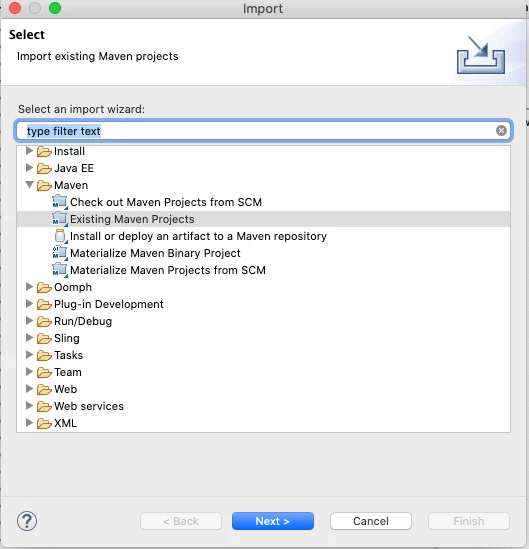
You can import the code using the "Existing Maven Projects" in Eclipse if you have the POM files and everything defined.


pmueller8Author
Level 2
February 12, 2020
I don't know how to get the packaged files into normal files and how to get the POM files. When I try to unzip the packages they just create a new zip file with .cpgz file extension. I'm very new at all this.
ArpitVarshney
Community Advisor
Community Advisor
February 13, 2020

Hi @pmueller8 

There should be corresponding AEM code base stored in GIT or some other repository which is a AEM maven project that can be build and deploy to AEM using some commands.


You can't unzip & import the package in eclipse stored in AEM package manager to make code changes.Please check with your team where is your code base. Then checkout & import that codebase in eclipse, make your changes and deploy it to AEM local instance.


Nirmal_Jose
Adobe Employee
Nirmal_JoseAdobe EmployeeAccepted solution
Adobe Employee
February 13, 2020

The package is a compiled version of your code where the java code is compiled to a jar files and is included in the /apps/<sitename>/install folder along with ui.apps content. Rest of the configurations under /apps, etc can be imported into eclipse, but not the java code. 

If you want to develop again, then you need the source code of the application which you can build again into package. Adobe provides a standard https://github.com/adobe/aem-project-archetype which defines the structure of the project with its best practices. 

If you aim is to just debug, you can use any decompiler to extract the /apps/<sitename>/install/<name>.jar file to see the java classes.