CORS issue | API call made from local server is failing even after configuring CORS policy in AEM 6.5 | Community
Skip to main content
Level 2
August 30, 2022
Solved

CORS issue | API call made from local server is failing even after configuring CORS policy in AEM 6.5

  • August 30, 2022
  • 2 replies
  • 2361 views

Hey folks,
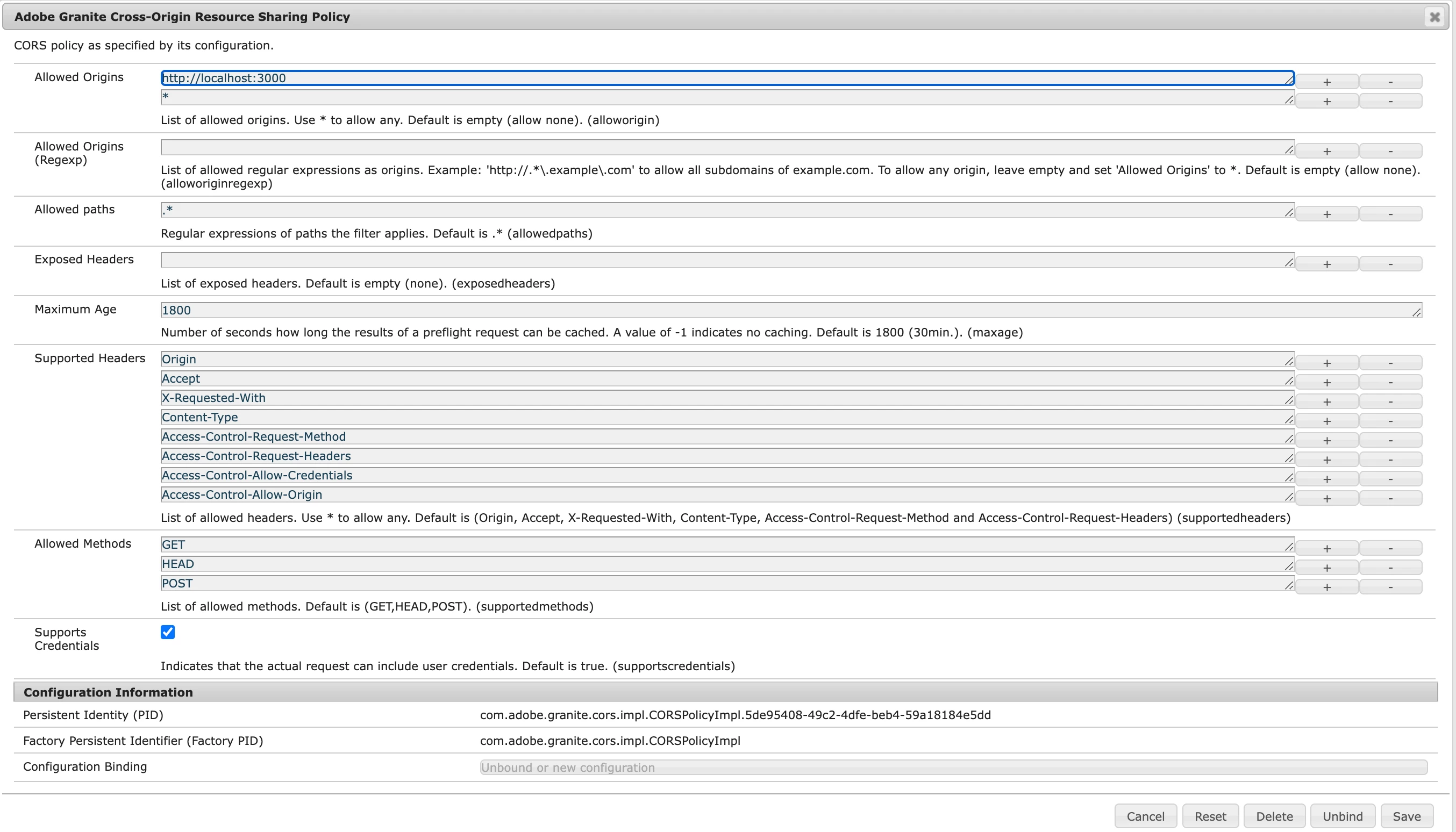
I'm trying to make a fetch request to "http://localhost:4503/api/assets/we-retail-screens.json" via a react app running on "localhost:3000" . I have configured Adobe Granite Cross-Origin-Resource-Sharing Policy (attached screenshot). I'm expecting a json response. Instead, the fetch request is failing with response "Access to fetch at 'http://localhost:4503/api/assets/we-retail-screens.json' from origin 'http://localhost:3000' has been blocked by CORS policy" (please refer screenshot)

This post is no longer active and is closed to new replies. Need help? Start a new post to ask your question.
Best answer by ksh_ingole7

Hi @gourav_on 


Can you add a logger and check the logs 

Logging is available under com.adobe.granite.cors:

  • enable DEBUG to see details about why a CORS request was denied
  • enable TRACE to see details about all requests going through the CORS handler.

Usually, this error occurs when a script on your website/web app attempts to make a request to a resource that isn't configured to accept requests coming from code that doesn't come from the same (sub)domain, thus violating the Same-Origin policy.


If the requested resource isn't configured to answer or to handle it correctly, then you'll see this error.


Please have a look at below doc. It explains on 2 approaches -

  1. Use a reverse proxy server to proxy requests to your resource and handle the OPTIONS method in the proxy.

  2. Add support for handling the OPTIONS method in the resource's code.


https://www.stackhawk.com/blog/fixing-no-access-control-allow-origin-header-present/


Thanks

2 replies

ksh_ingole7
Community Advisor
ksh_ingole7Community AdvisorAccepted solution
Community Advisor
August 30, 2022

Hi @gourav_on 


Can you add a logger and check the logs 

Logging is available under com.adobe.granite.cors:

  • enable DEBUG to see details about why a CORS request was denied
  • enable TRACE to see details about all requests going through the CORS handler.

Usually, this error occurs when a script on your website/web app attempts to make a request to a resource that isn't configured to accept requests coming from code that doesn't come from the same (sub)domain, thus violating the Same-Origin policy.


If the requested resource isn't configured to answer or to handle it correctly, then you'll see this error.


Please have a look at below doc. It explains on 2 approaches -

  1. Use a reverse proxy server to proxy requests to your resource and handle the OPTIONS method in the proxy.

  2. Add support for handling the OPTIONS method in the resource's code.


https://www.stackhawk.com/blog/fixing-no-access-control-allow-origin-header-present/


Thanks

Aditya_Chabuku
Community Advisor
Community Advisor
August 30, 2022

Hey @gourav_on , By Seeing the Screenshot you are not allowing CORS, to do so put *. in the Allowed Origins<Regex> field.

This should solve your problem.

Read this Docs if possible https://experienceleague.adobe.com/docs/experience-manager-learn/foundation/security/understand-cross-origin-resource-sharing.html?lang=en 

~Hope this Helps,

Aditya.Ch

Thanks,Aditya Chabuku