Core Teaser component automatically appending current page path as a redirection | Community
Skip to main content
Adobe Employee
January 22, 2024
Solved

Core Teaser component automatically appending current page path as a redirection

  • January 22, 2024
  • 4 replies
  • 1890 views

Hi Everyone,

    I have overridden core teaser component into my project to add some custom fields in dialog level, there is no major changes in sightly. If I configure redirection url in dialog then it's redirecting properly as per the configuration.

   But I didn't configure any redirection link in teaser dialog level, then it's taking current page path for redirection. I couldn't see any solutions so please folks help me with this to resolve this issue asap.


example: If I configured teaser component in our story page then markup will be like this.

<div class="cmp-teaser__image">
   <div>
         <a class="cmp-image__link" href="/content/proj/us/en/our-story.html" data-cmp-clickable="">
             <picture>
             <source media="(max-width:767px)" srcset="">
            <img src="" loading="lazy" class="cmp-image__image" itemprop="contentUrl" alt="alttxt">
            </picture>
         </a>
         <!--/* <span class="cmp-image__title" itemprop="caption" data-sly-test="false"></span>
        <meta itemprop="caption" content="" data-sly-test=""> */ -->
      </div>
</div>

    I have found this portion of markup is coming from core image component[image component called in teaser markup], there no issue because If I have authored image component I am not facing this kind of issue.


CC: @kautuk_sahni @veenavikraman @aanchal-sikka @estebanbustamante 
 

This post is no longer active and is closed to new replies. Need help? Start a new post to ask your question.
Best answer by jeromeleslyv

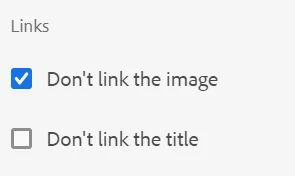
Guys, I got a solution - In teaser design dialog there will be one checkbox field called Don't link the image, after enabling this current page path is not appending in href.


If I configure custom link then it's redirecting to this link

@arunpatidar can you verify this whether it's correct or not?

4 replies

Raja_Reddy
Community Advisor
Community Advisor
January 22, 2024

Hi @jeromeleslyv 
Please try this way : modify the logic in your overridden teaser component to handle the case when no redirection link is configured. Instead of using the current page path for redirection, you can specify a default fallback URL or simply disable the redirection.


// Check if a redirection link is configured in the dialog String redirectionLink = properties.get("redirectionLink", String.class); if (StringUtils.isNotBlank(redirectionLink)) { // Redirect to the configured link response.sendRedirect(redirectionLink); } else { // Handle the case when no redirection link is configured // You can specify a default fallback URL or disable the redirection // For example, you can render the teaser component without the link // or display a message indicating that no redirection is available. }


By modifying the logic in your overridden teaser component, you can control the behavior when no redirection link is configured in the dialog.


Adobe Employee
January 22, 2024

This is not from teaser component, it's from the image component i.e teaser component calling image component for asset section

VeenaVikraman
Community Advisor
Community Advisor
January 22, 2024

@jeromeleslyv I hope you might have done this , but could you confirm if you have checked the default teaser component behaviour in the same enviornment for the same scenarios ? If it is working as expected then it is to do with some of your changes. Also could you confirm the AEM version you are working on ? 


Thanks

Veena ✌

Adobe Employee
January 22, 2024

I am using AEM cloud verison, It's working with core teaser component

Adobe Employee
January 22, 2024

I got to know one thing - If I doesn't configure title in teaser dialog then only its taking current path otherwise it's not coming. Is it OOTB behaviour?

If yes cany OOTB way to disable this?
@veenavikraman @raja_reddy @kautuk_sahni @arunpatidar 

arunpatidar
Community Advisor
Community Advisor
January 22, 2024

Hi @jeromeleslyv 
Which version of AEM and core components are you using?


Here is the OOTB code for image - https://github.com/adobe/aem-core-wcm-components/blob/main/content/src/content/jcr_root/apps/core/wcm/components/image/v2/image/image.html 

Arun Patidar
kautuk_sahni
Community Manager
Community Manager
January 23, 2024

@jeromeleslyv Did you find the suggestions from users helpful? Please let us know if more information is required. Otherwise, please mark the answer as correct for posterity. If you have found out solution yourself, please share it with the community.

Kautuk Sahni