core components 2.11.1 in archetype 23 | Community
Skip to main content
Level 3
September 10, 2020
Solved

core components 2.11.1 in archetype 23

  • September 10, 2020
  • 4 replies
  • 2303 views

Two quick questions.

1. Is archetype 23 the latest for aem 6.5 SP 6?

2. How can I get core components 2.11.1 (latest) to work with this archetype? I changed the POM to reflect this version and i get error.

[ERROR] Failed to execute goal on project aem656.all: Could not resolve dependencies for project com.aem656:aem656.all:content-package:1.0-SNAPSHOT: Failure to find com.adobe.cq:core.wcm.components.examples:zip:2.11.0 in https://repo.adobe.com/nexus/content/groups/public was cached in the local repository, resolution will not be reattempted until the update interval of adobe-public-releases has elapsed or updates are forced -> [Help 1]

This post is no longer active and is closed to new replies. Need help? Start a new post to ask your question.
Best answer by Theo_Pendle

Hi @aryan12345,

Could the issue be caused by the way you fetch your artifacts? What version of core components were you using before? 

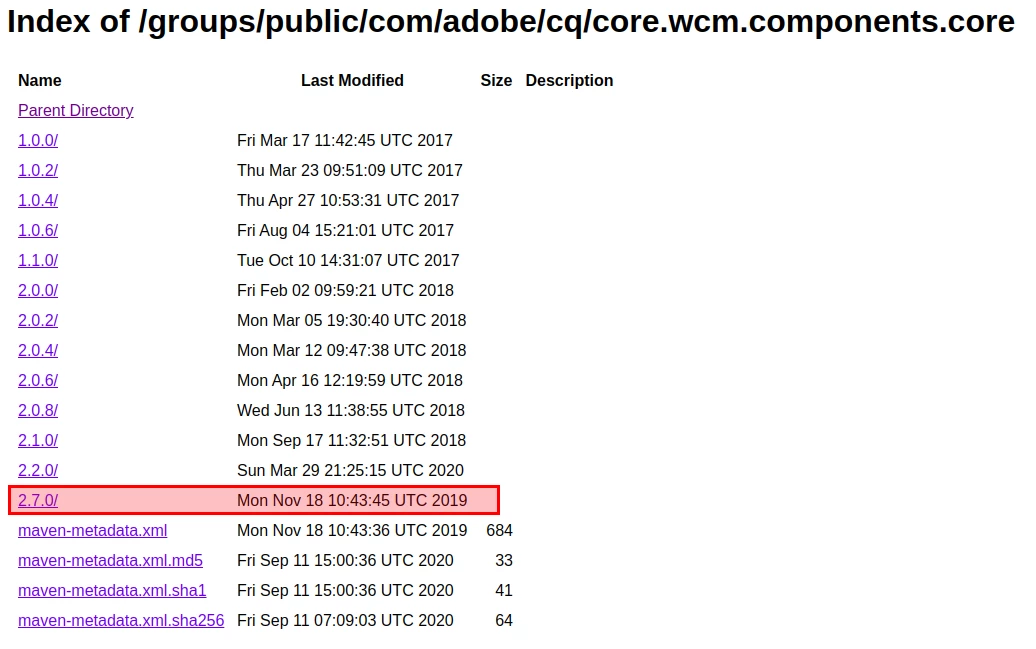
Since v2.7.0, the core components artifacts are no longer available on the Adobe Public repo, as you can see here: https://repo.adobe.com/nexus/content/groups/public/com/adobe/cq/core.wcm.components.core/

However, based on your error message, it seems like you are still trying to use the public Adobe repo. Instead, you should be fetching them from Maven Central. You can see this in my build of the Archetype 23 with Core Components v2.11.1

As you can see, the artifact is not found on the adobe public repo or the experience cloud repo 😕😕

This is the project I built without a problem (its just the Archetype 23 with a single change: bumping the Core Components version to 2.11.1) : https://filebin.net/nxqk9qqf8qj8xysm  


4 replies

VeenaVikraman
Community Advisor
Community Advisor
September 10, 2020

Hi @aryan12345 


1. Latest AEM archetype is 23 . Please refer https://github.com/adobe/aem-project-archetype


2. Why do you have to change the core components archetype ? 


Thanks

Veena

Level 3
September 10, 2020
That seems to be the latest version on GitHub. So wanted to have that. Any idea how? https://github.com/adobe/aem-core-wcm-components
VeenaVikraman
Community Advisor
Community Advisor
September 11, 2020

I don't think archetype is something you can change in the pom.xml, once project is created using a particular archetype.


I would like more expert opinion here @joerghoh @arunpatidar @theo_pendle 

arunpatidar
Community Advisor
Community Advisor
September 11, 2020
Theo_Pendle
Theo_PendleAccepted solution
Level 8
September 11, 2020

Hi @aryan12345,

Could the issue be caused by the way you fetch your artifacts? What version of core components were you using before? 

Since v2.7.0, the core components artifacts are no longer available on the Adobe Public repo, as you can see here: https://repo.adobe.com/nexus/content/groups/public/com/adobe/cq/core.wcm.components.core/

However, based on your error message, it seems like you are still trying to use the public Adobe repo. Instead, you should be fetching them from Maven Central. You can see this in my build of the Archetype 23 with Core Components v2.11.1

As you can see, the artifact is not found on the adobe public repo or the experience cloud repo 😕😕

This is the project I built without a problem (its just the Archetype 23 with a single change: bumping the Core Components version to 2.11.1) : https://filebin.net/nxqk9qqf8qj8xysm