Core Component Breadcrumb Title | Community
Skip to main content
jetate
Level 4
June 15, 2020
Solved

Core Component Breadcrumb Title

  • June 15, 2020
  • 1 reply
  • 4471 views

Is it possible to override the Breadcrumb or Page List component to use a different page title than the Navigation Title? 


I have a requirement where I need to use a shorter title in the Breadcrumb component than in the Page List Component, however, both are using the Navigation Title. If there is a way that I can use one title type for one component and another for the other component, that would be ideal.


I'm a relative beginner with Java and don't entirely understand how the Delegation Pattern for Sling Models (https://github.com/adobe/aem-core-wcm-components/wiki/Delegation-Pattern-for-Sling-Models) could tie into what I'm trying to do here, but if there is a tutorial or some information that might help guide a solution, I would appreciate the insight.

This post is no longer active and is closed to new replies. Need help? Start a new post to ask your question.
Best answer by Theo_Pendle

Hi @jetate,

It depends what you mean by "one title type for one component and another for the other component", because there are many title types. However, let's have a look at why the Navigation Title is used.

The breadcrumb model returns a list of NavigationItems (the interface). These are in fact instances of BreadcrumbItemImpl (the class). They in turn fetch the title property (which is used in the rednering HTL script using the following algorithm:

@Override public String getTitle() { String title = page.getNavigationTitle(); if (title == null) { title = page.getPageTitle(); } if (title == null) { title = page.getTitle(); } if (title == null) { title = page.getName(); } return title; }

 So all you need to do is override this behavior slightly. Let's say for example that you want to use the Page Title and not the Navigation Title in a breadcrumb, you should create the following item:

import com.adobe.cq.wcm.core.components.models.NavigationItem; import lombok.Getter; import lombok.experimental.Delegate; public class CustomNavigationItem implements NavigationItem { // Here we delegate everything to the original item, except the getTitle method (see interface below) @Delegate(excludes = DelegationExclusion.class) private final NavigationItem delegate; // Rather than getting a title from a page using an the algorithm I showed above, this item will simply return // whatever String was given to it in its constructor @Getter private final String title; public CustomNavigationItem(final NavigationItem item, final String title) { this.delegate = item; this.title = title; } private interface DelegationExclusion { String getTitle(); } }

Then, return these CustomNavigationItems rather than the default items using this model:

import com.adobe.cq.wcm.core.components.models.Breadcrumb; import com.adobe.cq.wcm.core.components.models.NavigationItem; import com.day.cq.wcm.api.PageManager; import org.apache.sling.api.SlingHttpServletRequest; import org.apache.sling.api.resource.Resource; import org.apache.sling.models.annotations.DefaultInjectionStrategy; import org.apache.sling.models.annotations.Model; import org.apache.sling.models.annotations.Via; import org.apache.sling.models.annotations.injectorspecific.ScriptVariable; import org.apache.sling.models.annotations.injectorspecific.Self; import org.apache.sling.models.annotations.via.ResourceSuperType; import java.util.Collection; import java.util.stream.Collectors; @Model( adaptables = {Resource.class, SlingHttpServletRequest.class}, adapters = Breadcrumb.class, resourceType = "demo/components/content/breadcrumb", defaultInjectionStrategy = DefaultInjectionStrategy.OPTIONAL ) public class CustomBreadcrumb implements Breadcrumb { @Self @Via(type = ResourceSuperType.class) private Breadcrumb delegate; @ScriptVariable private PageManager pageManager; @Override public Collection<NavigationItem> getItems() { // For each item, create an instance of our custom item return delegate.getItems().stream().map(item -> { // Set the title to be the page title final String pageTitle = pageManager.getPage(item.getPath()).getPageTitle(); return new CustomNavigationItem(item, pageTitle); }).collect(Collectors.toList()); } @Override public String getExportedType() { return delegate.getExportedType(); } }

Here is the result! The page properties:
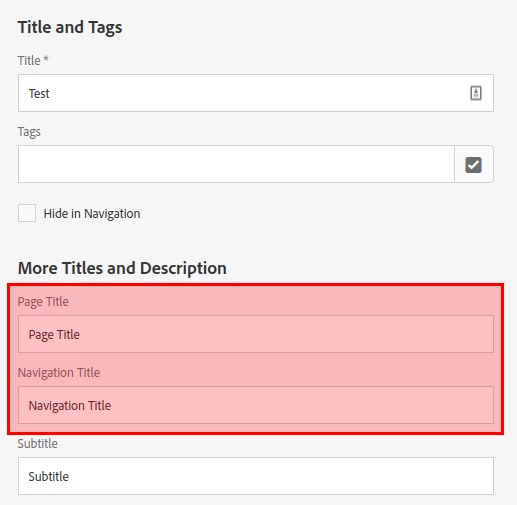
Ans as you can see, the page title is used, not the navigation title! Sorry, didn't have time for CSS 😛 
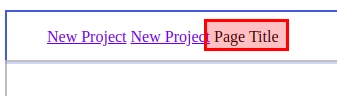
I've been generous with comments on the parts that are relative to your use-case. If you want a step-by-step tutorial to explain exactly how it all works, I wrote one recently here: https://levelup.gitconnected.com/aem-extend-core-component-models-using-resource-type-association-and-delegation-b8855ed281e2 🙂

1 reply

Theo_Pendle
Theo_PendleAccepted solution
Level 8
June 15, 2020

Hi @jetate,

It depends what you mean by "one title type for one component and another for the other component", because there are many title types. However, let's have a look at why the Navigation Title is used.

The breadcrumb model returns a list of NavigationItems (the interface). These are in fact instances of BreadcrumbItemImpl (the class). They in turn fetch the title property (which is used in the rednering HTL script using the following algorithm:

@Override public String getTitle() { String title = page.getNavigationTitle(); if (title == null) { title = page.getPageTitle(); } if (title == null) { title = page.getTitle(); } if (title == null) { title = page.getName(); } return title; }

 So all you need to do is override this behavior slightly. Let's say for example that you want to use the Page Title and not the Navigation Title in a breadcrumb, you should create the following item:

import com.adobe.cq.wcm.core.components.models.NavigationItem; import lombok.Getter; import lombok.experimental.Delegate; public class CustomNavigationItem implements NavigationItem { // Here we delegate everything to the original item, except the getTitle method (see interface below) @Delegate(excludes = DelegationExclusion.class) private final NavigationItem delegate; // Rather than getting a title from a page using an the algorithm I showed above, this item will simply return // whatever String was given to it in its constructor @Getter private final String title; public CustomNavigationItem(final NavigationItem item, final String title) { this.delegate = item; this.title = title; } private interface DelegationExclusion { String getTitle(); } }

Then, return these CustomNavigationItems rather than the default items using this model:

import com.adobe.cq.wcm.core.components.models.Breadcrumb; import com.adobe.cq.wcm.core.components.models.NavigationItem; import com.day.cq.wcm.api.PageManager; import org.apache.sling.api.SlingHttpServletRequest; import org.apache.sling.api.resource.Resource; import org.apache.sling.models.annotations.DefaultInjectionStrategy; import org.apache.sling.models.annotations.Model; import org.apache.sling.models.annotations.Via; import org.apache.sling.models.annotations.injectorspecific.ScriptVariable; import org.apache.sling.models.annotations.injectorspecific.Self; import org.apache.sling.models.annotations.via.ResourceSuperType; import java.util.Collection; import java.util.stream.Collectors; @Model( adaptables = {Resource.class, SlingHttpServletRequest.class}, adapters = Breadcrumb.class, resourceType = "demo/components/content/breadcrumb", defaultInjectionStrategy = DefaultInjectionStrategy.OPTIONAL ) public class CustomBreadcrumb implements Breadcrumb { @Self @Via(type = ResourceSuperType.class) private Breadcrumb delegate; @ScriptVariable private PageManager pageManager; @Override public Collection<NavigationItem> getItems() { // For each item, create an instance of our custom item return delegate.getItems().stream().map(item -> { // Set the title to be the page title final String pageTitle = pageManager.getPage(item.getPath()).getPageTitle(); return new CustomNavigationItem(item, pageTitle); }).collect(Collectors.toList()); } @Override public String getExportedType() { return delegate.getExportedType(); } }

Here is the result! The page properties:

Ans as you can see, the page title is used, not the navigation title! Sorry, didn't have time for CSS 😛 

I've been generous with comments on the parts that are relative to your use-case. If you want a step-by-step tutorial to explain exactly how it all works, I wrote one recently here: https://levelup.gitconnected.com/aem-extend-core-component-models-using-resource-type-association-and-delegation-b8855ed281e2 🙂

Theo_Pendle
Level 8
June 15, 2020
Oh and I should mention: I am using Lombok annotations to implement the delegation pattern. This all might be a bit advanced if you're a beginner, sorry if everything is not 100% clear but please read the tutorial for more detailed explanations 😉