
Coral UI select multiple field can't remove all value | Adobe Higher Education
Skip to main content
bhoang
Level 4
September 4, 2018
Beantwortet

Coral UI select multiple field can't remove all value

  • September 4, 2018
  • 15 Antworten
  • 7837 Ansichten

Hi Friends,

I am using selected multiple field. But it have problem, when I remove all values that I selected and save it. It can't save with none value selected.

Example: I selected one value and save ok.

after that I go to "Views properties" to edit that field and remove selected value.

When I save it comeback again.

If I selected more than one options and save. After that I remove some option and keep one or more than one selected and save, it work fine. If I remove all options and save it, It come back the option before I remove.

Example: I select 2 options and save ok.

I remove one option and save it work fine.

If I select 2 options and remove all and save, it back to.
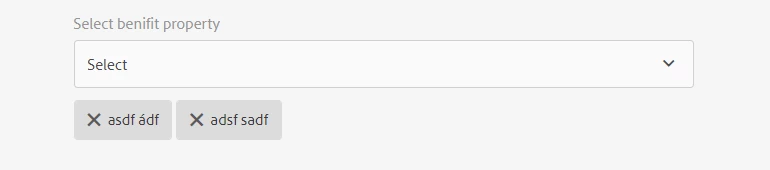
 

My code to bind data into select field and check option fields as below.


The Json data as below: http://localhost:4502/.abcbenefits.json/

[{"id":"1","description":"asdf à","langCode":"en"},{"id":"2","description":"asdf ádf","langCode":"en"},{"id":"3","description":"adsf sadf","langCode":"en"}]


<script>

$(document).ready(function(){


        var host_url = window.location.protocol + "//" + window.location.host + "/.abcbenefits.json/";

        var benefitSelectedValue = abcbenefits.values;


        // load property check on edit page or created page.

        var pageNameID = document.getElementById("cq-sites-properties-form");


// is create page

if(pageNameID === null) {

//loadServiceDataFromURL(host_url);

        }

// is edit page

        else {

        benefitSelectedValue = abcbenefits.values;

loadServiceDataFromURL(host_url);

        }


        function loadServiceDataFromURL(host_url) {

$.ajax(host_url, {

dataType: "json",

                contentType: "application/json",

                async: false,

                success: function(rawData, status, xhr) {

try {

                        benefitBindData(rawData);

                    } catch (err) {

console.log(err);

                    }

                },

                error: function (xhr, status, err) {

console.log(err);

                }

            });

        }


function benefitBindData(data) {

$("#abcbenefits> coral-select-item").remove();

var x = document.getElementById("abcbenefits");

var selectedItem = [];


data.forEach(function(item) {

var option = document.createElement("coral-select-item");

option.innerHTML = item["description"];

option.value = item["id"];


x.appendChild(option);

if (isSelectedBenefit(item["id"], benefitSelectedValue)) {

//option.selected = true;

selectedItem.push(option); //push selected item into an array

}

});


setTimeout(function(_selectedItems){

_selectedItems.forEach(function(option) {

option.selected = true;

});

}, 100, selectedItem)


}


function isSelectedBenefit(benefitId, benefitSelectedValues){

for(var i = 0; i < benefitSelectedValues.length;i++){

if(benefitId == benefitSelectedValues[i]) return true;

}

return false;

}


});

</script>


Please help me,

Thank you so much,

Dieses Thema wurde für Antworten geschlossen.
Beste Antwort von bhoang

I created a custom field for select and change the render.jsp file of the custom select field. So, I coded a JavaScript function to check the onchange of the select field. It work fine.


%><coral-select id = "abcProperty" <%= attrs.build() %>><%

    if (cfg.get("emptyOption", false)) {

        String value = "";


        AttrBuilder opAttrs = new AttrBuilder(null, xssAPI);

        opAttrs.add("value", value);

        opAttrs.addSelected(cmp.getValue().isSelected(value, false));


        out.println("<coral-select-item " + opAttrs.build() + "></coral-select-item>");

    }


    for (Iterator<Resource> items = itemIterator; items.hasNext();) {

        printOption(out, items.next(), cmp);

    }

%></coral-select><%!


<script>

abcProperty._onSelectionChange = function(){

        setTimeout(function(){

            var coralTaglist = $("#abcProperty> [name='./propertiesBenefits']")

            if(abcProperty._oldSelection.length == 0){

                coralTaglist.append("<input id = \"hiddenProperty\" handle=\"input\" type=\"hidden\" name=\"./propertiesBenefits\" value=\"\">");

coralTaglist[0].hidden = true;

            }

            else{

coralTaglist[0].hidden = false;

            }

        }, 100);


};


</script>

15 Antworten

bhoang
bhoangAutor
Level 4
September 5, 2018

When I click on anny position in the Coral UI form. It show an error

VM552:1 Uncaught SyntaxError: Unexpected token s in JSON at position 0

    at JSON.parse (<anonymous>)

    at receiveMessage (clientlibs.js:60)

When I click on clientlibs.js it goto the line code that happen the error as below.

    /**

     * Receive two-part messages from the TemplatePicker dialog.  The "data" part indicates the

     * template picker path should be updated; the "config" part indicates whether or not the

     * dialog should be closed.

     */

    function receiveMessage(event) {

        if (event.origin !== location.origin) {

            return;

        }

        var fromTemplateBrowser = JSON.parse(event.data);

        if (fromTemplateBrowser.sender !== "templatebrowser") {

            return;

        }

        if (fromTemplateBrowser.data) {

            var $sink = $templatePicker.data("sink"),

                path = fromTemplateBrowser.data.path;

            $sink.val(path).change();

        }

        if (fromTemplateBrowser.config) {

            var action = fromTemplateBrowser.config.action;

            if (action === 'close' || action === 'done') {

                $templatePicker.data("modal").hide();

            }

        }

    }

Do you have anny idea for this. This bug have effect to remove all option in multiple select field?

Thank you so much,

BienHV

smacdonald2008
Level 10
September 5, 2018

Have you tried using the logic in the article - Adobe Experience Manager Help | Using an WCMUsePojo class to populate an Experience Manager Touch UI Select Field

As I showed in the 2nd video - this issue does not appear when using this Java logic.

smacdonald2008
Level 10
September 5, 2018

YOu may have found a bug. IN your sample - you are using JSON and in mine - we are using a MAP and DataSource which is populating the Select field. As i showed in video - i am not experiencing your reported issue. I can save the dialog with no options.

bhoang
bhoangAutor
Level 4
September 5, 2018

I only used DataSource. But the bug still happen. If I remove many options and hole one option it work. If I remove all options it doesn't work. It back to the previous save.

bhoang
bhoangAutorAntwort
Level 4
September 10, 2018

I created a custom field for select and change the render.jsp file of the custom select field. So, I coded a JavaScript function to check the onchange of the select field. It work fine.


%><coral-select id = "abcProperty" <%= attrs.build() %>><%

    if (cfg.get("emptyOption", false)) {

        String value = "";


        AttrBuilder opAttrs = new AttrBuilder(null, xssAPI);

        opAttrs.add("value", value);

        opAttrs.addSelected(cmp.getValue().isSelected(value, false));


        out.println("<coral-select-item " + opAttrs.build() + "></coral-select-item>");

    }


    for (Iterator<Resource> items = itemIterator; items.hasNext();) {

        printOption(out, items.next(), cmp);

    }

%></coral-select><%!


<script>

abcProperty._onSelectionChange = function(){

        setTimeout(function(){

            var coralTaglist = $("#abcProperty> [name='./propertiesBenefits']")

            if(abcProperty._oldSelection.length == 0){

                coralTaglist.append("<input id = \"hiddenProperty\" handle=\"input\" type=\"hidden\" name=\"./propertiesBenefits\" value=\"\">");

coralTaglist[0].hidden = true;

            }

            else{

coralTaglist[0].hidden = false;

            }

        }, 100);


};


</script>

fabiotust
January 29, 2020
Hi bhoang! Thank you for your good problem description and the solution. It work for me.