coral-checkbox issue in Carousel | Community
Skip to main content
Level 4
January 17, 2019

coral-checkbox issue in Carousel

  • January 17, 2019
  • 2 replies
  • 3633 views

Dear All,

I have a checkbox item called Add Button in my Carousel and the requirement is that when somebody will check the checkbox Add Button , then button text and button link will be visible.

So below is the cq.dialog

<addbutton

jcr:primaryType="nt:unstructured"

sling:resourceType="granite/ui/components/coral/foundation/form/checkbox"

     name="./includebutton"

     text="Add button (bottom)"

     value="{Boolean}true"/>

<buttontext

     jcr:primaryType="nt:unstructured"

     sling:resourceType="granite/ui/components/coral/foundation/form/textfield"

     fieldLabel="Button Text"

     name="./btntext"/>

     <link

     jcr:primaryType="nt:unstructured"

     sling:resourceType="granite/ui/components/foundation/form/pathbrowser"

     fieldLabel="Button Link"

     name="./link"

     rootPath="/content/Sunita"/>

Below is the HTL and JS for this requirement.

/************************* HTL ***********************/

<div data-sly-test="${item.includebutton}" class="hero-cta-landing">

<sly data-sly-test="${item.btnstyle}">

<a class="landing-marquee-btn btn btn-trp-primary ${item.btnstyle}" href="${item.link @ extension='html'}" target="${item.newWindow?'_blank':''}">${item.btntext}</a>

</sly>

<sly data-sly-test="${!item.btnstyle}">

<a class="landing-marquee-btn btn btn-trp-primary btn-trp-primary" href="${item.link @ extension='html'}" target="${item.newWindow?'_blank':''}">${item.btntext}</a>

</sly>

</div>

/************************* JS ***********************/

(function ($, $document) {

    $document.ready(function () {

        $document.on("dialog-ready", function() {      


            if($("coral-checkbox[name='./includebutton'] :checked").length === 1){

            $("input[name='./btntext']").parent().show();

                $("input[name='./buttonLink']").parent().show();

             } else {

            $("input[name='./btntext']").parent().hide();

                $("input[name='./buttonLink']").parent().hide();

             }

            $("coral-checkbox[name='./includebutton']").on("click", function() {

            if($("coral-checkbox[name='./includebutton'] :checked").length === 1){

                      $("input[name='./btntext']").parent().show();

                    $("input[name='./buttonLink']").parent().show();                  

                 } else {

                $("input[name='./btntext']").parent().hide();

                    $("input[name='./buttonLink']").parent().hide();

                 }

            });

        });

});

}(jQuery, jQuery(document)));

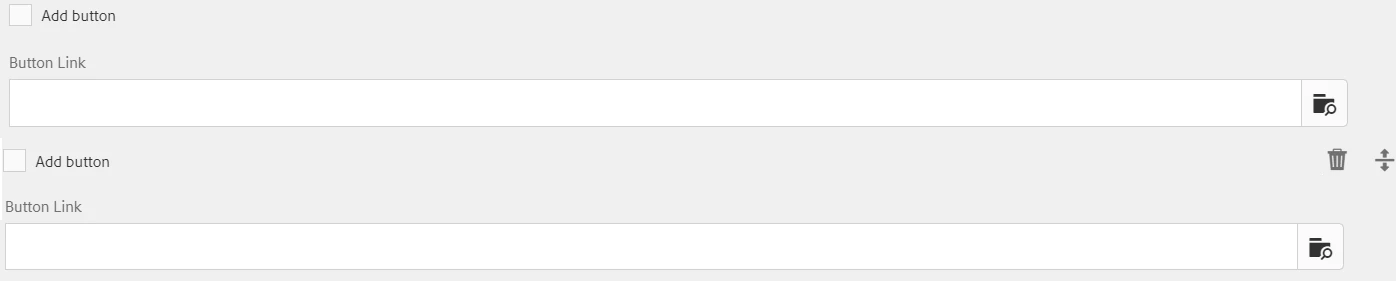
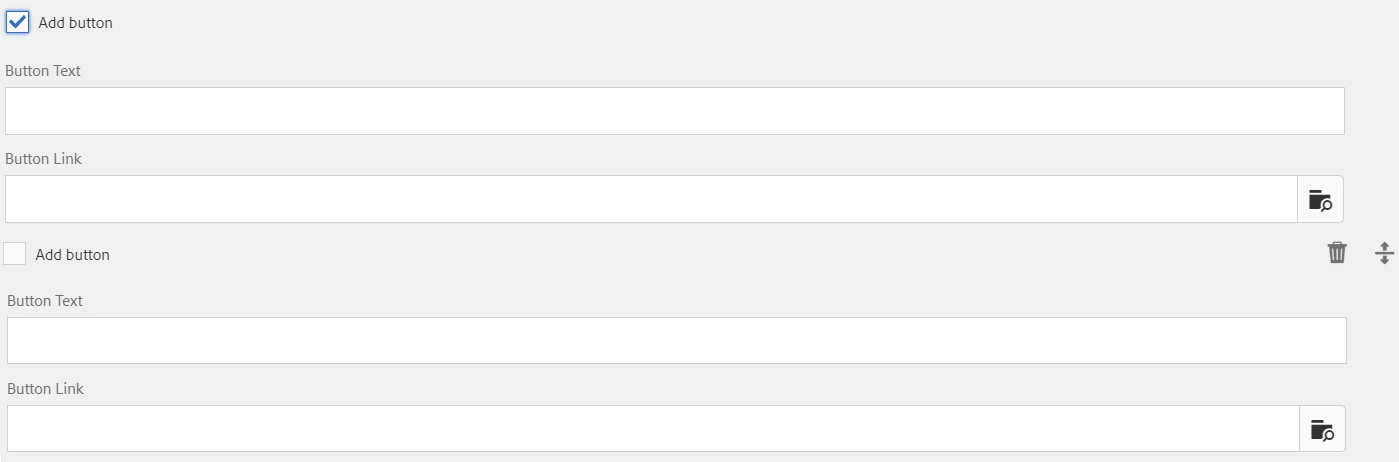
The issue here is , when I am trying to check the Add button checkbox then automatically in every carousel item the btntext and buttonLink is coming ,

as shown in below figure.

You can observe in the last picture that in the 2nd item , though Add Button is not checked in , still the button text is coming.

******************** BEFORE CHECKED IN ADD BUTTON****************************************
************** AFTER CHECKED IN ADD BUTTON****************************************
Please help me on this.

Thanks in advance

This post is no longer active and is closed to new replies. Need help? Start a new post to ask your question.

2 replies

smacdonald2008
Level 10
January 17, 2019

Are you modifying the AEM CORE Carousel component?

Level 4
January 17, 2019

Hi Donald,

No I am not modifying the AEM CORE Carousel component. Actually this carousel component was developed in AEM 6.0 and it is migrated to AEM 6.4

So now in the existing carousel Business want to add three more items called Add Button , button text and button link.

My code is working fine without carousel , but in the carousel when I am clicking on the Add Button checkbox then automatically in every item , it is coming.

Gaurav-Behl
Level 10
January 18, 2019

You are using jQuery named selector which is not appropriate to handle this use case. Below is an example with explanation. Assume these are the textboxes in carousel, one per carousel item

<input type="radio" name="./btntext" value="A">

<input type="radio" name="./btntext" value="B">

<input type="radio" name="./btntext" value="C">

Now when you use $("input[name='./btntext']"), it would select all the items with name './btntext' and not just a single element. You can check $("input[name='./btntext']").length in console to validate which would give you result as 3 and not 1

The solution is to use specific selectors or ids etc. to identify each unique element of carousel item 1, 2 & 3. There are various ways to achieve that.

E.g. https://api.jquery.com/multiple-attribute-selector/

HTH

kautuk_sahni
Community Manager
Community Manager
January 22, 2019
Level 4
January 22, 2019

Dear Kautuk,

Thanks for the response and currently working what gaurav suggested. Once completed , i will inform everybody.

Level 4
January 30, 2019

Hi Gaurav,

Thanks for the changes. But still my enable checkbox is not coming any value , as shown below.

I have updated my package in below.

GitHub - sunita197881/sunitatest1 at checkbox-Multifield

Can you please share your package. Am I missing something ?


Hi Gaurav,

Now it is working fine after I removed the space for removeClass

$(el).parent().parent().siblings('.button-option-enable-showhide-target').first().removeClass("hidden"); // TODO: this selector can be optimized

        } else {

            $(el).parent().parent().siblings('.button-option-enable-showhide-target').first().addClass("hidden");

Thanks a lot for your help. I am not able to mark as correct the above post.