Container panel for policies not displaying in editable templates | Community
Skip to main content
May 22, 2023
Solved

Container panel for policies not displaying in editable templates

  • May 22, 2023
  • 1 reply
  • 1459 views

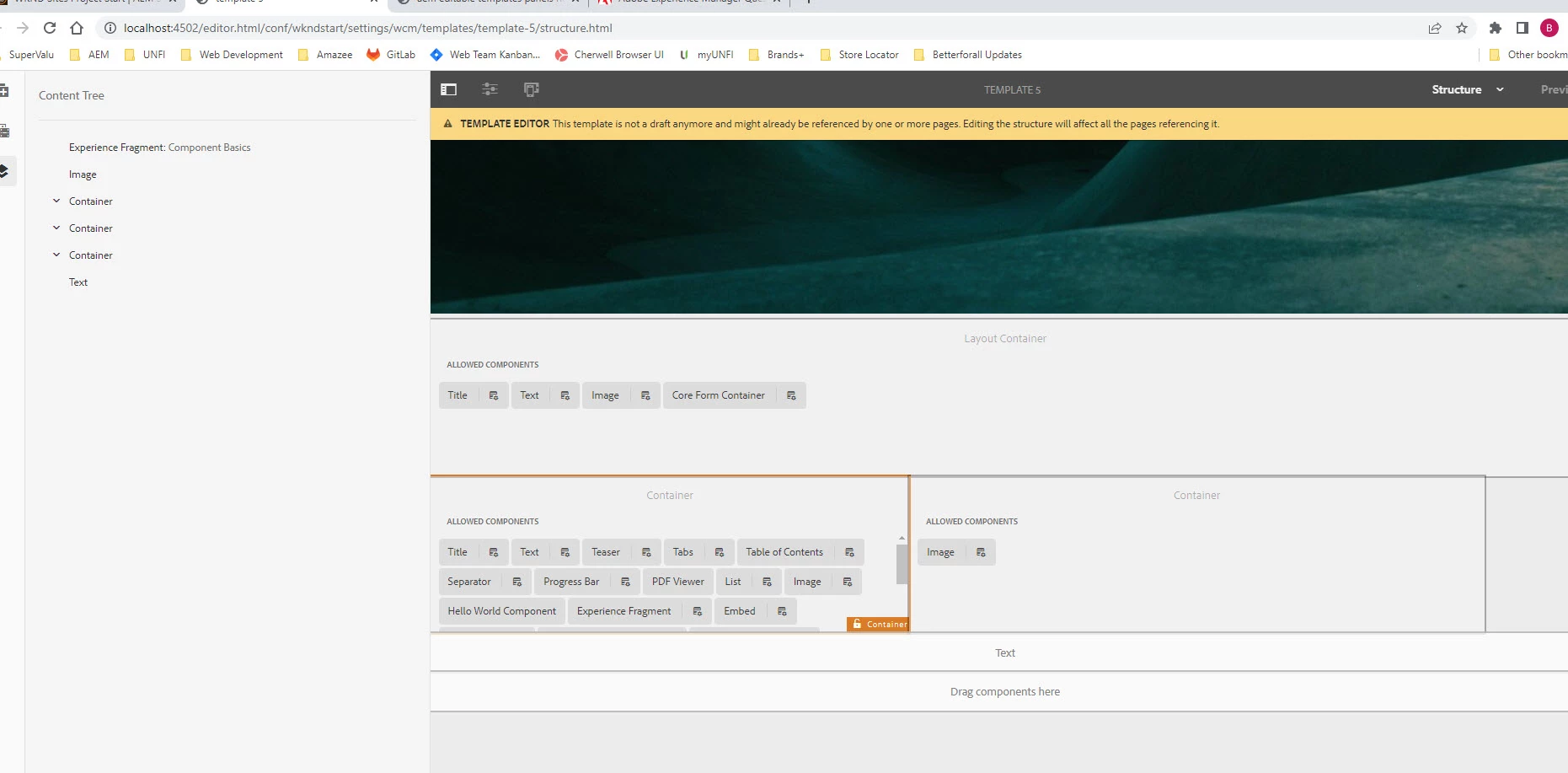
I've been working through the wknd tutorials on my local instance and was able to create a new editable template last week and update the policies.  Now I go into the templates that I created and the policy panel doesn't display.  Is there any special permissions for this to display (I'm running as admin)? It doesn't seem to work on any of my AEM instances now.  Could updating windows 10 cause this?  I'm at a loss on what to do. Any advise would greatly be appreciated. I tried to edit one of the we.retail templates too but get no policy panel. 


This post is no longer active and is closed to new replies. Need help? Start a new post to ask your question.
Best answer by Shivanandh

Clear your browser cache and try accessing AEM again. Sometimes cached resources can cause display issues.

If you made any customizations or modifications to AEM, templates, or policies, review your changes to see if there's any code or configuration that may be causing the issue. Revert any recent changes to see if the policy panel reappears. and  Check the AEM logs for any relevant error messages or warnings

1 reply

Fanindra_Surat
Community Advisor
Community Advisor
May 23, 2023

Hi @brians80208750 - The second icon on your first image (the one with a small wheel to the bottom right) is the one to configure policies for that specific component. This is also present for all the "Allowed components" within your Container component. If you are observing this not present on any component, it might be due to a missing design dialog for it.


Regards,

Fani

May 23, 2023

Should have made myself clearer.  The first image is what I'm trying to get.  The second image is what I'm getting.  When I hover over the container, the panel doesn't pop up.

ShivanandhAccepted solution
Level 2
May 29, 2023

Clear your browser cache and try accessing AEM again. Sometimes cached resources can cause display issues.

If you made any customizations or modifications to AEM, templates, or policies, review your changes to see if there's any code or configuration that may be causing the issue. Revert any recent changes to see if the policy panel reappears. and  Check the AEM logs for any relevant error messages or warnings