
Conflict with the OOTB ThumbnailServlet config. AEM6.5.5 | Community
Skip to main content
tushaar_srivastava
Level 6
March 11, 2021
Solved

Conflict with the OOTB ThumbnailServlet config. AEM6.5.5

  • March 11, 2021
  • 2 replies
  • 979 views

Hi Team,
I have created a page rendering component name data (/apps/project/dm/components/pages/data) [here dm is a folder.]

and the related template  (/apps/project/dm/templates/data) 
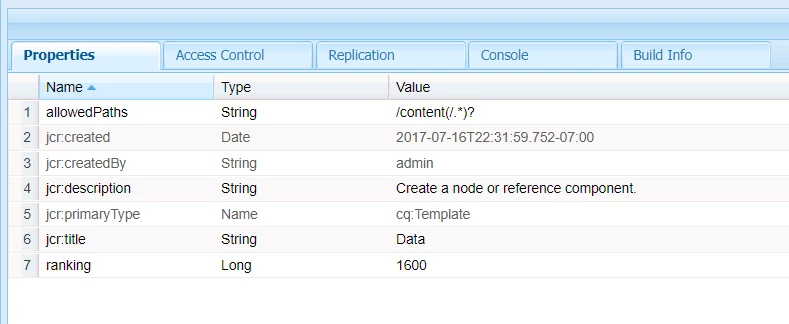
 

Any node/folder created using the data template (project/dm/components/pages/data) throws the below error while rendering the thumbnail. It is conflicting with the OOTB ThumbnailServlet config.


Author Error:

/mnt/crx/author/crx-quickstart/logs/error.log:19.08.2020 15:16:04.051 *ERROR* [10.113.90.115 [1597850164034] GET /content/www/data.thumb.48.48.png HTTP/1.1] org.apache.jsp.libs.cq.Page.thumb_png_jsp resource has no content. path=/content/www/data.thumb.48.48.png referrer=null


ThumbnailServlet:

component.name = com.day.cq.wcm.core.impl.servlets.ThumbnailServlet

service.pid = com.day.cq.wcm.core.impl.servlets.ThumbnailServlet

service.vendor = Adobe Systems Incorporated

sling.servlet.extensions = [gif, png, jpg]

sling.servlet.resourceTypes = sling/servlet/default

sling.servlet.selectors = thumb workspace = crx.default


http://localhost:4502/system/console/configMgr/com.day.cq.wcm.core.impl.servlets.ThumbnailServlet

http://localhost:4502/system/console/components/2914


  1. Not sure the reason behind the exception (Author error).
  2. Happens for the one template not with the custom inherited template.
  3. want to know more insight about ThumbnailServlet 


@vijayalakshmi_s  @arunpatidar  @vanegi  @kautuk_sahni  @theo_pendle 


This post is no longer active and is closed to new replies. Need help? Start a new post to ask your question.
Best answer by Vijayalakshmi_S

Hi @tushaar_srivastava,

Can you confirm if the thumbnail has jcr:content node. Shared error statement occurs when there is no jcr:content node on the requested resource. 

Also, suggest to check the resource resolving flow via "Recent Requests" in OSGI console - http://localhost:4502/system/console/requests


2 replies

Vijayalakshmi_S
Vijayalakshmi_SAccepted solution
Level 10
March 11, 2021

Hi @tushaar_srivastava,

Can you confirm if the thumbnail has jcr:content node. Shared error statement occurs when there is no jcr:content node on the requested resource. 

Also, suggest to check the resource resolving flow via "Recent Requests" in OSGI console - http://localhost:4502/system/console/requests


Anudeep_Garnepudi
Community Advisor
Community Advisor
March 14, 2021

@tushaar_srivastava 

Seems your page(/content/www/data) does not have jcr:content node. Sites(sites.html) will load 48x48 size thumbnail icon by default(can override from page properties thumbnail tab) from /libs/cq/ui/widgets/themes/default/icons/240x180/page.png by adapting current resource(Page) to Template.class. You will get this ERROR if page does not have jcr:content node.

AG