Configure Audit Logs on AEMaaCS | Community
Skip to main content
daniel-strmecki
Community Advisor and Adobe Champion
January 2, 2025
Solved

Configure Audit Logs on AEMaaCS

  • January 2, 2025
  • 5 replies
  • 3467 views

I am looking for documentation on how to properly configure audit logs for creating, updating, moving, publishing, unpublish, and deleting operations on assets and pages. All I can find is documentation on how to set up Maintenance/Audit Log Cleanup tasks in AEMaaCS. Can anyone refer me to the appropriate documentation or a good article on the topic?


Also, I am not sure if I should expect audit logs to appear in Cloud Manager UI or if are they only available via API?


Thanks,

Daniel

This post is no longer active and is closed to new replies. Need help? Start a new post to ask your question.
Best answer by daniel-strmecki

Audit logs are already enabled by default on AEMaaCS, but they are not really a log file in the traditional sense.

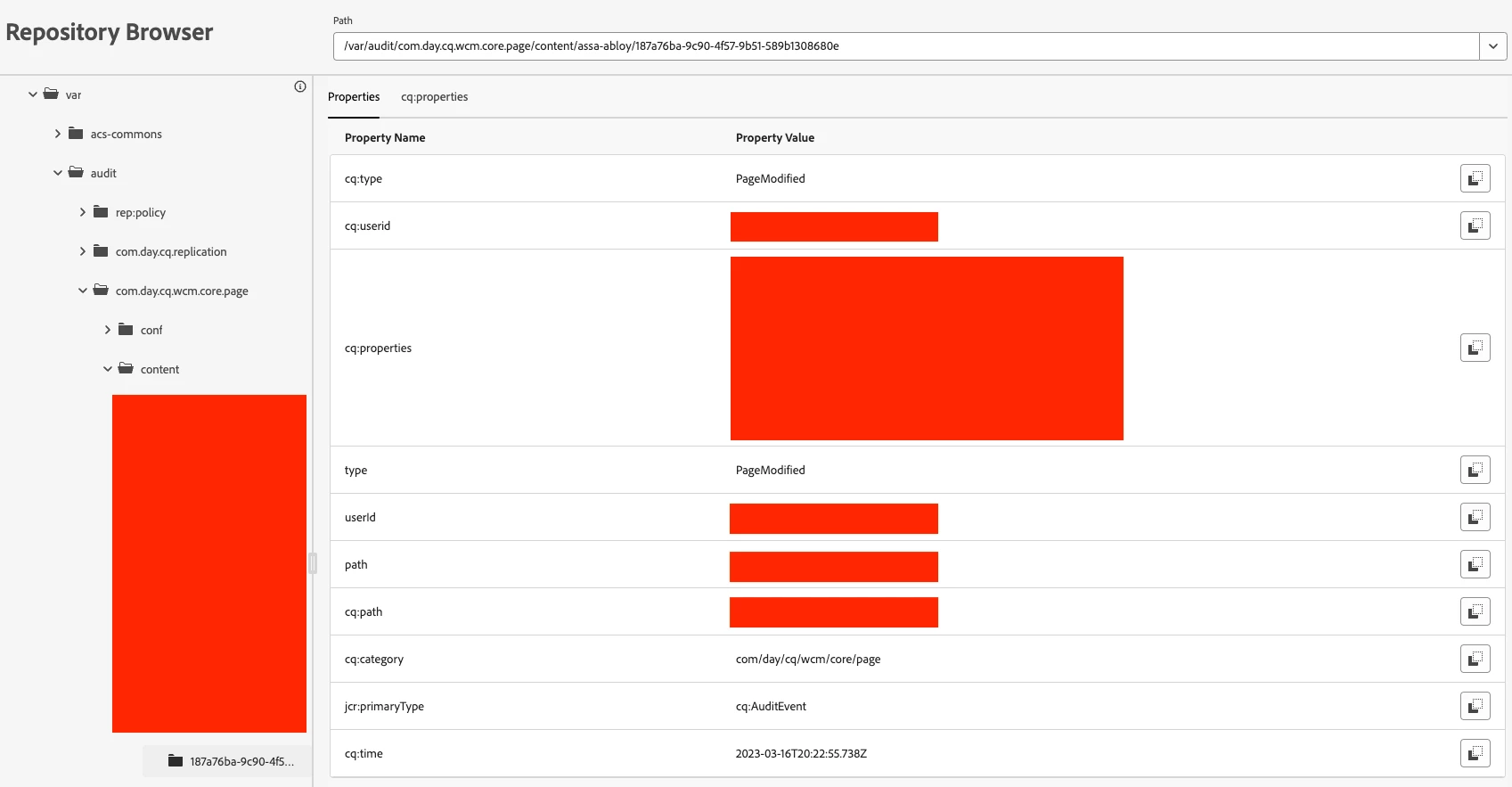
Instead, audit events are stored in the repository under the path /var/audit. AEM Devs can use the Repository Browser to inspect audit events. 
Therefore, audit logs cannot be forwarded to Splunk like the request or error logs.

Since audit logs occupy significant space in the JCR database, they need to be cleaned up regularly. The following cleanup configuration should be applied to AEMaaCS environments.


kind: "MaintenanceTasks" version: "1" metadata: envTypes: ["dev","stage","prod"] data: versionPurge: maximumVersions: 15 maximumAgeDays: 20 paths: ["/content"] minimumVersions: 1 retainLabelledVersions: false auditLogPurge: rules: - replication: maximumAgeDays: 15 contentPath: "/content" types: ["Activate", "Deactivate", "Delete", "Test", "Reverse", "Internal Poll"] - pages: maximumAgeDays: 15 contentPath: "/content" types: ["PageCreated", "PageModified", "PageMoved", "PageDeleted", "VersionCreated", "PageRestored", "PageValid", "PageInvalid"] - dam: maximumAgeDays: 15 contentPath: "/content" types: ["ASSET_EXPIRING", "METADATA_UPDATED", "ASSET_EXPIRED", "ASSET_REMOVED", "RESTORED", "ASSET_MOVED", "ASSET_VIEWED", "PROJECT_VIEWED", "PUBLISHED_EXTERNAL", "COLLECTION_VIEWED", "VERSIONED", "ADDED_COMMENT", "RENDITION_UPDATED", "ACCEPTED", "DOWNLOADED", "SUBASSET_UPDATED", "SUBASSET_REMOVED", "ASSET_CREATED", "ASSET_SHARED", "RENDITION_REMOVED", "ASSET_PUBLISHED", "ORIGINAL_UPDATED", "RENDITION_DOWNLOADED", "REJECTED"]


Hope this helps someone,

Daniel

5 replies

narendragandhi
Community Advisor
Community Advisor
January 3, 2025
daniel-strmecki
Community Advisor and Adobe Champion
January 3, 2025

Hi @narendragandhi,

thanks, but I am not looking to process events, but to enable and forward the audit logs to Splunk.


Daniel

narendragandhi
Community Advisor
Community Advisor
January 3, 2025

I was looking at the code for aio-lib-java to see how its being done there - https://github.com/adobe/aio-lib-java/blob/75adbd97a3f113f0fbc5c07644ccde6a750625f9/aem/events_osgi_mapping/README.md?plain=1#L80


This mapping might help to get details on what events it's listening to. It does seem like there would be some custom code needed if you want to get these in the logs.


Thanks

Narendra

aanchal-sikka
Community Advisor
Community Advisor
January 3, 2025

Hello @daniel-strmecki 


Option-1:

To capture audit events on AEM Instance, we can use Day CQ DAM Event Recorder configuration https://techrevel.blog/2019/10/13/aem-asset-reports/


Option-2:

To process events using Adobe I/O: https://experienceleague.adobe.com/en/docs/experience-manager-learn/cloud-service/aem-eventing/overview 

Aanchal Sikka
daniel-strmecki
Community Advisor and Adobe Champion
January 3, 2025

Hi @aanchal-sikka,

thanks, option 1 is what I am looking for, but I would like to log more events for pages and replication. Also, ideally, forward those logs to Splunk so the team can use them for analysis.


BR,

Daniel

B_Sravan
Community Advisor
Community Advisor
January 3, 2025

Hi @daniel-strmecki 

To configure audit logs in AEMaaCS for operations such as creating, updating, moving, publishing, unpublishing, and deleting assets and pages, follow these steps:

  1. Enable the Adobe CQ DAM Event Audit Listener:

    • Access the AEM System Console.
    • Navigate to the "Adobe CQ DAM Event Audit Listener" configuration.
    • Ensure it is enabled. If not, enable it.
  2. Configure the Day CQ DAM Event Recorder:

    • In the System Console, locate the "DAMEventRecorderImpl" configuration.
    • Select the events you wish to audit. By default, some events are pre-selected; you can customize this selection based on your requirements.

These configurations will enable audit logging for the specified events in the Digital Asset Management (DAM) system. You can test the setup by performing operations such as modification, replication, or deletion on any asset or page through the AEM console.


Audit logs are stored in the repository under the path /var/audit/. To access them:

  • Use CRXDE Lite to navigate to /var/audit/ and review the logs.
  • Alternatively, you can enable audit logging to the file system:
    • Go to http://localhost:4502/system/console/slinglog.
    • Locate the audit.log entry (not auditlog.log) and set the log level to DEBUG or TRACE.
    • Save the changes. The audit logs will then be recorded in the /crx-quickstart/logs directory.

Regarding access to audit logs in AEMaaCS, they are not directly available through the Cloud Manager UI. Instead, you can access them via the Cloud Manager API or command-line interface (CLI):

  • Using the Cloud Manager API:

    • Set up an integration with Adobe I/O to access Cloud Manager programmatically.
    • Use the API to download or tail logs for specific environments.
  • Using the Adobe I/O CLI:

    • Install the Adobe I/O CLI and the Cloud Manager plugin.
    • Authenticate using your Adobe I/O credentials.
    • Use commands like aio cloudmanager:download-logs or aio cloudmanager:tail-log to access logs.

For detailed instructions on accessing and managing logs via the Cloud Manager UI and API, refer to Adobe's documentation.


Additionally, the ACS AEM Commons library provides an Audit Log Search tool that can help in searching and analyzing audit logs within AEM.

Please note that audit logs can consume significant disk space. It's essential to configure audit log purging in AEM to manage and minimize space usage. Regular maintenance tasks, such as the Audit Log Purge, help keep the author instance performant by removing older audit logs.


By following these steps and utilizing the available tools, you can effectively configure and manage audit logs for your AEMaaCS instance.

- Sravan


daniel-strmecki
Community Advisor and Adobe Champion
January 3, 2025

Hi @b_sravan,

thanks for the detailed response. I found the Day CQ DAM Event Recorder Service Config, but is there a similar Service to enable Page and Replication events?

Also, will the audit logs get forwarded to Splunk with the existing Log Forwarding configuration, or are some additional steps required?


Daniel

SreenivasBr
Level 4
January 3, 2025

If you are looking to search or pull up a report based on the audit log events, I recommend using https://adobe-consulting-services.github.io/acs-aem-commons/features/audit-log-search/index.html


daniel-strmecki
Community Advisor and Adobe Champion
January 3, 2025

Hi @sreenivasbr,

thanks, but I would prefer to use Splunk for querying the audit logs.


BR,

Daniel

Adobe Employee
January 29, 2025

Hi @daniel-strmecki 

For Splunk, AEMaaCS proposes Log Forwarding to Splunk,

Log Forwarding for AEM as a Cloud Service | Adobe Experience Manager

You might want to look at this feature prior building your own,

Just a suggestion of course,

Thanks

Denis

kautuk_sahni
Community Manager
Community Manager
January 7, 2025

@daniel-strmecki Did you find the suggestions helpful? Please let us know if you require more information. Otherwise, please mark the answer as correct for posterity. If you've discovered a solution yourself, we would appreciate it if you could share it with the community. Thank you!

Kautuk Sahni
daniel-strmecki
Community Advisor and Adobe Champion
January 7, 2025

@kautuk_sahniI raised a ticket with Adobe Support, will post an answer once I implement it properly.

daniel-strmecki
Community Advisor and Adobe Champion
daniel-strmeckiCommunity Advisor and Adobe ChampionAuthorAccepted solution
Community Advisor and Adobe Champion
January 8, 2025

Audit logs are already enabled by default on AEMaaCS, but they are not really a log file in the traditional sense.

Instead, audit events are stored in the repository under the path /var/audit. AEM Devs can use the Repository Browser to inspect audit events. 

Therefore, audit logs cannot be forwarded to Splunk like the request or error logs.

Since audit logs occupy significant space in the JCR database, they need to be cleaned up regularly. The following cleanup configuration should be applied to AEMaaCS environments.


kind: "MaintenanceTasks" version: "1" metadata: envTypes: ["dev","stage","prod"] data: versionPurge: maximumVersions: 15 maximumAgeDays: 20 paths: ["/content"] minimumVersions: 1 retainLabelledVersions: false auditLogPurge: rules: - replication: maximumAgeDays: 15 contentPath: "/content" types: ["Activate", "Deactivate", "Delete", "Test", "Reverse", "Internal Poll"] - pages: maximumAgeDays: 15 contentPath: "/content" types: ["PageCreated", "PageModified", "PageMoved", "PageDeleted", "VersionCreated", "PageRestored", "PageValid", "PageInvalid"] - dam: maximumAgeDays: 15 contentPath: "/content" types: ["ASSET_EXPIRING", "METADATA_UPDATED", "ASSET_EXPIRED", "ASSET_REMOVED", "RESTORED", "ASSET_MOVED", "ASSET_VIEWED", "PROJECT_VIEWED", "PUBLISHED_EXTERNAL", "COLLECTION_VIEWED", "VERSIONED", "ADDED_COMMENT", "RENDITION_UPDATED", "ACCEPTED", "DOWNLOADED", "SUBASSET_UPDATED", "SUBASSET_REMOVED", "ASSET_CREATED", "ASSET_SHARED", "RENDITION_REMOVED", "ASSET_PUBLISHED", "ORIGINAL_UPDATED", "RENDITION_DOWNLOADED", "REJECTED"]


Hope this helps someone,

Daniel