


Configure and start remote debugger in Eclipse | AEM Community Blog Seeding
Configure and start remote debugger in Eclipse by rashid jorvee blog
Abstract
Set the remote debugger configuration in Eclipse, to debug the running application code and identify the code issues.

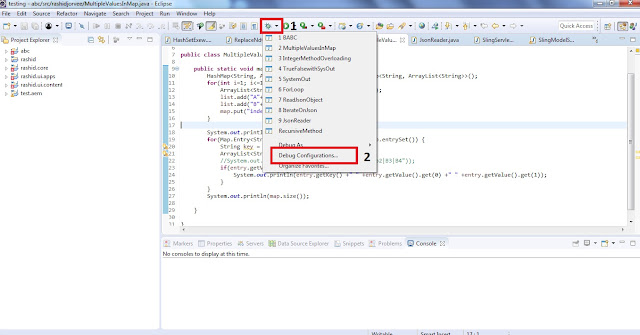
Step 1: Open the Debug perspective from tool bar. if you don't see debug perspective option in your toolbar, then open the perspective from this path in Eclipse.
Windows >> Perspective >> Open perspective >> Others >> Debug
1. Click on the perspective drop-down option very next to bug symbol.
2. Select the option Debug configuration

Step 2: Debug Configuration will open a new window(below is the screenshot).
1. Click on Remote Java Application option from left side rail.
2. Click on the New Launch configuration(new configuration) button. As shown in the screenshot below.
Read Full Blog
Configure and start remote debugger in Eclipse
Q&A
Please use this thread to ask the related questions.