Solved
Conditionally displaying a field in dialog based on select value
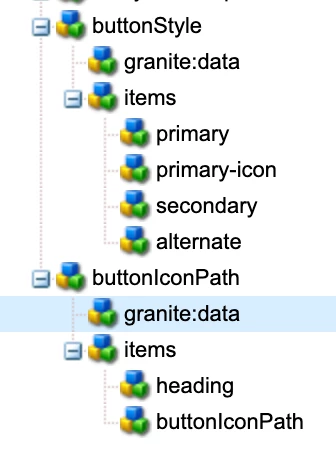
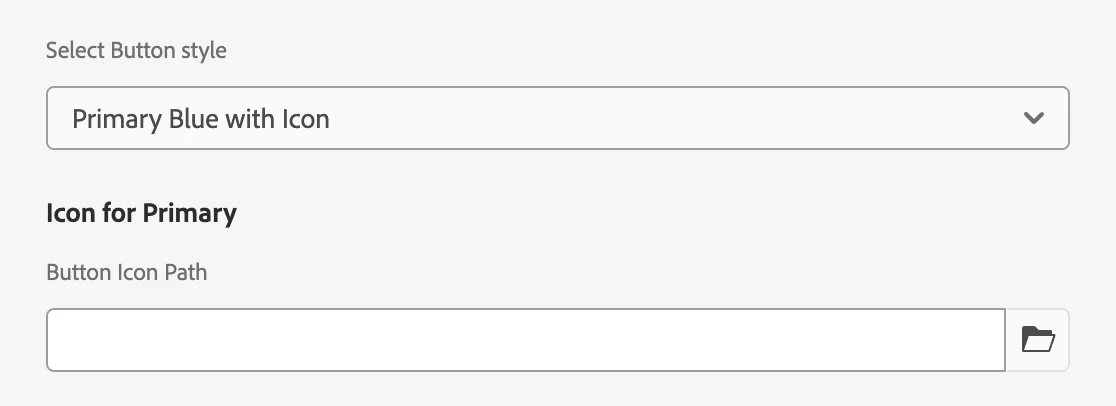
We have a select in our dialog with several options to select button style. One of the button styles includes adding an icon into the button. If the icon option is selected, we need a pathfield to appear. How can we accomplish that? Here is what I've tried so far. The following is the select with the options:
<buttonStyle
    jcr:primaryType="cq:WidgetCollection"
    sling:resourceType="granite/ui/components/coral/foundation/form/select"
    defaultValue="primary"
    fieldDescription="Buttle style"
    fieldLabel="Select button style"
    name="./buttonStyle">
    <granite:data
        jcr:primaryType="nt:unstructured"
        cq-dialog-dropdown-showhide-target=".buttonStyle-showhide-target"/>
    <items jcr:primaryType="nt:unstructured">
        <primary
            jcr:primaryType="nt:unstructured"
            text="Primary Blue"
            value="primary"/>
        <primary-icon
            jcr:primaryType="nt:unstructured"
            text="Primary Blue with Icon"
            value="primary-icon"/>
        <primary-small
            jcr:primaryType="nt:unstructured"
            text="Secondary Blue"
            value="secondary"/>
        <secondary-large
            jcr:primaryType="nt:unstructured"
            text="Alternate Gray"
            value="alternate"/>
    </items>
</buttonStyle>
When "Primary Blue with Icon" is selected, we need the following pathfield to appear. When "Primary Blue with Icon" is not selected, the following pathfield should not appear:
<buttonIconPath
    jcr:primaryType="nt:unstructured"
    sling:resourceType="granite/ui/components/coral/foundation/form/pathfield"
    fieldLabel="Button Icon Path"
    name="./buttonIconPath"
    rootPath="/content/dam/">
    <granite:rendercondition
        jcr:primaryType="nt:unstructured"
        sling:resourceType="granite/ui/components/coral/foundation/renderconditions/simple"
        expression="${granite:resourceValue('buttonStyle') == 'primary-icon'}"/>
</ctaIconPath>