composite component containing other components | Community
Skip to main content
sreedobe
November 13, 2020
Solved

composite component containing other components

  • November 13, 2020
  • 3 replies
  • 2661 views

Hi,


I have article header, article next steps components. I would like to have a composite component "articlecontainer" that would be dropped in editable template.


issue is : if I drop article header, article insights components separately in editable template , when I click edit icon able to see dialog.

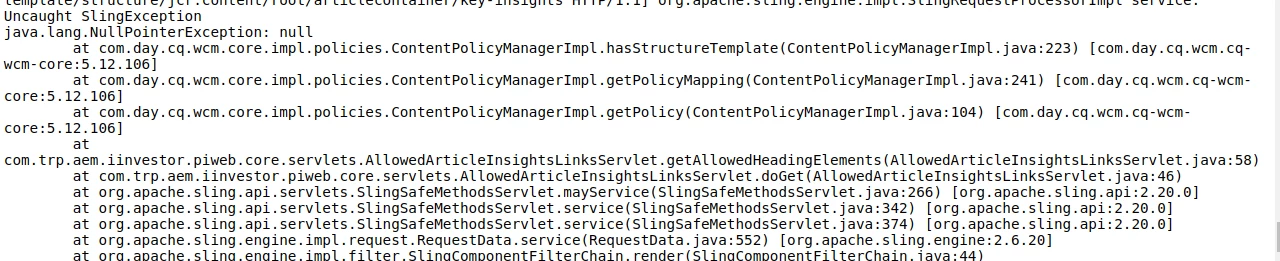
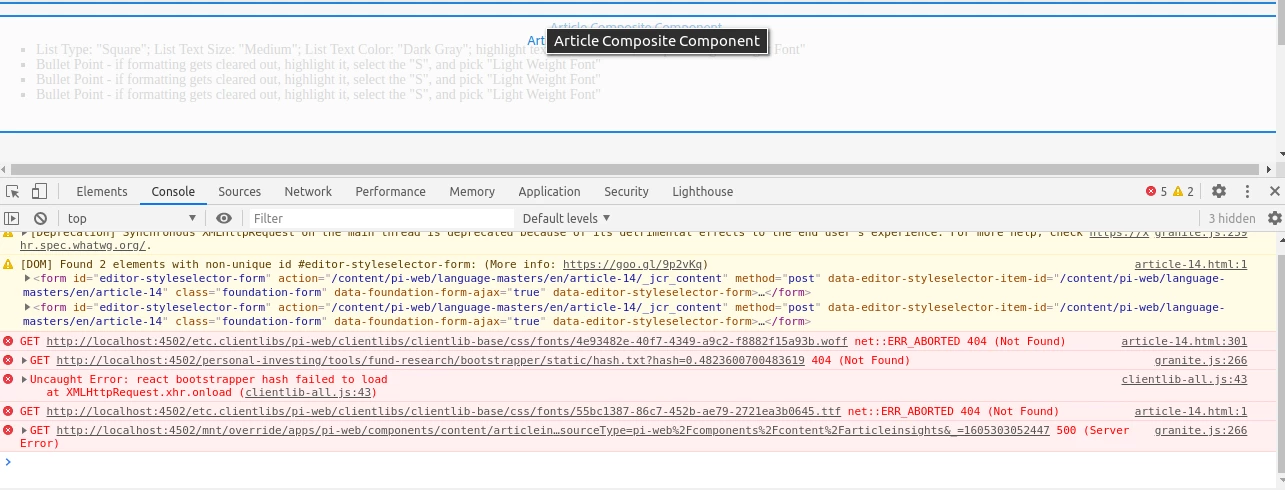
But, if I drop "articlecontianer" component in editable template , when I click on edit icon of included components, it is throwing 500 server error and dialog not displayed.


update1: simple components such as "helloworld" working fine. aricleheader, articleinsights components have policies and model classes throwing null pointer exception. I tried to see , if I can author policies but I could see only articlecontainer composite component in editabletemplate and not the components included through data-sly-resouce.


<div data-sly-test="${pageProperties.isArticlePage}"> <div itemscope itemtype="http://schema.org/Article"> <div data-sly-resource="${'key-insights' @ resourceType='pi-web/components/content/articleinsights'}" /> </div> </div> <div data-sly-test="${(wcmmode.edit || wcmmode.preview)}" class="cq-placeholder ${classAppend}" data-emptytext="${component.properties.jcr:title}${emptyTextAppend && ' - '}${emptyTextAppend}"> </div>


Above is htl code and below is component properties
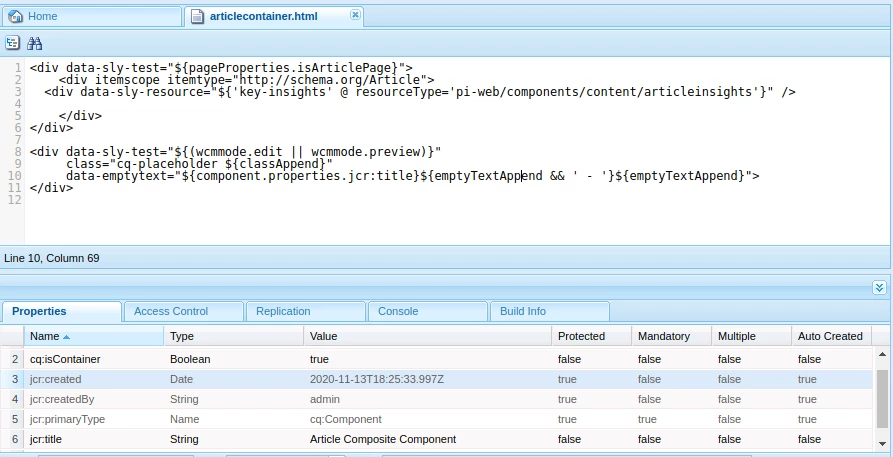


UPDATE 2: 


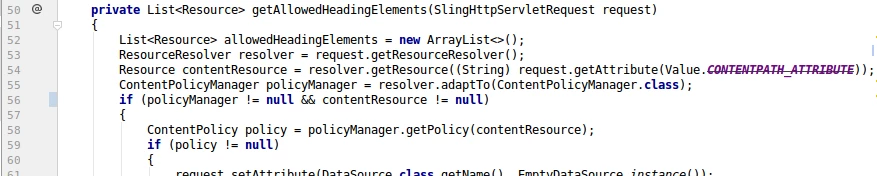
I tried to put null checks in code and created a page. The dialog coming up for article insights , but links dropdown is empty. data source servlet code, dialog model code screen shots below. 

This post is no longer active and is closed to new replies. Need help? Start a new post to ask your question.
Best answer by arunpatidar

Hi

From the logs I can see, the contentResource could be null.

You can check the below sample code to get Policy value from design (e.g. is only for String type, but you can change the types)

/** * Method reads design dialog property and sets it. * * @90521 resource - resource * @90521 propertyName - propertyName * @2007960 <b>String</b> - property value or <b>null</b> */ public static String getDesignPropertyValue(Resource resource, String propertyName, String defaultValue) { ResourceResolver resourceResolver = resource.getResourceResolver(); ContentPolicyManager policyManager = resourceResolver.adaptTo(ContentPolicyManager.class); if (policyManager != null) { ContentPolicy contentPolicy = policyManager.getPolicy(resource); if (contentPolicy != null) { return contentPolicy.getProperties().get(propertyName, defaultValue); } } return defaultValue; } }


3 replies

VeenaVikraman
Community Advisor
Community Advisor
November 14, 2020

What is the error you are getting in the error log when the component is throwing 500 error ? Can you send the logs ?

sreedobe
sreedobeAuthor
November 17, 2020

@veenavikraman  thanks for the response , I put in UPDATE2 with screenshot of log and also updated code blocks, screen shot of dialog for the component. ( what you see is update if blocks to get away with 500 null pointer exception.


arunpatidar
Community Advisor
arunpatidarCommunity AdvisorAccepted solution
Community Advisor
November 17, 2020

Hi

From the logs I can see, the contentResource could be null.

You can check the below sample code to get Policy value from design (e.g. is only for String type, but you can change the types)

/** * Method reads design dialog property and sets it. * * @90521 resource - resource * @90521 propertyName - propertyName * @2007960 <b>String</b> - property value or <b>null</b> */ public static String getDesignPropertyValue(Resource resource, String propertyName, String defaultValue) { ResourceResolver resourceResolver = resource.getResourceResolver(); ContentPolicyManager policyManager = resourceResolver.adaptTo(ContentPolicyManager.class); if (policyManager != null) { ContentPolicy contentPolicy = policyManager.getPolicy(resource); if (contentPolicy != null) { return contentPolicy.getProperties().get(propertyName, defaultValue); } } return defaultValue; } }


Arun Patidar
sreedobe
sreedobeAuthor
November 17, 2020

@arunpatidar  @veenavikraman I have a servlet mapped with resourceType to dialog field. How to get policy, stored design dialog values that template author authored for component (select dropdown is dialog field that mapped to servlet to auto populate authored links from design dialog). Thanks again.


package com.company.aem.core.servlets; import com.adobe.granite.ui.components.Value; import com.adobe.granite.ui.components.ds.DataSource; import com.adobe.granite.ui.components.ds.EmptyDataSource; import com.adobe.granite.ui.components.ds.SimpleDataSource; import com.adobe.granite.ui.components.ds.ValueMapResource; import com.day.cq.wcm.api.policies.ContentPolicy; import com.day.cq.wcm.api.policies.ContentPolicyManager; import org.apache.sling.api.SlingHttpServletRequest; import org.apache.sling.api.SlingHttpServletResponse; import org.apache.sling.api.resource.Resource; import org.apache.sling.api.resource.ResourceMetadata; import org.apache.sling.api.resource.ResourceResolver; import org.apache.sling.api.resource.ValueMap; import org.apache.sling.api.servlets.SlingSafeMethodsServlet; import org.apache.sling.api.wrappers.ValueMapDecorator; import org.osgi.service.component.annotations.Component; import javax.servlet.Servlet; import javax.servlet.ServletException; import java.io.IOException; import java.util.ArrayList; import java.util.HashMap; import java.util.List; /** * * Data source for links dropdown */ @Component(service = { Servlet.class }, property = { "sling.servlet.resourceTypes=" + AllowedArticleInsightsLinksServlet.RESOURCE_TYPE, "sling.servlet.methods=GET", "sling.servlet.extensions=html" }) public class AllowedArticleInsightsLinksServlet extends SlingSafeMethodsServlet { public final static String RESOURCE_TYPE = "pi-web/components/content/articleinsights/datasource/allowedlinks"; @Override protected void doGet( SlingHttpServletRequest request, SlingHttpServletResponse response) throws ServletException, IOException { SimpleDataSource allowedHeadingElementsDataSource = new SimpleDataSource(getAllowedHeadingElements(request).iterator()); request.setAttribute(DataSource.class.getName(), allowedHeadingElementsDataSource); } private List<Resource> getAllowedHeadingElements(SlingHttpServletRequest request) { List<Resource> allowedHeadingElements = new ArrayList<>(); ResourceResolver resolver = request.getResourceResolver(); Resource contentResource = resolver.getResource((String) request.getAttribute(Value.CONTENTPATH_ATTRIBUTE)); ContentPolicyManager policyManager = resolver.adaptTo(ContentPolicyManager.class); if (policyManager != null && contentResource != null) { ContentPolicy policy = policyManager.getPolicy(contentResource); if (policy != null) { request.setAttribute(DataSource.class.getName(), EmptyDataSource.instance()); Resource allowedLinksResource = policy.adaptTo(Resource.class).getChild("links"); if (allowedLinksResource != null) { ValueMap vm = null; for (Resource rs : allowedLinksResource.getChildren()) { vm = new ValueMapDecorator(new HashMap<>()); // Specify the value and text values String Value = rs.getValueMap().get("linkhref", String.class); String Text = rs.getValueMap().get("linkname", String.class); //populate the map vm.put("value", Value); vm.put("text", Text); allowedHeadingElements.add( new ValueMapResource(resolver, new ResourceMetadata(), "nt:unstructured", vm)); } } } } return allowedHeadingElements; } }


VeenaVikraman
Community Advisor
Community Advisor
November 19, 2020

The issue here I see is since you have 

<divdata-sly-resource="${'key-insights' @ resourceType='pi-web/components/content/articleinsights'}"/>

included the articleinsights component inside your container component, obviously it will not create an articleinsights node once you drop the container component. Rather than than, can you try keeping a parsys inside the container component and drag and drop your articleinsights component to it. ? It might be an easy way to fix this I guess. If it was only for one articleinsights component include, I am bit confused on the need for a container component in the first place