Component's dialog tabs are broken in AEM 6.3, CoralUi3 | Community
Skip to main content
Level 2
August 8, 2018
Solved

Component's dialog tabs are broken in AEM 6.3, CoralUi3

  • August 8, 2018
  • 32 replies
  • 14156 views

I was migrating the sling:resourceType granite/coralUi3 properties by follwing this helpex article : Migration Guide to CoralUI 3-based — Granite UI 1.0 documentation 

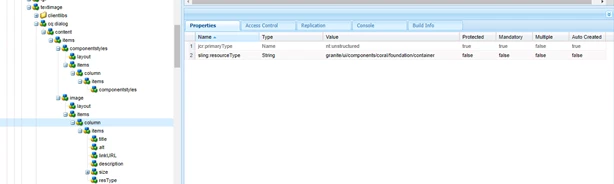
Where i was trying to modify the textImage component. This article says that in AEM 6.3 layouts have been removed. so i modified my component as:
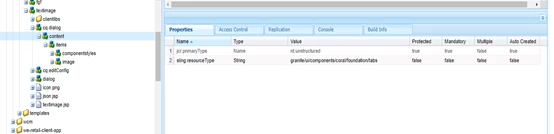

I removed the "layout" from starting. But my dialog tabs appears to be broken:
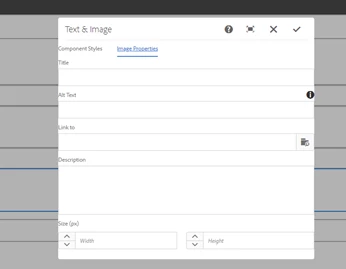
I changed all the sling:resourceType properties inside second tab according to that helpex document and after that this dialogs is showing distorted.  Also the margin in the two tabs also not looking good.

Is there problem going on with coralUi3 or something i missed here? Any suggestions would be appreciated.

This post is no longer active and is closed to new replies. Need help? Start a new post to ask your question.
Best answer by smacdonald2008

Here is the link with the package that works.

https://helpx.adobe.com/experience-manager/using/aem64_htl_movie_component.html

Also - here is a video that shows Granite/COral component dialog looks good with tabs.

32 replies

Level 2
August 9, 2018

Thank you so much Scott! for your quick response This works fine now.

smacdonald2008
Level 10
August 9, 2018

Excellent - i am glad its working for you!

smacdonald2008
Level 10
August 9, 2018

Your feedback to about the 1st Granite Type Article should have a link to the movie one. We will put that in.

smacdonald2008
Level 10
August 9, 2018

We added this to the 1st article listed here to make it clear:

Level 2
August 9, 2018

Sorry to ask you so late, but is it okay to have this property(granite/ui/components/foundation/container) instead of  (granite/ui/components/coral/foundation/container)  for content node under cq:dialog ?

smacdonald2008
Level 10
August 9, 2018

I recommend using all granite/coral as shown in the movie component - do not mix them up

Level 2
August 9, 2018

Okay! but the this movie component has the same structure. the tab-component inside the AEM 6.4 package (in that article you shared) is having the content node has (granite/ui/components/foundation/container) instead of  (granite/ui/components/coral/foundation/container)

Level 2
August 9, 2018

and if i changethe content node property to (granite/ui/components/coral/foundation/container) it is again showing the cascaded structure of the tabs

smacdonald2008
Level 10
August 9, 2018

I am not following you. All nodes under the tab component dialog use coral/granite types - ie:

Ratna_Kumar
Level 10
August 9, 2018

Hi Ashish,

Use coral/granite resource types as shown in the new AEM 6.4 movie component Helpx..

Also, this article uses only coral/granite resource types..pleas don't mix both..

Thanks,

Ratna kumar