Component not showing up in page but available under jcr node | Community
Skip to main content
vinodp18961354
November 7, 2019
Solved

Component not showing up in page but available under jcr node

  • November 7, 2019
  • 5 replies
  • 2595 views

Hi All,

We have created an editable template and baked in some components into it and JCR node structure looks like this.
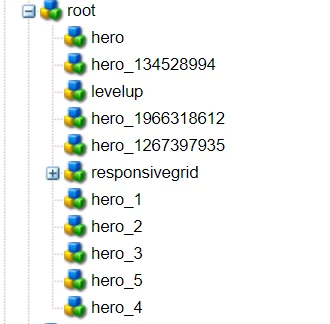
but i have removed all the baked in components from code and delployed it... but already authored components under root is not showing up in page.. only components present in responsive grid are available.

please let me know if there any specification that components will only show up if it is under parsys/grid/responsive grid.

let me know incase of any details required.

Thanks & regards,

This post is no longer active and is closed to new replies. Need help? Start a new post to ask your question.
Best answer by arunpatidar

If you are updating the structure of the template then all the pages(existing & new) will have the impact.

If you change the initial content of the template then only new pages will have the affect.

5 replies

Ankur_Khare
Community Advisor
Community Advisor
November 7, 2019

Yes node should be under responsive grid

vinodp18961354
November 7, 2019

My root node also have resourceType as responsiveGrid.. not sure what i am missing!!

Level 2
November 7, 2019

Have you defined the edit config and dialog? If so there is something wrong with dialog structure. You can still see the component structure in content tree in the left content finder. Check there first.

Adobe Employee
November 7, 2019

In order to be able to select a component and drag and drop it, the component must have a dialog.

Components do not have to be under parsys/grid/responsive, whenever you are creating a template, you can put a component outside of a parsys or a layout container.

"but already authored components under root is not showing up in page." - do you see any error in a log or in browser's dev tool? Do components have some dependencies  (a core/proxy component, a sling model etc) that are not deployed yet and hence it causes a rendition failure?

arunpatidar
Community Advisor
arunpatidarCommunity AdvisorAccepted solution
Community Advisor
November 7, 2019

If you are updating the structure of the template then all the pages(existing & new) will have the impact.

If you change the initial content of the template then only new pages will have the affect.

Arun Patidar