component is not visible | Community
Skip to main content
manikanthar1295
Level 5
January 11, 2019
Solved

component is not visible

  • January 11, 2019
  • 9 replies
  • 3996 views

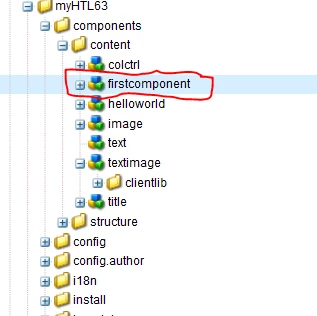
Hi i have created the Project and created the one custom component in crxde consle

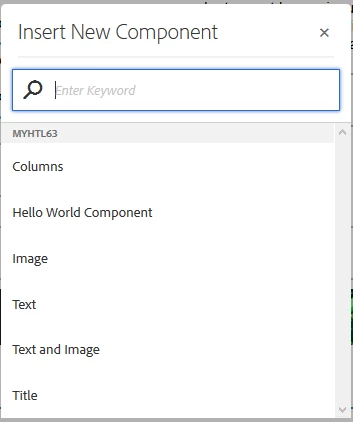
the component is created sucessfully. but when you appling on engilish page that component is not visible.

is there any permission issue.

below is screen shor for the same
when u add component into page it is not showing

screen shot is below.
This post is no longer active and is closed to new replies. Need help? Start a new post to ask your question.
Best answer by Gaurav-Behl
  1. Click on Page information icon (middle one on top left corner)
  2. Click on Edit Template option
  3. Choose the specific layout container/component where you want to add your own custom component
  4. Select that layout container/component and click on policy icon
  5. Choose a specific policy to add your custom component under Policy on left side. Leave it default in case you want to modify the default policy.
  6. Find & add your component on the right side Properties > Allowed Components widget
  7. Click Done on the top right corner
  8. Go back to your page & refresh
  9. Check if your component is available on the container where you allowed it to be visible.

9 replies

Gaurav-Behl
Level 10
January 11, 2019

check the group name of the component and is it allowed/added in the policy of the page-template?

smacdonald2008
Level 10
January 11, 2019

What is your code in the component - try putting a simple <p>Hello There</p>

arunpatidar
Community Advisor
Community Advisor
January 12, 2019

Can you check if cq:editConfig or cq:dialog node is created under component or not? If Yes then check allowed component group or component for particular template.

Arun Patidar
Amit-Tiwari
Level 4
January 12, 2019

1. make sure you have dialog in your component

2.make sure your component name and jcr:title property value are not same

manikanthar1295
Level 5
January 13, 2019

Hi gaurav,

As pr you suggestion i have added componentGroup  property but still i'm not able to see that component to add in english page.

check the group name of the component and is it allowed/added in the policy of the page-template?

Can you explain little bit more here hoe i can create the custom component and add to the English page

Awaiting for your response.

Reards

Manikantha R

manikanthar1295
Level 5
January 13, 2019

Hi Arun,

cq:dialog node is there for the custom component  which i have created.

But how i can check the allowed component group or component for particular template.

Regards

Manikantha R

manikanthar1295
Level 5
January 13, 2019

Hi smacdonald2008

I have added simple <p> the is first componenet </p>

but still i'm not getting the component in english page.

Regards

Manikantha R

Gaurav-Behl
Gaurav-BehlAccepted solution
Level 10
January 13, 2019
  1. Click on Page information icon (middle one on top left corner)
  2. Click on Edit Template option
  3. Choose the specific layout container/component where you want to add your own custom component
  4. Select that layout container/component and click on policy icon
  5. Choose a specific policy to add your custom component under Policy on left side. Leave it default in case you want to modify the default policy.
  6. Find & add your component on the right side Properties > Allowed Components widget
  7. Click Done on the top right corner
  8. Go back to your page & refresh
  9. Check if your component is available on the container where you allowed it to be visible.
manikanthar1295
Level 5
January 14, 2019

Hi gaurav,

Thanks for your quick response.

I have followed the steps which you have provided to me.

It is working fine to me.

I am able to added custom component which i have created now.

Let me ping you if any  more clarification need for me.

Ones again thanks much for your support.

Regards

Manikantha R