component dialog fields are large
Hi All,
We have carousel component and for this dialog text fields and multifield are added but when we open the dialog seeing fields are large and not fit into the box.
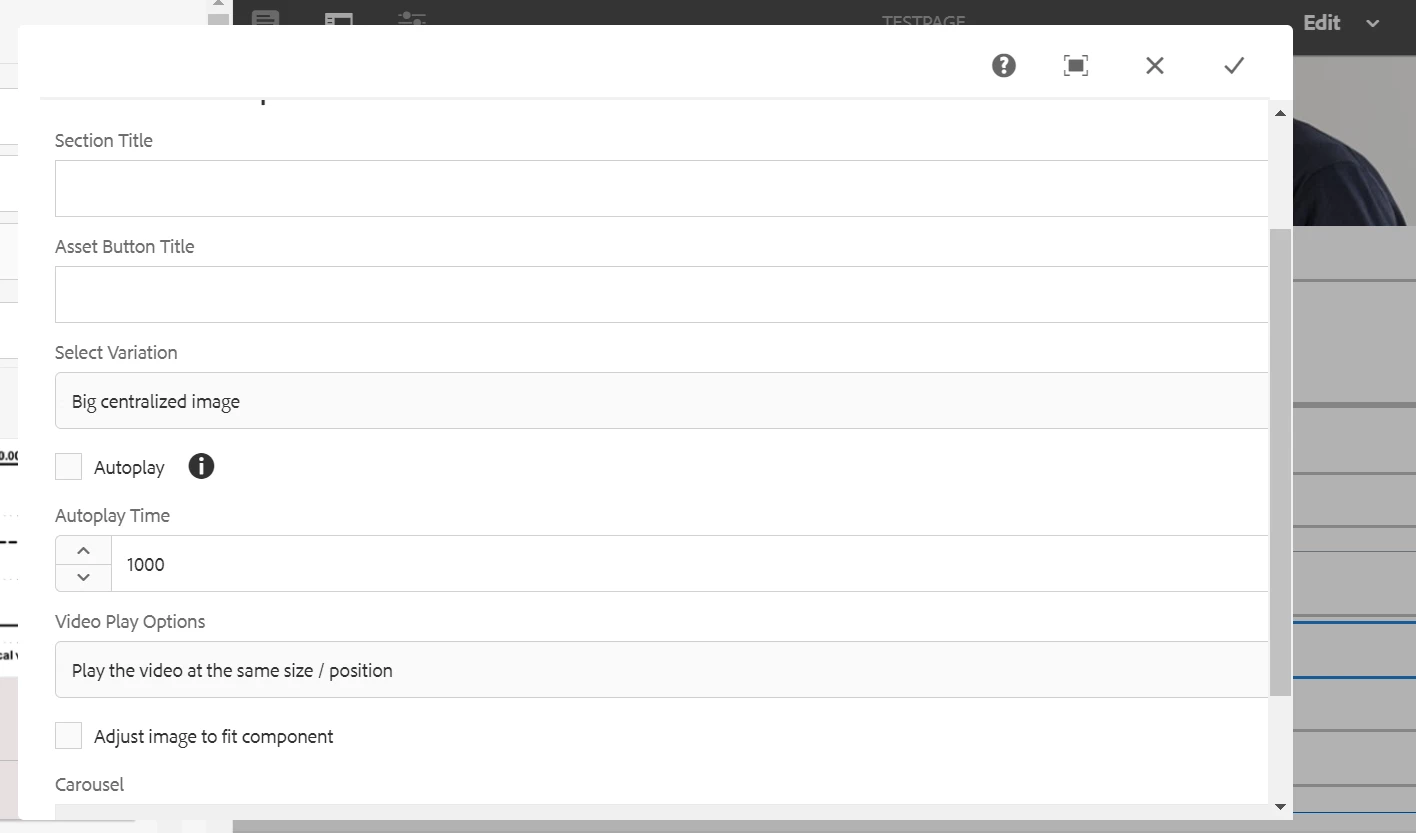
Could you please help us on this why the fields are large and we want to fit into the box and without going into Toggle full screen.
here is the dialog xml
<?xml version="1.0" encoding="UTF-8"?>
<jcr:root xmlns:sling="http://sling.apache.org/jcr/sling/1.0" xmlns:cq="http://www.day.com/jcr/cq/1.0" xmlns:jcr="http://www.jcp.org/jcr/1.0" xmlns:nt="http://www.jcp.org/jcr/nt/1.0"
jcr:primaryType="nt:unstructured"
sling:resourceType="cq/gui/components/authoring/dialog"
width="850"
helpPath="/content/dia/authoring-help.carousel.html?wcmmode=disabled">
<content
jcr:primaryType="nt:unstructured"
sling:resourceType="granite/ui/components/foundation/container">
<layout
jcr:primaryType="nt:unstructured"
sling:resourceType="granite/ui/components/foundation/layouts/tabs"
type="nav"/>
<items jcr:primaryType="nt:unstructured">
<carousel
jcr:primaryType="nt:unstructured"
jcr:title="Carousel Component"
sling:resourceType="granite/ui/components/foundation/section">
<layout
jcr:primaryType="nt:unstructured"
sling:resourceType="granite/ui/components/foundation/layouts/fixedcolumns"/>
<items jcr:primaryType="nt:unstructured">
<column
jcr:primaryType="nt:unstructured"
sling:resourceType="granite/ui/components/foundation/container"
class="carousel-multifield-width">
<items jcr:primaryType="nt:unstructured">
<fieldset
jcr:primaryType="nt:unstructured"
jcr:title="Carousel Input"
sling:resourceType="granite/ui/components/foundation/form/fieldset">
<layout
jcr:primaryType="nt:unstructured"
sling:resourceType="granite/ui/components/foundation/layouts/fixedcolumns"/>
<items jcr:primaryType="nt:unstructured">
<column
jcr:primaryType="nt:unstructured"
sling:resourceType="granite/ui/components/foundation/container">
<items jcr:primaryType="nt:unstructured">
<sectionTitle
jcr:primaryType="nt:unstructured"
sling:resourceType="granite/ui/components/foundation/form/textfield"
fieldDescription="Define the Heading for the Section"
fieldLabel="Section Title"
name="./secTitle"/>
<buttonTitle
jcr:primaryType="nt:unstructured"
sling:resourceType="granite/ui/components/foundation/form/textfield"
fieldDescription="Define the Button title for this section"
fieldLabel="Asset Button Title"
name="./buttonTitle"/>
<variationDropdown
jcr:primaryType="nt:unstructured"
sling:resourceType="granite/ui/components/foundation/form/select"
fieldDescription="Select the variation from dropdown"
fieldLabel="Select Variation"
name="./variationDropdown">
<items jcr:primaryType="nt:unstructured">
<bigImage
jcr:primaryType="nt:unstructured"
text="Big centralized image"
value="bigImage"/>
<sameImage
jcr:primaryType="nt:unstructured"
text="Same image height"
value="sameImage"/>
</items>
</variationDropdown>
<autoplay
jcr:primaryType="nt:unstructured"
sling:resourceType="granite/ui/components/foundation/form/checkbox"
defaultChecked="{Boolean}false"
fieldDescription="Check if you want to autoplay the images"
fieldLabel="Autoplay"
name="./autoplay"
text="Autoplay"
value="true"/>
<autoplayTime
jcr:primaryType="nt:unstructured"
sling:resourceType="granite/ui/components/coral/foundation/form/numberfield"
fieldDescription="Set the slideshow time"
fieldLabel="Autoplay Time"
name="./autoplayTime"
value="{Long}1000"/>
<overlayOption
jcr:primaryType="nt:unstructured"
sling:resourceType="granite/ui/components/foundation/form/select"
fieldDescription="Please configure in which size a video will be played"
fieldLabel="Video Play Options"
name="./overlayOption">
<items jcr:primaryType="nt:unstructured">
<default
jcr:primaryType="nt:unstructured"
text="Play the video at the same size / position"
value="default"/>
<fullscreen
jcr:primaryType="nt:unstructured"
text="Play video after click on play in fullscreen"
value="fullscreen"/>
<overlayM
jcr:primaryType="nt:unstructured"
text="Play video as overlay in medium size"
value="overlayM"/>
<overlayL
jcr:primaryType="nt:unstructured"
text="Play video as overlay in large size"
value="overlayL"/>
</items>
</overlayOption>
<fitoption
jcr:primaryType="nt:unstructured"
sling:resourceType="granite/ui/components/foundation/form/checkbox"
name="./fitCrop"
text="Adjust image to fit component"
value="true"/>
<multi
jcr:primaryType="nt:unstructured"
sling:resourceType="granite/ui/components/foundation/form/multifield"
fieldDescription="Click 'Add Fields' to add Asset for Carousel (Max. 8 and Min. 3 Assets Required)"
fieldLabel="Carousel"
max="{Long}8"
min="{Long}3">
<field
jcr:primaryType="nt:unstructured"
sling:resourceType="granite/ui/components/foundation/form/fieldset"
owp-acs-commons-nested="JSON_STORE"
name="./carouselData">
<layout
jcr:primaryType="nt:unstructured"
sling:resourceType="granite/ui/components/foundation/layouts/fixedcolumns"
method="absolute"/>
<items jcr:primaryType="nt:unstructured">
<column
jcr:primaryType="nt:unstructured"
sling:resourceType="granite/ui/components/foundation/container">
<items jcr:primaryType="nt:unstructured">
<assetType
jcr:primaryType="nt:unstructured"
sling:resourceType="granite/ui/components/foundation/form/select"
fieldDescription="Tip : Select the Asset Type"
fieldLabel="Asset Type"
name="./assetType">
<items jcr:primaryType="nt:unstructured">
<image
jcr:primaryType="nt:unstructured"
text="Image"
value="image"/>
<video
jcr:primaryType="nt:unstructured"
text="Video"
value="video"/>
</items>
</assetType>
<assetHeading
jcr:primaryType="nt:unstructured"
sling:resourceType="granite/ui/components/foundation/form/textfield"
fieldDescription="Enter the Heading for the given asset"
fieldLabel="Asset Heading"
name="./assetHeading"
required="{Boolean}true"/>
<assetPath
jcr:primaryType="nt:unstructured"
sling:resourceType="roc/dia/overlays/pathbrowser"
fieldDescription="Select the path for Asset (Expected size: 1176X600)"
fieldLabel="Asset Path"
name="./assetPath"
required="{Boolean}true"
rootPath="/content/dam"/>
<assetAltText
jcr:primaryType="nt:unstructured"
sling:resourceType="granite/ui/components/foundation/form/textfield"
fieldDescription="Enter the Alternate text for the Asset(Image only)"
fieldLabel="Asset Alt. Text"
name="./assetAltText"
required="{Boolean}true"/>
<posterImage
jcr:primaryType="nt:unstructured"
sling:resourceType="roc/dia/overlays/pathbrowser"
fieldDescription="Poster Image for Video"
fieldLabel="Poster Image"
name="./posterImage"
rootPath="/content/dam"/>
<linkBehaviour
jcr:primaryType="nt:unstructured"
sling:resourceType="granite/ui/components/foundation/form/select"
fieldDescription="Select the link behaviour"
fieldLabel="Link behaviour"
name="./linkBehaviour">
<items jcr:primaryType="nt:unstructured">
<sameWindow
jcr:primaryType="nt:unstructured"
text="Same window"
value="_self"/>
<newWindow
jcr:primaryType="nt:unstructured"
text="New window"
value="_blank"/>
</items>
</linkBehaviour>
<path
jcr:primaryType="nt:unstructured"
contextPath="{Boolean}true"
sling:resourceType="roc/dia/overlays/pathbrowser"
fieldDescription="Define Asset Link path"
fieldLabel="Asset Link Page Path"
name="./linkPath"
rootPath="/content"/>
<assetSummary
jcr:primaryType="nt:unstructured"
sling:resourceType="granite/ui/components/foundation/include"
fieldLabel="Asset Summary"
name="./assetSummary"
path="/apps/roc/dia/components/richTextEditor/cq:dialog/content/items/rte/items/column/items/bodyText"/>
</items>
</column>
</items>
</field>
</multi>
</items>
</column>
</items>
</fieldset>
</items>
</column>
</items>
</carousel>
</items>
</content>
</jcr:root>
Thanks,