Compare one field in two different multifields, if matched add the one field value. | Community
Skip to main content
Level 2
August 31, 2023
Solved

Compare one field in two different multifields, if matched add the one field value.

  • August 31, 2023
  • 1 reply
  • 955 views

Hi ,

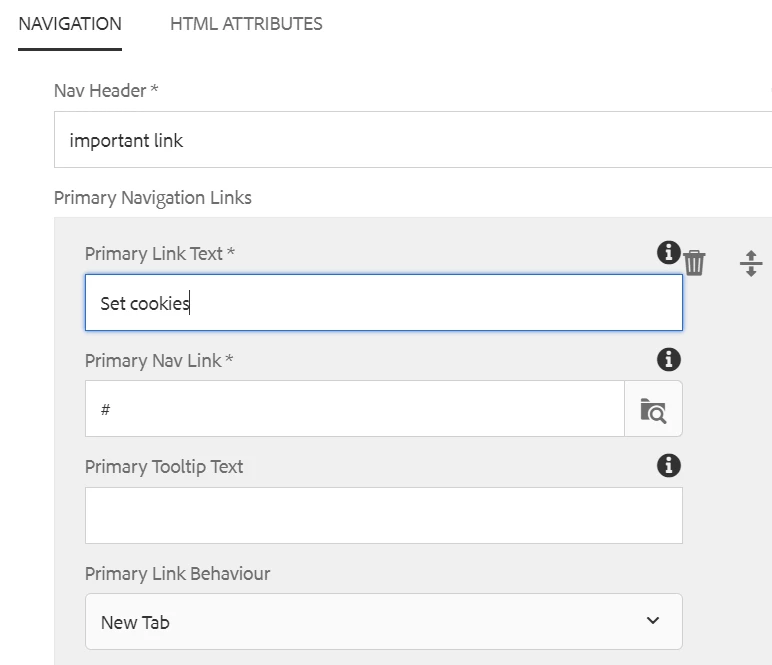
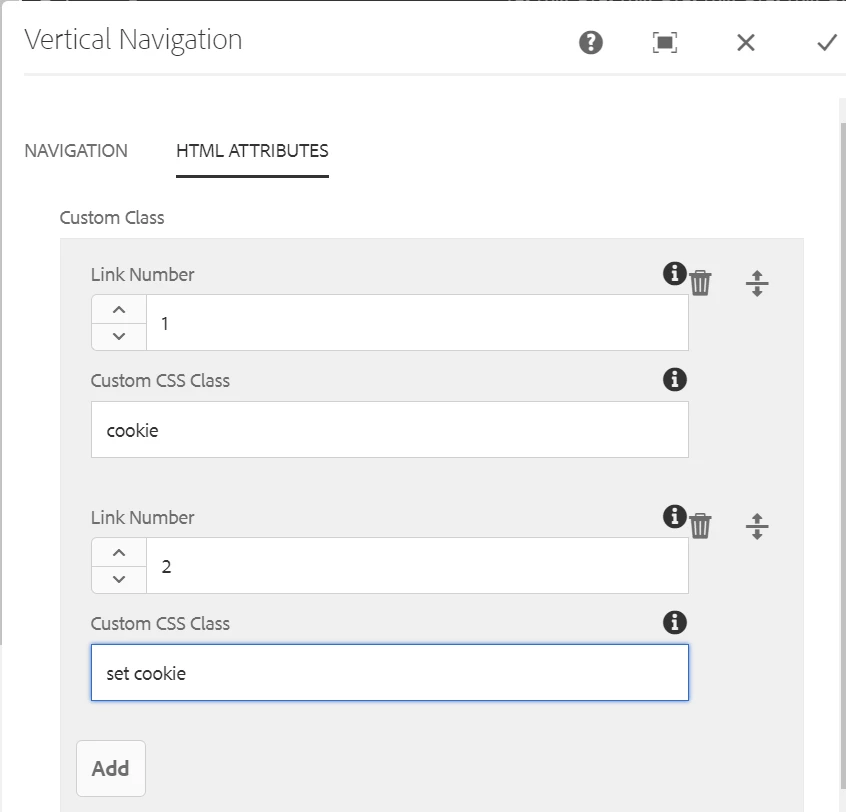
There are two tabs in my dialog box with multifield in each tab. Assume, in first tabs multifield there's field with navigation title, link, and count also like how many multi fields that much count will generate i.e.. 1,2 & in 2nd tabs multifield there's fields like select id number & custom class.

I want to compare two multi fields and if count number and id number are same then in custom what we are writing that will get added to that li only.
This post is no longer active and is closed to new replies. Need help? Start a new post to ask your question.
Best answer by Sady_Rifat

Now it is totally understandable, But I think you can simplify the Author's Dialog and make it easier,
Just put the "Custom CSS Class" field into the first tab multifield.

  • No Need for additional validation
  • Less error prone
  • No extra complex code


1 reply

Sady_Rifat
Community Advisor
Community Advisor
August 31, 2023

Hello @ssin93 ,

Can you please explain more about this requirement?


I want to compare two multi fields and if count number and id number are same then in custom what we are writing that will get added to that li only.


I am not clear about your lines.

ssin93Author
Level 2
August 31, 2023

Hi @sady_rifat  We have requirement like link number as you can see in the HTML attribute tab like link number if we provide 1 and custom class name we provide something so if we have provided link number as 1 then that class name should get added to the primary navigation link in the first field while doing inspect that class name should show similarly if we provide 2 it should get added to the second primary navigation link.
To compare with that in the primary navigation field we are generating count as 1,2,3 etc so if the count number matches with the link number what we have added in the HTML attributes tab it should generate that custom css class which which are providing in the second tab.

I hope it will clarify your doubt if you need to know anything else please let me know.

Sady_Rifat
Community Advisor
Sady_RifatCommunity AdvisorAccepted solution
Community Advisor
August 31, 2023

Now it is totally understandable, But I think you can simplify the Author's Dialog and make it easier,
Just put the "Custom CSS Class" field into the first tab multifield.

  • No Need for additional validation
  • Less error prone
  • No extra complex code