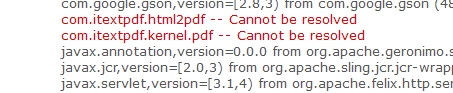
com.itextpdf.html2pdf and com.itextpdf.kernel.pdf -- Cannot be resolved | Community
Skip to main content
April 16, 2023
Solved

com.itextpdf.html2pdf and com.itextpdf.kernel.pdf -- Cannot be resolved

  • April 16, 2023
  • 1 reply
  • 6789 views

Hi Everyone,

I am using AEM Sites SDK and trying to convert a HTML string to PDF Binary which will be used to save the PDF in AZURE using an API.

As part of converting HTML string to PDF binary I am trying to use iTextPDF library and added below dependency in core pom.xml


<!-- https://mvnrepository.com/artifact/com.itextpdf/html2pdf -->
<dependency>
<groupId>com.itextpdf</groupId>
<artifactId>html2pdf</artifactId>
<version>4.0.5</version>
</dependency>

Also, tried with differenent versions.


But it is not getting resolved.


I have tried adding embed dependency in core pom.xml which was specified in https://experienceleaguecommunities.adobe.com/t5/adobe-experience-manager/maven-dependency-when-using-opencsv-unable-to-start-bundle/td-p/364750#M76355


Still it is not getting resolved.


It would be really helpful if someone can help in solving this issue.


Thanks,

Arunkumar

This post is no longer active and is closed to new replies. Need help? Start a new post to ask your question.
Best answer by Sady_Rifat

Hello @papenaarun ,
Recently I faced with a similar type of issue. To solve this thread will help you: https://experienceleaguecommunities.adobe.com/t5/adobe-experience-manager/aws-java-sdk-cannot-be-resolved/m-p/569807/highlight/true#M142326 

Embedding Third party dependency/OSGi bundle: https://myaemlearnings.blogspot.com/2021/08/embedding-third-party-dependencyosgi.html 


In Summary:

You need to create a new module where the pom.xml will like this.

<project xmlns="http://maven.apache.org/POM/4.0.0" xmlns:xsi="http://www.w3.org/2001/XMLSchema-instance" xsi:schemaLocation="http://maven.apache.org/POM/4.0.0 http://maven.apache.org/xsd/maven-4.0.0.xsd"> <modelVersion>4.0.0</modelVersion> <!-- ====================================================================== --> <!-- P A R E N T P R O J E C T D E S C R I P T I O N --> <!-- ====================================================================== --> <parent> <groupId>com.my.project</groupId> <artifactId>my-project</artifactId> <version>0.0.1-SNAPSHOT</version> <relativePath>../pom.xml</relativePath> </parent> <!-- ====================================================================== --> <!-- P R O J E C T D E S C R I P T I O N --> <!-- ====================================================================== --> <artifactId>com.my.project.core</artifactId> <packaging>bundle</packaging> <name>BS AEM Commons - Common Core</name> <description>All third party bundle for BS AEM Commons</description> <!-- ====================================================================== --> <!-- B U I L D D E F I N I T I O N --> <!-- ====================================================================== --> <build> <plugins> <plugin> <groupId>org.apache.felix</groupId> <artifactId>maven-bundle-plugin</artifactId> <version>5.1.8</version> <extensions>true</extensions> <configuration> <instructions> <Import-Package>*;resolution:=optional</Import-Package> <Export-Package> com.itextpdf.* </Export-Package> <Embed-Dependency>*</Embed-Dependency> <Embed-Transitive>true</Embed-Transitive> </instructions> </configuration> </plugin> <plugin> <groupId>org.apache.sling</groupId> <artifactId>sling-maven-plugin</artifactId> </plugin> </plugins> </build> <!-- ====================================================================== --> <!-- D E P E N D E N C I E S --> <!-- ====================================================================== --> <dependencies> <dependency> <groupId>org.apache.sling</groupId> <artifactId>org.apache.sling.api</artifactId> </dependency> <dependency> <groupId>com.itextpdf</groupId> <artifactId>html2pdf</artifactId> </dependency> </dependencies> </project>

Then you need to deploy this with your project build. After deploying you will see a new bundle called **.commons.core

By following this documentation you will get how to add the extra module with maven build.
 

1 reply

Sady_Rifat
Community Advisor
Sady_RifatCommunity AdvisorAccepted solution
Community Advisor
April 17, 2023

Hello @papenaarun ,
Recently I faced with a similar type of issue. To solve this thread will help you: https://experienceleaguecommunities.adobe.com/t5/adobe-experience-manager/aws-java-sdk-cannot-be-resolved/m-p/569807/highlight/true#M142326 

Embedding Third party dependency/OSGi bundle: https://myaemlearnings.blogspot.com/2021/08/embedding-third-party-dependencyosgi.html 


In Summary:

You need to create a new module where the pom.xml will like this.

<project xmlns="http://maven.apache.org/POM/4.0.0" xmlns:xsi="http://www.w3.org/2001/XMLSchema-instance" xsi:schemaLocation="http://maven.apache.org/POM/4.0.0 http://maven.apache.org/xsd/maven-4.0.0.xsd"> <modelVersion>4.0.0</modelVersion> <!-- ====================================================================== --> <!-- P A R E N T P R O J E C T D E S C R I P T I O N --> <!-- ====================================================================== --> <parent> <groupId>com.my.project</groupId> <artifactId>my-project</artifactId> <version>0.0.1-SNAPSHOT</version> <relativePath>../pom.xml</relativePath> </parent> <!-- ====================================================================== --> <!-- P R O J E C T D E S C R I P T I O N --> <!-- ====================================================================== --> <artifactId>com.my.project.core</artifactId> <packaging>bundle</packaging> <name>BS AEM Commons - Common Core</name> <description>All third party bundle for BS AEM Commons</description> <!-- ====================================================================== --> <!-- B U I L D D E F I N I T I O N --> <!-- ====================================================================== --> <build> <plugins> <plugin> <groupId>org.apache.felix</groupId> <artifactId>maven-bundle-plugin</artifactId> <version>5.1.8</version> <extensions>true</extensions> <configuration> <instructions> <Import-Package>*;resolution:=optional</Import-Package> <Export-Package> com.itextpdf.* </Export-Package> <Embed-Dependency>*</Embed-Dependency> <Embed-Transitive>true</Embed-Transitive> </instructions> </configuration> </plugin> <plugin> <groupId>org.apache.sling</groupId> <artifactId>sling-maven-plugin</artifactId> </plugin> </plugins> </build> <!-- ====================================================================== --> <!-- D E P E N D E N C I E S --> <!-- ====================================================================== --> <dependencies> <dependency> <groupId>org.apache.sling</groupId> <artifactId>org.apache.sling.api</artifactId> </dependency> <dependency> <groupId>com.itextpdf</groupId> <artifactId>html2pdf</artifactId> </dependency> </dependencies> </project>

Then you need to deploy this with your project build. After deploying you will see a new bundle called **.commons.core

By following this documentation you will get how to add the extra module with maven build.


April 17, 2023

@sady_rifat lemme try and update you.

April 17, 2023

@sady_rifat  Tried by creating another module for external dependencies. It worked in local.


Thanks a lot for the help. Now need to check deploying in the server.