com.day.cq.wcm.api,version=[1.31,2) -- Cannot be resolved | Community
Skip to main content
January 9, 2025
Solved

com.day.cq.wcm.api,version=[1.31,2) -- Cannot be resolved

  • January 9, 2025
  • 3 replies
  • 2622 views

Hi Team, 


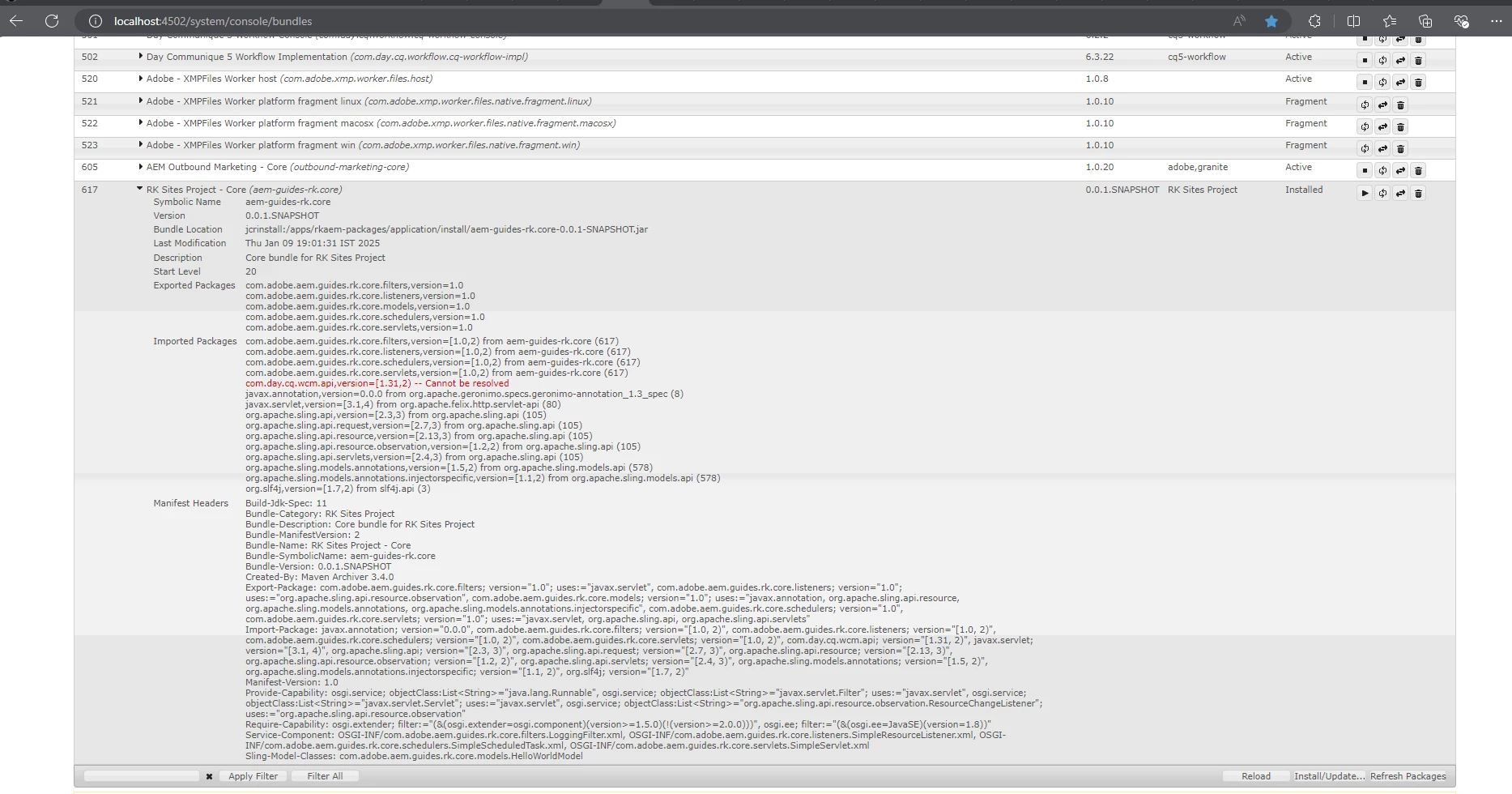
I am new to AEM, we have installed AEM cloud in our local machine and try to create a project using Mavan, After created that project that its not active in system bundles section. I shows installed status. After see the details of the bundles, its shows "com.day.cq.wcm.api,version=[1.31,2) -- Cannot be resolved". 


we try to add below dependency in pom.xml and re-build but still we face same issue:


<dependency> <groupId>com.day.cq</groupId> <artifactId>cq-wcm-api</artifactId> <version>1.31.0</version> <scope>provided</scope> </dependency>


Pls suggest what was we missing to build the project. Thanks in advance


Build Command:


mvn -B org.apache.maven.plugins:maven-archetype-plugin:3.2.1:generate \ -D archetypeGroupId=com.adobe.aem \ -D archetypeArtifactId=aem-project-archetype \ -D archetypeVersion=39 \ -D appTitle="RK Sites Project" \ -D appId="rkaem" \ -D groupId="com.adobe.rk.aem.guides" \ -D artifactId="aem-guides-rk" \ -D package="com.adobe.aem.guides.rk" \ -D version="0.0.1-SNAPSHOT" \ -D aemVersion="cloud"


Reference Screenshot:


This post is no longer active and is closed to new replies. Need help? Start a new post to ask your question.
Best answer by konstantyn_diachenko

Hi @rajku7 ,


The error you are encountering, "com.day.cq.wcm.api,version=[1.31,2) -- Cannot be resolved", typically indicates a missing or unresolved dependency in your project setup. Here's how you can address this issue:


AEM Archetype Version Compatibility: You are using version 39 of the AEM archetype. Ensure this version supports the dependencies you are including. The latest version of the archetype is 51, so I'd suggest to use latest one.

I checked and confirm that with the <aem.sdk.api>2024.10.18311.20241017T104455Z-241000</aem.sdk.api> I have exported package com.day.cq.wcm.api with 1.31 version in com.day.cq.wcm.cq-wcm-api bundle.

Dependency Version Alignment: The version [1.31,2) indicates that the project is looking for a compatible version of cq-wcm-api. However, ensure your dependency aligns with the SDK version:

  1. Open http://localhost:4502/system/console/depfinder 
  2. Search for com.day.cq.wcm.api
  3. It will suggest what dependency do you need to use

For me it suggested to use:

<dependency> <artifactId>cq-wcm-api</artifactId> <version>5.15.32</version> <groupId>com.day.cq.wcm</groupId> <scope>provided</scope> </dependency>

Validate OSGi Bundle Resolution: Even if the dependency compiles, you must ensure it resolves in AEM. After building and deploying the bundle, check System Console → Bundles


Best regards,

Kostiantyn Diachenko.

3 replies

konstantyn_diachenko
Community Advisor
konstantyn_diachenkoCommunity AdvisorAccepted solution
Community Advisor
January 9, 2025

Hi @rajku7 ,


The error you are encountering, "com.day.cq.wcm.api,version=[1.31,2) -- Cannot be resolved", typically indicates a missing or unresolved dependency in your project setup. Here's how you can address this issue:


AEM Archetype Version Compatibility: You are using version 39 of the AEM archetype. Ensure this version supports the dependencies you are including. The latest version of the archetype is 51, so I'd suggest to use latest one.

I checked and confirm that with the <aem.sdk.api>2024.10.18311.20241017T104455Z-241000</aem.sdk.api> I have exported package com.day.cq.wcm.api with 1.31 version in com.day.cq.wcm.cq-wcm-api bundle.

Dependency Version Alignment: The version [1.31,2) indicates that the project is looking for a compatible version of cq-wcm-api. However, ensure your dependency aligns with the SDK version:

  1. Open http://localhost:4502/system/console/depfinder 
  2. Search for com.day.cq.wcm.api
  3. It will suggest what dependency do you need to use

For me it suggested to use:

<dependency> <artifactId>cq-wcm-api</artifactId> <version>5.15.32</version> <groupId>com.day.cq.wcm</groupId> <scope>provided</scope> </dependency>

Validate OSGi Bundle Resolution: Even if the dependency compiles, you must ensure it resolves in AEM. After building and deploying the bundle, check System Console → Bundles


Best regards,

Kostiantyn Diachenko.

Kostiantyn Diachenko, Community Advisor, Certified Senior AEM Developer, creator of free AEM VLT Tool, maintainer of AEM Tools plugin.
EstebanBustamante
Community Advisor and Adobe Champion
January 10, 2025

Hi,


The com.day.cq.wcm.api is typically included as part of the AEM SDK if you're using AEMaaCS or a Service Pack (SP). To resolve this issue, you’ll need to either:

  1. Use the latest version of the AEM SDK if you're working with AEMaaCS.
  2. Install a newer SP that is compatible.

Both the AEM SDK and Service Packs can be downloaded from the Software Distribution portal https://experience.adobe.com/#/downloads/content/software-distribution/en/aemcloud.html


I hope this helps!

Esteban Bustamante
joerghoh
Adobe Employee
Adobe Employee
January 17, 2025

please use the latest archetype version (which is currently 51)!