com.adobe.cq.wcm.core.components.commons.link,version=[1.2,2) -- Cannot be resolved | Community
Skip to main content
June 17, 2024
Solved

com.adobe.cq.wcm.core.components.commons.link,version=[1.2,2) -- Cannot be resolved

  • June 17, 2024
  • 6 replies
  • 1938 views

one of my project bundle is not getting started because of this issues 

com.adobe.cq.wcm.core.components.commons.link,version=[1.2,2) -- Cannot be resolved

when i check my pom.xml file there it is something like this , can any one suggest how to fix this ?

<dependency>
<groupId>com.adobe.cq</groupId>
<artifactId>core.wcm.components.core</artifactId>
<version>${core.wcm.components.version}</version>
<scope>provided</scope>
</dependency>
This post is no longer active and is closed to new replies. Need help? Start a new post to ask your question.
Best answer by EstebanBustamante

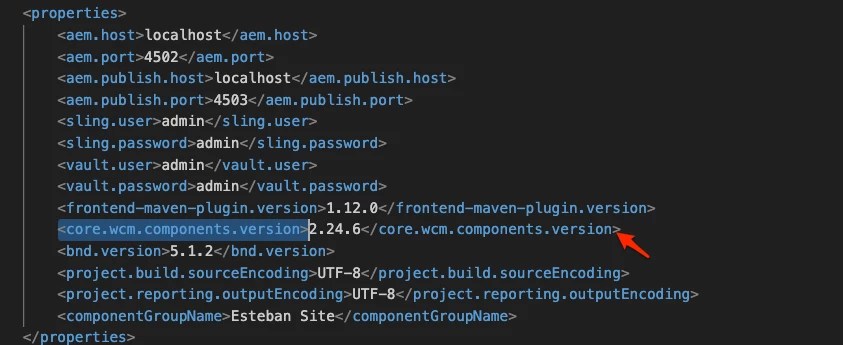
What is the value of the <core.wcm.components.version> in your root pom? Maybe you need to upgrade that version. 


6 replies

h_kataria
Community Advisor
Community Advisor
June 17, 2024

This would basically mean that core component package is not present on your AEM instance.
Having the dependency will not include the package at run time. It will only help in compilation on your local.
So, if you have the dependency on core component package, then either install the core component package on your instance manually or it needs to be embedded in your project pom itself using filevault-package-maven-plugin. 
You can refer this for sample https://github.com/adobe/aem-guides-wknd/blob/main/all/pom.xml#L238 (lines 238 to 254)
Hope this helps.

June 17, 2024

Check if  the parent pom and core pom has values similar and check if that dependency is loaded in maven folder ,then

Rebuild it with mvn clean install -Padobe -public .


If the issue still persists check if that version is available or not (com.adobe.cq.wcm.core.components.commons.link,version=[1.2,2) )

PGURUKRISHNA
June 17, 2024

It looks like you're experiencing an issue with a Maven dependency in your Adobe CQ project.

The error message indicates that the com.adobe.cq.wcm.core.components.commons.link dependency with a version range of [1.2, 2) cannot be resolved. This is likely because the core.wcm.components.core artifact you've declared in your pom.xml file doesn't include the commons.link module.

To fix this issue, you can try adding an explicit dependency for the commons.link module in your pom.xml file. Here's an example:

<dependency>
<groupId>com.adobe.cq</groupId>
<artifactId>core.wcm.components.commons.link</artifactId>
<version>${core.wcm.components.version}</version>
<scope>provided</scope>
</dependency>


Add this dependency alongside the existing core.wcm.components.core dependency. Make sure to use the same version ${core.wcm.components.version} to ensure consistency.

If you're still facing issues, you can try checking the following:

  1. Verify that the core.wcm.components.version property is correctly defined in your pom.xml file or in a parent POM.
  2. Check the Adobe CQ documentation to ensure that the commons.link module is included in the version range you're using.
  3. Try updating the version range to a more specific version, e.g., <version>1.2.4</version>, to see if that resolves the issue.

Let me know if this helps, or if you have further questions!
EstebanBustamante
Community Advisor and Adobe Champion
EstebanBustamanteCommunity Advisor and Adobe ChampionAccepted solution
Community Advisor and Adobe Champion
June 17, 2024

What is the value of the <core.wcm.components.version> in your root pom? Maybe you need to upgrade that version. 


Esteban Bustamante
kautuk_sahni
Community Manager
Community Manager
June 18, 2024

@kumarmo1 Did you find the suggestions from users helpful? Please let us know if you require more information. Otherwise, please mark the answer as correct for posterity. If you've discovered a solution yourself, we would appreciate it if you could share it with the community. Thank you!

Kautuk Sahni
Level 2
June 18, 2024

@kumarmo1 , 

The issue is due to absence of "com.adobe.cq.wcm.core.components" in the AEM. 

To fix the issue you can try following


  1. Remove the <scope> tag and let maven download the dependency directly from the Adobe repo.

  2. Embed the package inside your all module's POM file. 


<embedded> <groupId>com.adobe.cq</groupId> <artifactId>core.wcm.components.content</artifactId> <target>/apps/<projectname>-vendor-packages/application/install</target> </embedded>​


replace <projectname> with your actual project name.