Code Scanning failing in Cloud Manger | Community
Skip to main content
August 5, 2024

Code Scanning failing in Cloud Manger

  • August 5, 2024
  • 4 replies
  • 1771 views

Hi All,


I am using AEMaaCS and trying to push custom Lucene index changes to Clod Manager. I am getting build success and failing on "Code scanning" step. Please find the below exception in log:


21:27:53,865 [main] [DEBUG] 21:27:53.865 Could not complete symbolic execution:
org.sonar.java.se.ExplodedGraphWalker$MaximumStepsReachedException: reached limit of 16000 steps for method updatettachments#510 in class BVCodeCasesService


If I remove custom Lucene index changes, I am getting build success without any issues.


filevault-package-maven-plugin:
<artifactId>filevault-package-maven-plugin</artifactId>
<version>1.1.6</version>


I am getting local build success and indexes are created in local without any issues.


Could you please help me to resolve the issue.

This post is no longer active and is closed to new replies. Need help? Start a new post to ask your question.

4 replies

h_kataria
Community Advisor
Community Advisor
August 6, 2024

The log which you posted seems to be a debug log and probably not relevant for code scanning failure. 
Please check if you have followed these guidelines while namng your indexes https://experienceleague.adobe.com/en/docs/experience-manager-cloud-service/content/operations/indexing#index-names 

MukeshYadav_
Community Advisor
Community Advisor
August 6, 2024
muskaanchandwani
Adobe Employee
Adobe Employee
August 6, 2024

Also, please note that it is recommend to use version >= 1.3.2 of the Jackrabbit filevault-package-maven-plugin

https://experienceleague.adobe.com/en/docs/experience-manager-cloud-service/content/operations/indexing#project-configuration

kautuk_sahni
Community Manager
Community Manager
August 7, 2024

@rr_mr 

Did you find the suggestions helpful? Please let us know if you require more information. Otherwise, please mark the answer as correct for posterity. If you've discovered a solution yourself, we would appreciate it if you could share it with the community. Thank you!

Kautuk Sahni
RR_MRAuthor
August 7, 2024

Hi kautuk_sahni,


Not yet get any solution for this and trying with all possibilities. I have tried with filevault-package-maven-plugin version with 1.3.0 and getting local build success and failing at Cloud Manager build


Error

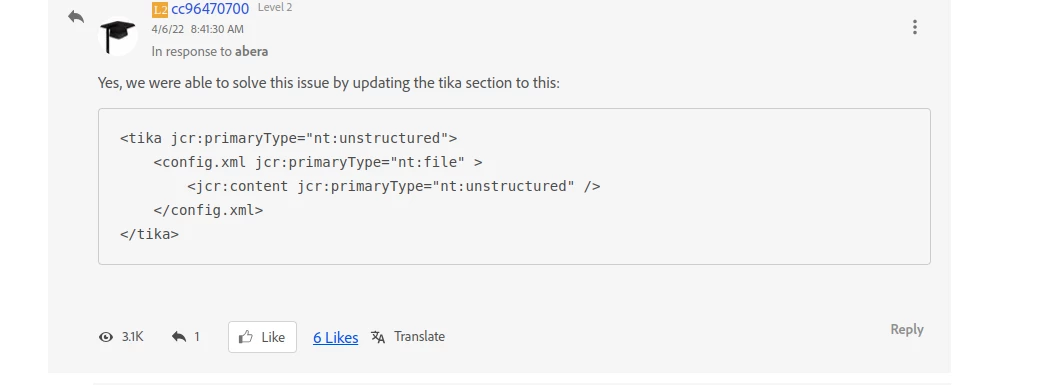
The index /oak:index/lucene-custom-1 is a customization of the out of the box index /oak:index/lucene which requires a config.xml file under the child node named tika


filevault-package-maven-plugin in parent pom file

<plugin>
<groupId>org.apache.jackrabbit</groupId>
<artifactId>filevault-package-maven-plugin</artifactId>
<extensions>true</extensions>
<version>1.3.0</version>
<configuration>
<packageType>application</packageType>
<allowIndexDefinitions>true</allowIndexDefinitions>
<validatorsSettings>
<jackrabbit-packagetype>
<options>
<immutableRootNodeNames>apps,libs,oak:index</immutableRootNodeNames>
</options>
</jackrabbit-packagetype>
<jackrabbit-nodetypes>
<options>
<!-- use the nodetypes and namespaces from the aem-nodetypes.jar
provided in the plugin dependencies -->
<cnds>tccl:aem.cnd</cnds>
</options>
</jackrabbit-nodetypes>
</validatorsSettings>
<properties>
<noIntermediateSaves>true</noIntermediateSaves>
</properties>
</configuration>

Custom Index code 

<?xml version="1.0" encoding="UTF-8"?>
<jcr:root xmlns:jcr="http://www.jcp.org/jcr/1.0" xmlns:nt="http://www.jcp.org/jcr/nt/1.0" xmlns:oak="http://jackrabbit.apache.org/oak/ns/1.0" xmlns:rep="internal"
jcr:mixinTypes="[rep:AccessControllable]"
jcr:primaryType="nt:unstructured">
<lucene-1-custom-2
jcr:primaryType="oak:QueryIndexDefinition"
async="[async]"
compatVersion="{Long}2"
deprecated="{Boolean}true"
evaluatePathRestrictions="{Boolean}true"
includedPaths="[/content/dam/images/carrier/en]"
queryPaths="[/content/dam/images/carrier/en]"
maxFieldLength="{Long}100000"
reindex="{Boolean}false"
reindexCount="{Long}6"
seed="{Long}-2257980824417909955"
type="lucene">
<facets
jcr:primaryType="nt:unstructured"
secure="statistical"
topChildren="100"/>
<indexRules jcr:primaryType="nt:unstructured">
<nt:unstructured
jcr:primaryType="nt:unstructured"
indexNodeName="{Boolean}true">
<properties jcr:primaryType="nt:unstructured">
<dcTitle
jcr:primaryType="nt:unstructured"
boost="{Double}2.0"
name="jcr:content/metadata/dc:title"
nodeScopeIndex="{Boolean}true"
ordered="{Boolean}true"
propertyIndex="{Boolean}true"
useInSpellcheck="{Boolean}true"
useInSuggest="{Boolean}true"/>
</properties>
</nt:unstructured>
</indexRules>
<tika jcr:primaryType="nt:unstructured">
<config.xml/>
</tika>
</lucene-1-custom-2>
</jcr:root>


tika - config.xml

<properties>
<detectors>
<detector class="org.apache.tika.detect.TypeDetector"/>
</detectors>
<parsers>
<parser class="org.apache.tika.parser.DefaultParser">
<mime>text/plain</mime>
</parser>
</parsers>
<service-loader initializableProblemHandler="ignore" dynamic="true"/>
</properties>

config.xml available in tika folder but still deployment is failing at Cloud Manager.


Could you please check and suggest any other configurations required.