Child Module error | Community
Skip to main content
Level 2
June 6, 2021
Solved

Child Module error

  • June 6, 2021
  • 2 replies
  • 4675 views

Hi Community, 
@veenavikraman 
Getting the below error while trying to build a project.
I am running the below command
 mvn clean install -PautoInstallSinglePackage -Pclassic

D:\AEM Project\aem-wknd-spa\mysite>mvn clean install [INFO] Scanning for projects... [ERROR] [ERROR] Some problems were encountered while processing the POMs:


[ERROR] Child module D:\AEM Project\aem-wknd-spa\mysite\ui.frontend of D:\AEM Project\aem-wknd-spa\mysite\pom.xml does not exist @ [ERROR] Child module D:\AEM Project\aem-wknd-spa\mysite\dispatcher of D:\AEM Project\aem-wknd-spa\mysite\pom.xml does not exist @ @ [ERROR] The build could not read 1 project -> [Help 1] [ERROR]


[ERROR] The project com.mysite:mysite:1.0.0-SNAPSHOT (D:\AEM Project\aem-wknd-spa\mysite\pom.xml) has 2 errors

[ERROR] Child module D:\AEM Project\aem-wknd-spa\mysite\ui.frontend of D:\AEM Project\aem-wknd-spa\mysite\pom.xml does not exist

[ERROR] Child module D:\AEM Project\aem-wknd-spa\mysite\dispatcher of D:\AEM Project\aem-wknd-spa\mysite\pom.xml does not exist [ERROR]

[ERROR] To see the full stack trace of the errors, re-run Maven with the -e switch. [ERROR] Re-run Maven using the -X switch to enable full debug logging. [ERROR]

[ERROR] For more information about the errors and possible solutions, please read the following articles: [ERROR] [Help 1]

http://cwiki.apache.org/confluence/display/MAVEN/ProjectBuildingException
This post is no longer active and is closed to new replies. Need help? Start a new post to ask your question.
Best answer by VeenaVikraman

@adityas31531516 I think there is some issues in the pom.xml. The errors clearly say that the child modules are missing. That said , it is looking for the pom.xml for the child modules and it might be missing. Can you cross check this ? Also , if you followed some tutorial , could you share the link or the steps you followed. It will help us to check what exactly is going wrong here


Edit :- Did you follow this GIT ? https://github.com/adobe/aem-guides-wknd-spa . If so , please make sure to follow the right steps mentioned. Assuming if we want to run the React branch , do the below properly


$ git clone git@github.com:adobe/aem-guides-wknd-spa.git
$ cd aem-guides-wknd-spa
$ git checkout React/latest
$ mvn clean install -PautoInstallSinglePackage

You have to make sure that you switch your branch to the right one ( like highlighted above ) . Once done that , instead of running -PautoInstallSinglePackage , run mvn clean install  and check if everything is running fine !


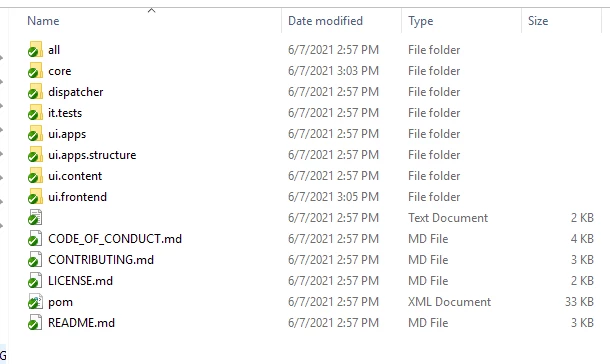
I tried the same in my local and I have below modules in my package 

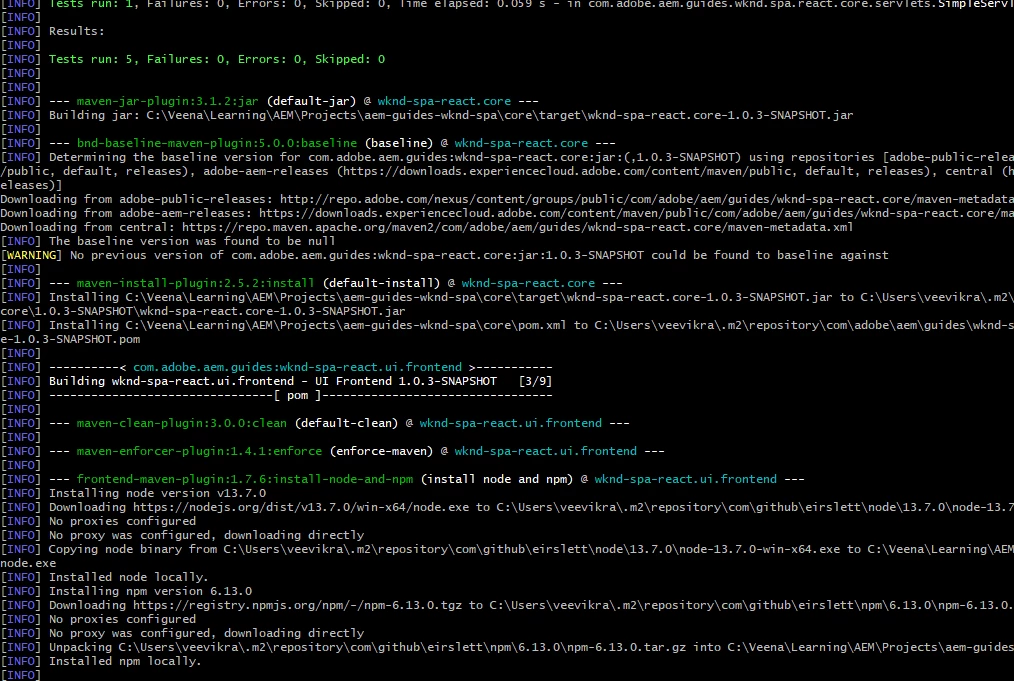
 Also I ran the build command in my git bash and all seems to be working fine 
 

Can you recheck and let us know your steps you followed ?


Thanks

Veena ✌

2 replies

shelly-goel
Adobe Employee
Adobe Employee
June 6, 2021

@adityas31531516  It seems your project does not contain the child modules ui.frontend and dispatcher under D:\AEM Project\aem-wknd-spa\mysite\ which the profile is looking for. PLease add these modules or comment these in parent pom.xml

Level 2
June 6, 2021
Project 'com.mysite:mysite.ui.frontend:1.0.0-SNAPSHOT' is duplicated in the reactor
VeenaVikraman
Community Advisor
VeenaVikramanCommunity AdvisorAccepted solution
Community Advisor
June 7, 2021

@adityas31531516 I think there is some issues in the pom.xml. The errors clearly say that the child modules are missing. That said , it is looking for the pom.xml for the child modules and it might be missing. Can you cross check this ? Also , if you followed some tutorial , could you share the link or the steps you followed. It will help us to check what exactly is going wrong here


Edit :- Did you follow this GIT ? https://github.com/adobe/aem-guides-wknd-spa . If so , please make sure to follow the right steps mentioned. Assuming if we want to run the React branch , do the below properly


$ git clone git@github.com:adobe/aem-guides-wknd-spa.git
$ cd aem-guides-wknd-spa
$ git checkout React/latest
$ mvn clean install -PautoInstallSinglePackage

You have to make sure that you switch your branch to the right one ( like highlighted above ) . Once done that , instead of running -PautoInstallSinglePackage , run mvn clean install  and check if everything is running fine !


I tried the same in my local and I have below modules in my package 

 Also I ran the build command in my git bash and all seems to be working fine 


Can you recheck and let us know your steps you followed ?


Thanks

Veena ✌