
Check asset status (publish/unpublished) in Asset Finder on Page load (AEM 6.2) | Adobe Higher Education
Skip to main content
Himanshu_Singhal
Community Advisor
Community Advisor
January 1, 2019

Check asset status (publish/unpublished) in Asset Finder on Page load (AEM 6.2)

  • January 1, 2019
  • 1 の返信
  • 7544 ビュー

Hi,

I've a requirement where it's required to check the Publish status to Published on component dialog open in AEM 6.2
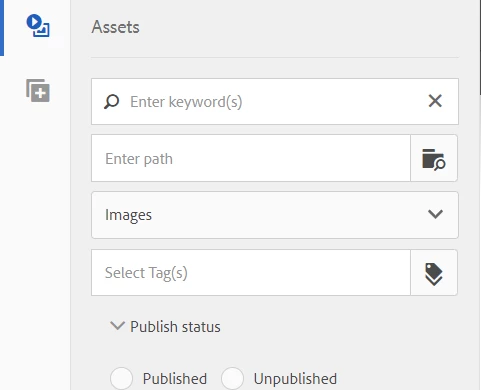
I've tried checking the DOM changes on click on but I don't see the value e.g. checked=true getting added in the input field or not able to find how should perform click event pragmatically on radio button here?

Could anyone help me regarding this?

Regards,
Himanshu Singhal

このトピックへの返信は締め切られました。

1 の返信

Gaurav-Behl
Level 10
January 1, 2019

Try this

(function ($, $document, author) {

    "use strict";

    $document.on('foundation-contentloaded', onAssetFinderLoad);

    function onAssetFinderLoad(){

        $.ajax(author.page.path+ "/jcr:content.json").done(checkStatus);

   }

    function checkStatus (data){

        var q = data["cq:lastReplicationAction"];

        if(q && q == "Activate"){

            $( "input[type=radio][value=Activate]")[0].checked = true;  // use a different selector for radio buttons in case of a conflict/customization

           $( "input[type=radio][value=Deactivate]")[0].checked = false;

        }

        else {

          $( "input[type=radio][value=Activate]")[0].checked = false;

          $( "input[type=radio][value=Deactivate]")[0].checked = true;

        }

    }

})($, $(document), Granite.author);

Add it under 'cq.authoring.dialog' category.

**This is just a sample code and not tested properly. Extend/Modify it per your use case to make it more specific.

Himanshu_Singhal
Community Advisor
Community Advisor
January 2, 2019

Hi Gaurav,

Thanks for the code.

The code I made it work as per the requirement. But, what's happening is when I try to check the radio button using JavaScript/jQuery, that part is working fine as it's checking the radio button but when I try to trigger click event then it has no effect and nothing appears in the filter. However, if we click on radio button physically(manual click) then it appears in the filter.

Any idea?

Lokesh_Shivalingaiah
Level 10
January 2, 2019

You need to call this javascript on a click event of the radio button.