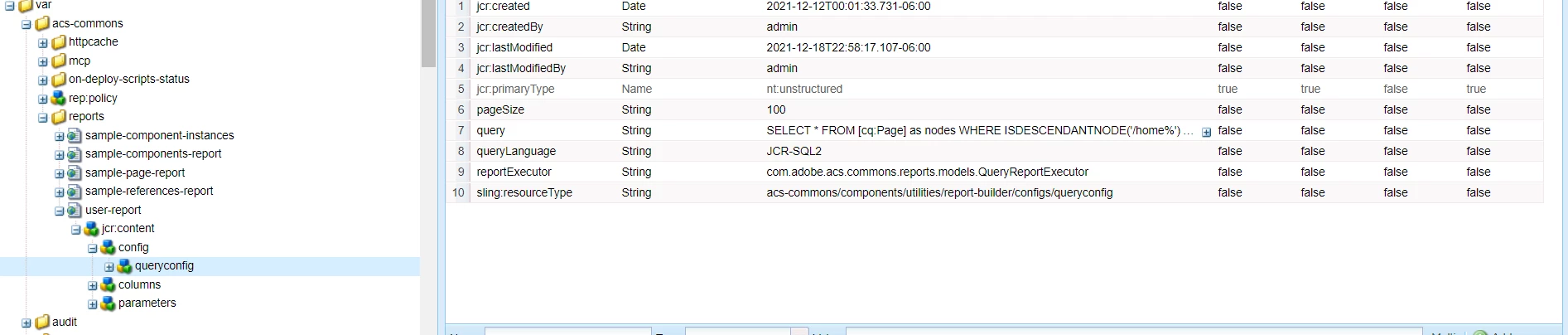
Caused by: javax.jcr.query.InvalidQueryException: The specified language is not supported: sas_84362
Hi Team,
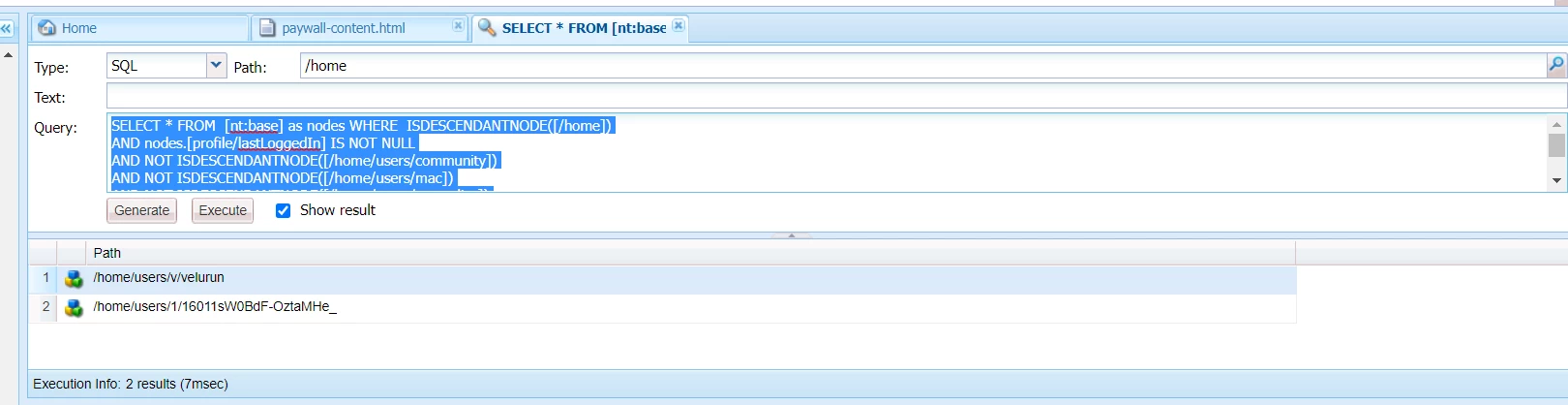
Anybody please help on this below issue. if i execute the below query it is executing in CRX but in code level it is getting this below error.
at org.eclipse.jetty.server.session.SessionHandler.doHandle(SessionHandler.java:1624) [org.apache.felix.http.jetty:4.1.4]
at org.eclipse.jetty.server.handler.ScopedHandler.nextHandle(ScopedHandler.java:233) [org.apache.felix.http.jetty:4.1.4]
at org.eclipse.jetty.server.handler.ContextHandler.doHandle(ContextHandler.java:1435) [org.apache.felix.http.jetty:4.1.4]
at org.eclipse.jetty.server.handler.ScopedHandler.nextScope(ScopedHandler.java:188) [org.apache.felix.http.jetty:4.1.4]
at org.eclipse.jetty.servlet.ServletHandler.doScope(ServletHandler.java:501) [org.apache.felix.http.jetty:4.1.4]
at org.eclipse.jetty.server.session.SessionHandler.doScope(SessionHandler.java:1594) [org.apache.felix.http.jetty:4.1.4]
at org.eclipse.jetty.server.handler.ScopedHandler.nextScope(ScopedHandler.java:186) [org.apache.felix.http.jetty:4.1.4]
at org.eclipse.jetty.server.handler.ContextHandler.doScope(ContextHandler.java:1350) [org.apache.felix.http.jetty:4.1.4]
at org.eclipse.jetty.server.handler.ScopedHandler.handle(ScopedHandler.java:141) [org.apache.felix.http.jetty:4.1.4]
at org.eclipse.jetty.server.handler.ContextHandlerCollection.handle(ContextHandlerCollection.java:191) [org.apache.felix.http.jetty:4.1.4]
at org.eclipse.jetty.server.handler.HandlerWrapper.handle(HandlerWrapper.java:127) [org.apache.felix.http.jetty:4.1.4]
at org.eclipse.jetty.server.Server.handle(Server.java:516) [org.apache.felix.http.jetty:4.1.4]
at org.eclipse.jetty.server.HttpChannel.lambda$handle$1(HttpChannel.java:388) [org.apache.felix.http.jetty:4.1.4]
at org.eclipse.jetty.server.HttpChannel.dispatch(HttpChannel.java:633) [org.apache.felix.http.jetty:4.1.4]
at org.eclipse.jetty.server.HttpChannel.handle(HttpChannel.java:380) [org.apache.felix.http.jetty:4.1.4]
at org.eclipse.jetty.server.HttpConnection.onFillable(HttpConnection.java:273) [org.apache.felix.http.jetty:4.1.4]
at org.eclipse.jetty.io.AbstractConnection$ReadCallback.succeeded(AbstractConnection.java:311) [org.apache.felix.http.jetty:4.1.4]
at org.eclipse.jetty.io.FillInterest.fillable(FillInterest.java:105) [org.apache.felix.http.jetty:4.1.4]
at org.eclipse.jetty.io.ChannelEndPoint$1.run(ChannelEndPoint.java:104) [org.apache.felix.http.jetty:4.1.4]
at org.eclipse.jetty.util.thread.strategy.EatWhatYouKill.runTask(EatWhatYouKill.java:336) [org.apache.felix.http.jetty:4.1.4]
at org.eclipse.jetty.util.thread.strategy.EatWhatYouKill.doProduce(EatWhatYouKill.java:313) [org.apache.felix.http.jetty:4.1.4]
at org.eclipse.jetty.util.thread.strategy.EatWhatYouKill.tryProduce(EatWhatYouKill.java:171) [org.apache.felix.http.jetty:4.1.4]
at org.eclipse.jetty.util.thread.strategy.EatWhatYouKill.run(EatWhatYouKill.java:129) [org.apache.felix.http.jetty:4.1.4]
at org.eclipse.jetty.util.thread.ReservedThreadExecutor$ReservedThread.run(ReservedThreadExecutor.java:375) [org.apache.felix.http.jetty:4.1.4]
at org.eclipse.jetty.util.thread.QueuedThreadPool.runJob(QueuedThreadPool.java:773) [org.apache.felix.http.jetty:4.1.4]
at org.eclipse.jetty.util.thread.QueuedThreadPool$Runner.run(QueuedThreadPool.java:905) [org.apache.felix.http.jetty:4.1.4]
at java.base/java.lang.Thread.run(Thread.java:834)
Caused by: com.adobe.acs.commons.reports.api.ReportException: Exception executing search results
at com.adobe.acs.commons.reports.models.QueryReportExecutor.fetchResults(QueryReportExecutor.java:110)
at com.adobe.acs.commons.reports.models.QueryReportExecutor.getResults(QueryReportExecutor.java:185)
at java.base/jdk.internal.reflect.NativeMethodAccessorImpl.invoke0(Native Method)
at java.base/jdk.internal.reflect.NativeMethodAccessorImpl.invoke(NativeMethodAccessorImpl.java:62)
at java.base/jdk.internal.reflect.DelegatingMethodAccessorImpl.invoke(DelegatingMethodAccessorImpl.java:43)
at java.base/java.lang.reflect.Method.invoke(Method.java:566)
at javax.el.BeanELResolver.getValue(BeanELResolver.java:83) [org.apache.sling.scripting.el-api:1.0.4]
... 154 common frames omitted
Caused by: javax.jcr.query.InvalidQueryException: The specified language is not supported: sas_84362
at org.apache.jackrabbit.oak.jcr.query.QueryManagerImpl.createQuery(QueryManagerImpl.java:82) [org.apache.jackrabbit.oak-jcr:1.22.6]
at org.apache.jackrabbit.oak.jcr.query.QueryManagerImpl.createQuery(QueryManagerImpl.java:59) [org.apache.jackrabbit.oak-jcr:1.22.6]
at com.adobe.acs.commons.reports.models.QueryReportExecutor.fetchResults(QueryReportExecutor.java:90)
... 160 common frames omitted