carousel panel item name issue | Community
Skip to main content
May 28, 2025
Solved

carousel panel item name issue

  • May 28, 2025
  • 2 replies
  • 465 views

carousel panel item name issue:

i have inherited carousel component and created custom component and carousel panel select is impacted.

custom component panel select is only showing child component name only for children's.

but core component is showing child component name : item name for children's.

i debugged the issue.. when i change custom component jcr title and component name to carousel, it shows proper name in panel select.
can anyone suggest what exactly its happening.

Best answer by SantoshSai

@sudarshanv1 
Can you try this?

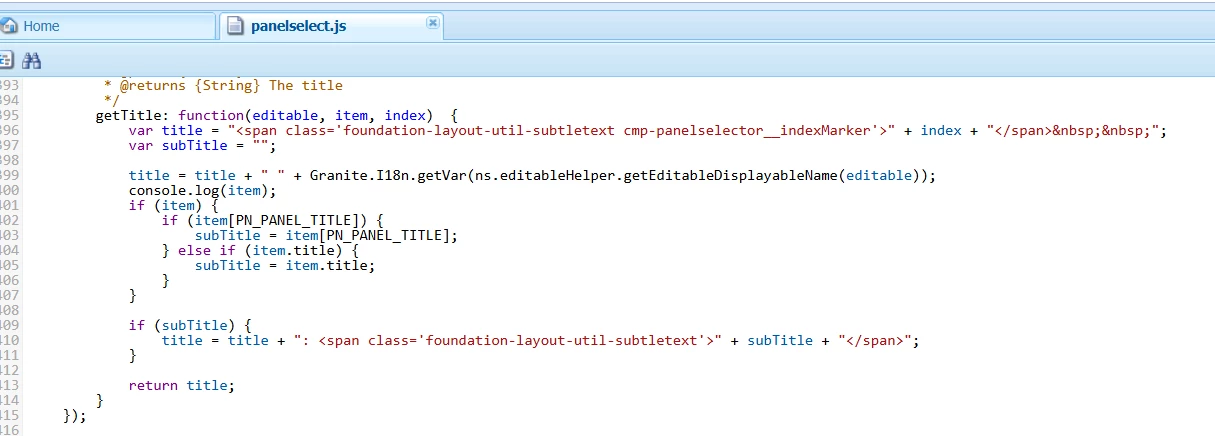
function getTitle(editable, item, index) { var title = "<span class='foundation-layout-util-subtletext cmp-panelselector__indexMarker'>" + index + "</span>&nbsp;&nbsp;"; var subTitle = ""; title = title + " " + Granite.I18n.getVar(ns.editableHelper.getEditableDisplayableName(editable)); // Support custom component resourceType too if (item) { if (item[PN_PANEL_TITLE]) { subTitle = item[PN_PANEL_TITLE]; } else if (item.title) { subTitle = item.title; } } if (subTitle) { title = title + ": <span class='foundation-layout-util-subtletext'>" + subTitle + "</span>"; } return title; }

2 replies

SantoshSai
Community Advisor
Community Advisor
May 28, 2025

Hi @sudarshanv1,

Please confirm:

Option 1: Use cq:isContainer = true and correct resourceSuperType

Ensure your custom component inherits correctly:

/custom/components/carousel
    - sling:resourceSuperType = "core/wcm/components/carousel/v1/carousel"
    - jcr:title = "Carousel"
    - cq:isContainer = true
Option 2: Extend and Overlay the Panel Selector Logic

If your custom component name is not carousel, and you still want the same behavior:

  1. Overlay the Carousel clientlib (responsible for authoring UI enhancements).

  2. Modify the JavaScript responsible for generating the dropdown labels:

    • Located in /libs/wcm/foundation/components/parsys/clientlibs/parsys/js/panelselect.js or under /libs/core/wcm/components/carousel/...

    • Update the logic to detect your custom component’s resourceType and treat it like the core one.

Option 3: Keep the same componentGroup and mimic structure

Sometimes AEM's authoring UI logic checks componentGroup too. Set yours to match the core:

- componentGroup = "wcm.foundation.components"

 Hope that helps!

Santosh Sai
May 29, 2025

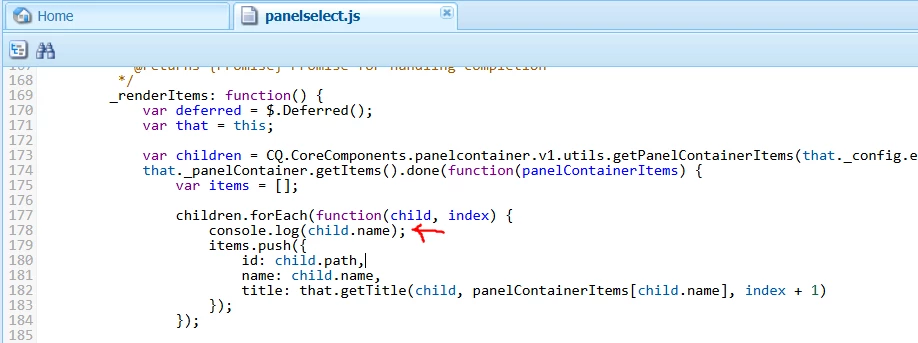
here the value its printing but in below function item is undefined so its showing only title.


component configuration:

Can you help?


SantoshSai
Community Advisor
SantoshSaiCommunity AdvisorAccepted solution
Community Advisor
May 29, 2025

@sudarshanv1 
Can you try this?

function getTitle(editable, item, index) { var title = "<span class='foundation-layout-util-subtletext cmp-panelselector__indexMarker'>" + index + "</span>&nbsp;&nbsp;"; var subTitle = ""; title = title + " " + Granite.I18n.getVar(ns.editableHelper.getEditableDisplayableName(editable)); // Support custom component resourceType too if (item) { if (item[PN_PANEL_TITLE]) { subTitle = item[PN_PANEL_TITLE]; } else if (item.title) { subTitle = item.title; } } if (subTitle) { title = title + ": <span class='foundation-layout-util-subtletext'>" + subTitle + "</span>"; } return title; }
Santosh Sai
kautuk_sahni
Community Manager
Community Manager
July 31, 2025

@sudarshanv1 Did you find the suggestions helpful? If you need more information, please let us know. If a response resolved your issue, kindly mark it as correct to help others in the future. Alternatively, if you discovered a solution on your own, we'd appreciate it if you could share it with the community. Thank you!

Kautuk Sahni