cannot see more languages when creating language copy | Community
Skip to main content
mehaka69489534
March 16, 2015
Solved

cannot see more languages when creating language copy

  • March 16, 2015
  • 3 replies
  • 1275 views

Hi

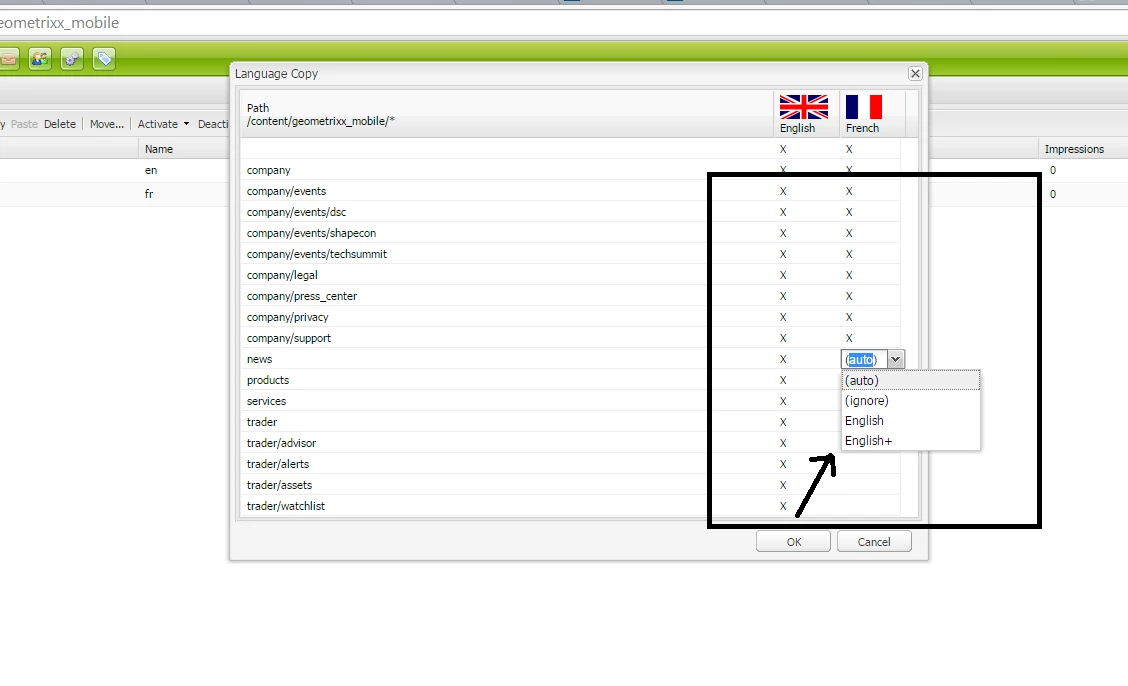
I want to create a french language copy of an English page but i am not able to see the more language names apart from "English " or English+" any idea how can i add more languages to the create language copy dialog drop down as shown in attached image

Best answer by BrianKasingli

It might be because you have a invalid cq:LiveSyncConfig node.
For example

In CRX/DE take a look at the properties on the cq:LiveSyncConfig (/content/we-retail/en_ca/jcr:content/cq:LiveSyncConfig) node. Does this node have the correct configurations?

  • cq:isDeep == {{Boolean} true
  • cq:master == {String} /content/we-retail/language-masters/en
  • cq:rolloutConfigs == {String[]} /libs/msm/wcm/rolloutconfigs/default
  • jcr:primaryType == {String} cq:LiveCopy

if these configurations are there, then you should be able to see the options that you have provided above. For full instructions on how to fix the cq:LiveSyncConfig node, click here https://sourcedcode.com/blog/aem/how-to-re-sync-a-live-copy-language-root-to-a-blueprint-in-aem-msm

 

3 replies

July 17, 2023

.

BrianKasingli
Community Advisor and Adobe Champion
BrianKasingliCommunity Advisor and Adobe ChampionAccepted solution
Community Advisor and Adobe Champion
July 17, 2023

It might be because you have a invalid cq:LiveSyncConfig node.
For example

In CRX/DE take a look at the properties on the cq:LiveSyncConfig (/content/we-retail/en_ca/jcr:content/cq:LiveSyncConfig) node. Does this node have the correct configurations?

  • cq:isDeep == {{Boolean} true
  • cq:master == {String} /content/we-retail/language-masters/en
  • cq:rolloutConfigs == {String[]} /libs/msm/wcm/rolloutconfigs/default
  • jcr:primaryType == {String} cq:LiveCopy

if these configurations are there, then you should be able to see the options that you have provided above. For full instructions on how to fix the cq:LiveSyncConfig node, click here https://sourcedcode.com/blog/aem/how-to-re-sync-a-live-copy-language-root-to-a-blueprint-in-aem-msm


AmitVishwakarma
Community Advisor
Community Advisor
January 18, 2025

Hi @mehaka69489534 

To add more languages to the "Create Language Copy" dialog in AEM, follow these steps:

  1. Check Language Settings:

    • Go to AEM Console > Tools > Internationalization > Languages.
    • Make sure the language you're looking for (e.g., French) is listed under available languages.
  2. Enable Languages:

    • If the language is not listed, you need to add the language to the system.
      • Go to AEM > Tools > Configuration Browser > JCR Settings.
      • Add the language you need to the supportedLanguages list.
  3. Create the Language Copy:

    • After ensuring the language is enabled in AEM, try creating the language copy again by selecting the page and using the Create Language Copy option.

If the language still doesn't appear, clear your AEM cache or restart AEM to ensure the settings are updated.