Cancelling Livecopy inheritence in experience fragment not workin | Community
Skip to main content
Level 4
January 11, 2024
Solved

Cancelling Livecopy inheritence in experience fragment not workin

  • January 11, 2024
  • 3 replies
  • 668 views

Hi Team,

We are using AEM as cloud service


In a experience fragment (XF1) with 2 different component in layout container.

now from this another Live copy variation (XF2) has been created as one of the component needs to inheritance 


now in XF2 variation 1st component inheritance has been cancelled but enabled for 2nd component and same content is required there 


still rolling out as page rollout still pushing to cancelled inheritance also . we are using OOB standard rollout config.


while investigation further seems inheritance hasn't been cancelled for multi-field of the component


i.e at component node is showing as cq:LiveSyncCancelled hence property like id or other property is not getting overridden
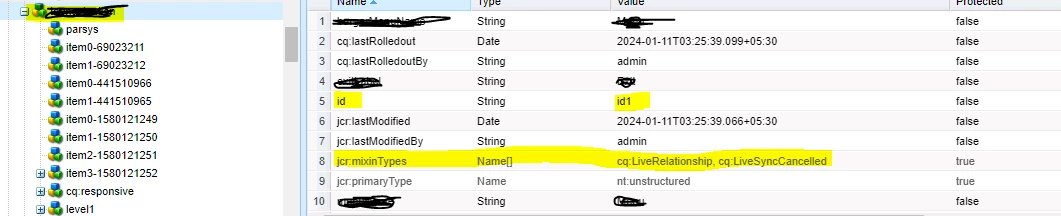
 

but multi-field property of the sample component cq:LiveSyncCancelled not getting applied

 

how we can apply the cq:LiveSyncCancelled to this multifield ?


This post is no longer active and is closed to new replies. Need help? Start a new post to ask your question.
Best answer by Harwinder-singh

@sonuk85184451 You might want to look into this one -- 

  • SITES-16001: MSM: Ability to exclude multi field components from rollout configuration while creating Live Copy.

I am not sure if this works for XFs as well but try it out.

This was fixed as part of the 2023.11.0 feature activation. 

https://experienceleague.adobe.com/docs/experience-manager-cloud-service/content/release-notes/maintenance/2023/2023.11.0.html?lang=en#fixed-issues-14227


3 replies

Harwinder-singh
Community Advisor
Harwinder-singhCommunity AdvisorAccepted solution
Community Advisor
January 12, 2024

@sonuk85184451 You might want to look into this one -- 

  • SITES-16001: MSM: Ability to exclude multi field components from rollout configuration while creating Live Copy.

I am not sure if this works for XFs as well but try it out.

This was fixed as part of the 2023.11.0 feature activation. 

https://experienceleague.adobe.com/docs/experience-manager-cloud-service/content/release-notes/maintenance/2023/2023.11.0.html?lang=en#fixed-issues-14227


TarunKumar
Community Advisor
Community Advisor
January 12, 2024

Hi @sonuk85184451 

Can you try adding msm related clienlibs to enable/execute necessary checks at component dialog level like cq.wcm.msm.properties and if necessary others.


Also, you can refer any foundation component residing under path /libs/wcm/foundation/components/basicpage/v1/basicpage/cq:dialog to check those libraries and dependencies it is using.

Thanks
Tarun

kautuk_sahni
Community Manager
Community Manager
January 15, 2024

@sonuk85184451 Did you find the suggestions from users helpful? Please let us know if more information is required. Otherwise, please mark the answer as correct for posterity. If you have found out solution yourself, please share it with the community.

Kautuk Sahni