Can we add or customize Lock/Unlock Feature in Search tab in Siteadmin | Community
Skip to main content
prajwal008
Level 2
July 27, 2017
Solved

Can we add or customize Lock/Unlock Feature in Search tab in Siteadmin

  • July 27, 2017
  • 11 replies
  • 5151 views

Hi,

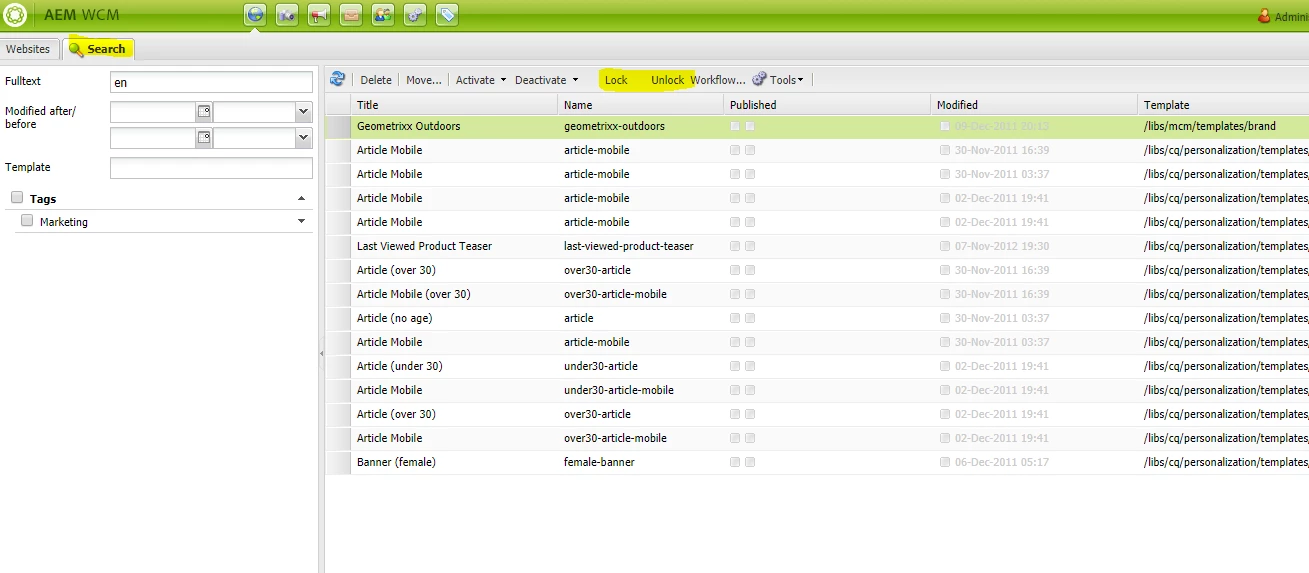
I'm using AEM 6.1 and we have a requirement to lock the pages which come after the search result. In the search tab, we will search the text and it will show the result pages related to it. I have to lock/unlock these pages. Currently, in AEM 6.1 we don't have these feature. Is there any way I can customize or add these feature same as we have in our website tab.

Currently, in AEM 6.1 we don't have these feature in search tab but we have the lock/unlock feature in website tab for pages.

Is there any way I can customize or add these feature same as we have in our website tab.
This post is no longer active and is closed to new replies. Need help? Start a new post to ask your question.
Best answer by Techaspect_Solu

Hi Prajwal,

There is no need to restart any service.This is working as expected at my end.

Just you need to change the context property by adding the "toolbar".

Please find the attached screenshot.

Thanks,

Techaspect Solutions.

11 replies

Techaspect_Solu
Level 7
July 27, 2017

Hi prajwal008,

Generally to lock/unlock a page we need to open a page and go to the page properties and lock/unlock it.

But as you mentioned-"in AEM 6.1 we don't have these feature in search tab but we have the lock/unlock feature in website tab for pages".

I didn't find the lock page functionality on website tab.

Can you please give more details on it.

Thanks,

Techaspect Solutions.

prajwal008
Level 2
July 27, 2017

Hi,

In Siteadmin, we have website and search tab. In website tab when we select a page we can see the lock/unlock link beside workflow in the menu bar. But when we search a text and page result shows and we click on a page there is no lock/unlock link present on the menu bar. I'm trying to customize or add the lock/unlock feature present on website tab to search tab.

I hope I have cleared your doubt.

Thanks,

Prajwal A

Techaspect_Solu
Level 7
July 27, 2017

Hi Prajwal,

I got your issue.

Please navigate to "/libs/wcm/core/content/siteadmin/tabs/searchpanel/actions/lock".

Update "context" property by adding "toolbar" to it.

Please find the attached screenshot.

Thanks,

Techaspect Solutions.

prajwal008
Level 2
July 27, 2017

Hi,

I tried your solution but it didn't workout.

See the below Screenshot.

Do we have to do anything else?

Thanks,

Prajwal A

prajwal008
Level 2
July 27, 2017

Hi,

I have tried changing the text value of 2-3 links but nothing is showing up in the toolbar. I have verified that I have access to that node in useradmin.

Do we have to restart any service to make this changes take effect?

Thanks,

Prajwal A

Techaspect_Solu
Techaspect_SoluAccepted solution
Level 7
July 27, 2017

Hi Prajwal,

There is no need to restart any service.This is working as expected at my end.

Just you need to change the context property by adding the "toolbar".

Please find the attached screenshot.

Thanks,

Techaspect Solutions.

susheel
Level 5
July 27, 2017

Hi Prajwal,

Please verify if you are updating at correct location:

/libs/wcm/core/content/siteadmin/tabs/searchpanel/actions/lock

/libs/wcm/core/content/siteadmin/tabs/searchpanel/actions/unlock

I think you can also create same node structure in apps and add the toolbar property there.(unverified)

prajwal008
Level 2
July 28, 2017

Hi,

PFB the SS of the configuration I have in my AEM at the location - /libs/wcm/core/content/siteadmin/tabs/searchpanel/actions/lock

Please verify if it is correct. I have also verified that I had full access to this node to make changes.

Thanks,

Prajwal A

susheel
Level 5
July 28, 2017

Is it not working for you yet ?

prajwal008
Level 2
July 28, 2017

No, it is not yet working for me.