Resuelto
Can we add image as the title of the tab in tabs component?
Hi All,
I want to add icon(image field) along with the title of the tab. Is it possible to do it?
similar to below:-
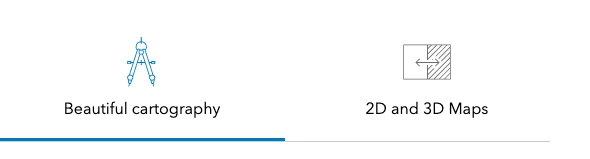
Hi All,
I want to add icon(image field) along with the title of the tab. Is it possible to do it?
similar to below:-
@rohit_utreja Have you created the tabitems node ? if yes, can you share the resourceType of it? because i'm unable to find that node in core components.
@naveent10
Please find below dialog xml.
<?xml version="1.0" encoding="UTF-8"?>
<jcr:root xmlns:sling="http://sling.apache.org/jcr/sling/1.0" xmlns:granite="http://www.adobe.com/jcr/granite/1.0" xmlns:cq="http://www.day.com/jcr/cq/1.0" xmlns:jcr="http://www.jcp.org/jcr/1.0" xmlns:nt="http://www.jcp.org/jcr/nt/1.0"
    jcr:primaryType="nt:unstructured"
    jcr:title="Tabs"
    sling:resourceType="cq/gui/components/authoring/dialog"
    extraClientlibs="[core.wcm.components.commons.editor.dialog.childreneditor.v1,core.wcm.components.tabs.v1.editor]"
    helpPath="https://www.adobe.com/go/aem_cmp_tabs_v1"
    trackingFeature="core-components:tabs:v1">
    <content
        granite:class="cmp-tabs__editor"
        jcr:primaryType="nt:unstructured"
        sling:resourceType="granite/ui/components/coral/foundation/container">
        <items jcr:primaryType="nt:unstructured">
            <tabs
                jcr:primaryType="nt:unstructured"
                sling:resourceType="granite/ui/components/coral/foundation/tabs"
                maximized="{Boolean}true">
                <items jcr:primaryType="nt:unstructured">
                    <tabitems
                        jcr:primaryType="nt:unstructured"
                        jcr:title="Items"
                        sling:resourceType="granite/ui/components/coral/foundation/container"
                        margin="{Boolean}true">
                        <items jcr:primaryType="nt:unstructured">
                            <columns
                                jcr:primaryType="nt:unstructured"
                                sling:resourceType="granite/ui/components/coral/foundation/fixedcolumns"
                                margin="{Boolean}true">
                                <items jcr:primaryType="nt:unstructured">
                                    <column
                                        jcr:primaryType="nt:unstructured"
                                        sling:resourceType="granite/ui/components/coral/foundation/container">
                                        <items jcr:primaryType="nt:unstructured">
                                            <tabitems
                                                jcr:primaryType="nt:unstructured"
                                                sling:resourceType="core/wcm/components/commons/editor/dialog/childreneditor/v1/childreneditor"/>
                                        </items>
                                    </column>
                                </items>
                            </columns>
                        </items>
                        <parentConfig
                            jcr:primaryType="nt:unstructured"
                            icon="/content/dam/mynewsite/346c4c9073be5d94887f2db0a6cf3f4f.png"/>
                    </tabitems>
                    <properties
                        jcr:primaryType="nt:unstructured"
                        jcr:title="Properties"
                        sling:resourceType="granite/ui/components/coral/foundation/container"
                        maximized="{Boolean}true">
                        <items jcr:primaryType="nt:unstructured">
                            <columns
                                jcr:primaryType="nt:unstructured"
                                sling:resourceType="granite/ui/components/coral/foundation/fixedcolumns"
                                margin="{Boolean}true">
                                <items jcr:primaryType="nt:unstructured">
                                    <column
                                        jcr:primaryType="nt:unstructured"
                                        sling:resourceType="granite/ui/components/coral/foundation/container">
                                        <items jcr:primaryType="nt:unstructured">
                                            <activeItem
                                                jcr:primaryType="nt:unstructured"
                                                sling:resourceType="/libs/granite/ui/components/coral/foundation/form/hidden"
                                                name="./activeItem">
                                                <granite:data
                                                    jcr:primaryType="nt:unstructured"
                                                    cmp-tabs-v1-dialog-edit-hook="activeItem"/>
                                            </activeItem>
                                            <activeSelect
                                                jcr:primaryType="nt:unstructured"
                                                sling:resourceType="/libs/granite/ui/components/coral/foundation/form/select"
                                                fieldDescription="The item that is active by default."
                                                fieldLabel="Active Item">
                                                <granite:data
                                                    jcr:primaryType="nt:unstructured"
                                                    cmp-tabs-v1-dialog-edit-hook="activeSelect"/>
                                                <items jcr:primaryType="nt:unstructured">
                                                    <default
                                                        jcr:primaryType="nt:unstructured"
                                                        text="Default"
                                                        value=""/>
                                                </items>
                                            </activeSelect>
                                            <id
                                                jcr:primaryType="nt:unstructured"
                                                sling:resourceType="granite/ui/components/coral/foundation/form/textfield"
                                                fieldDescription="HTML ID attribute to apply to the component."
                                                fieldLabel="ID"
                                                name="./id"/>
                                        </items>
                                    </column>
                                </items>
                            </columns>
                        </items>
                    </properties>
                    <accessibility
                        jcr:primaryType="nt:unstructured"
                        jcr:title="Accessibility"
                        sling:resourceType="granite/ui/components/coral/foundation/container"
                        margin="{Boolean}true">
                        <items jcr:primaryType="nt:unstructured">
                            <columns
                                jcr:primaryType="nt:unstructured"
                                sling:resourceType="granite/ui/components/coral/foundation/fixedcolumns"
                                margin="{Boolean}true">
                                <items jcr:primaryType="nt:unstructured">
                                    <column
                                        jcr:primaryType="nt:unstructured"
                                        sling:resourceType="granite/ui/components/coral/foundation/container">
                                        <items jcr:primaryType="nt:unstructured">
                                            <accessibilityLabel
                                                jcr:primaryType="nt:unstructured"
                                                sling:resourceType="granite/ui/components/coral/foundation/form/textfield"
                                                fieldDescription="Value of an aria-label attribute, which describes the purpose of the set of tabs."
                                                fieldLabel="Label"
                                                name="./accessibilityLabel"
                                                value=""/>
                                        </items>
                                    </column>
                                </items>
                            </columns>
                        </items>
                    </accessibility>
                </items>
            </tabs>
        </items>
    </content>
</jcr:root>
Enter your E-mail address. We'll send you an e-mail with instructions to reset your password.