[Campaign <-> AEM 6.2 Integration] Failed to fetch content from AEM during delivery creation. | Community
Skip to main content
manovinayaka757
Level 3
November 6, 2017

[Campaign <-> AEM 6.2 Integration] Failed to fetch content from AEM during delivery creation.

  • November 6, 2017
  • 1 reply
  • 6180 views

We are unable to fetch content from AEM from campaign. Please find the below case information. I raised a ticket with Neolane, but there is no response.

If someone who has encountered, please provide some information on how to resolve this.

Environment Information:

AEM version : 6.2

Adobe Campaign version : 6.1

Adobe campaign Hybrid Model

Adobe campaign Mid sourcing deployment model

Adobe campaign on premise marketing wfserver build number: 8861

Adobe campaign client console build number: 8861

CASE:

I created a campaign in AEM 6.2 and then tried to fetch the content created for the campaign in Campaign client console, but this ended in error:

I followd the steps mentioned in the following documentation.

Integrating with Adobe Campaign 6.1

During delivery creation, upon clicking the "Synchronise" button, I get the following error as shown in the screen shot.

Server LOG:

14:41:45 >>> INT-150012 The HTTP query returned a 'Service Unavailable' type error (503) (iRc=-53)

14:41:45 >>> JST-310000 Error while compiling script 'nms:amcIntegration.js' line 1665: JSON.parse.

SCREEN SHOT:
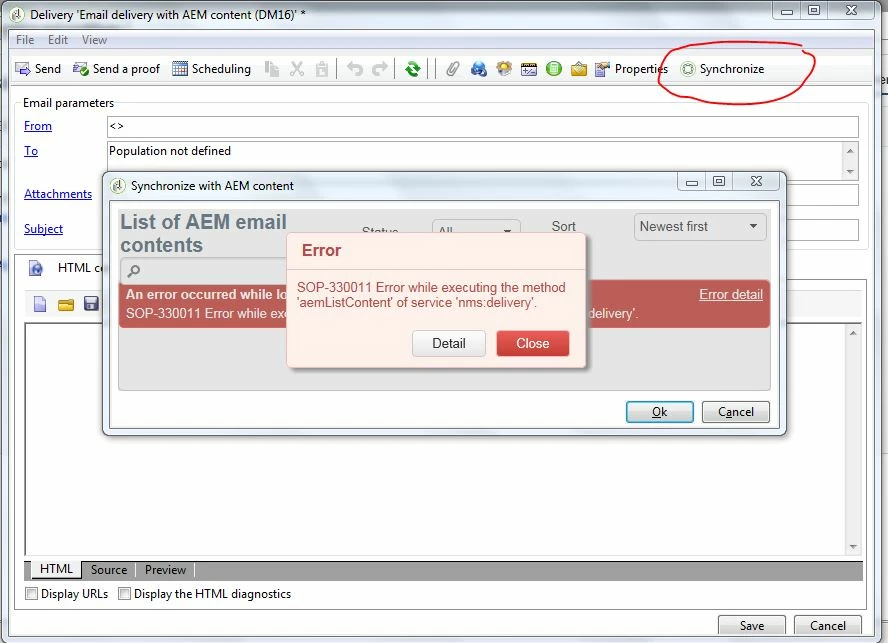
This post is no longer active and is closed to new replies. Need help? Start a new post to ask your question.

1 reply

kautuk_sahni
Community Manager
Community Manager
November 6, 2017

/content/campaignsTry Following:

1. Check the AEM "campaign-remote" user permissions

2. Make sure the AEM connection-url configured in the External Accounts is reachable from the machine.

    A switch from localhost to an IP-address solved this issue.

     Source:- Troubleshooting your Adobe Campaign Integration

3. Check the existence of path /content/campaigns

4. Make sure No firewall blocking access between AEM and ACS.

~kautuk

Kautuk Sahni
manovinayaka757
Level 3
November 13, 2017

Hi kautuksahni​,

As per the below post, Is campaign-api mandatory? By default I only find campaign-remote user ?

Should I create campaign-api user with the same set of permissions as campaign-remote user ?

AEM email content synchronization issues

Regards,

Mano

kautuk_sahni
Community Manager
Community Manager
November 15, 2017

Hi Florent,

I had already configured the replication agent with the publisher IP address as mentioned in the doc, and the replication works well.

I do not see the AEM access logs moving, when the "Synchronize" button is pressed in campaign delivery.

But when I hit the URL from the browser, I see the AEM access logs moving and below are the lines priented in logs.

AEM access.log when the URL is accessed from browser within the Campaign server environment:

URL:

http://10.70.213.92:4502/api/content/sites/campaigns.json?query=SELECT%20*%20FROM%20page%20

WHERE%20%5Bchild%5D.%5Bcq%3AacLinks%5D%20IS%20NULL%20ORDER%20BY%20%5Bcq%3AlastModified%5D%20DESC&limit=100&filter.rt=mcm

%2Fcampaign%2Fcomponents%2Fnewsletter&showAllProperties=true

AEM access.log:

127.0.0.1 - - 15/Nov/2017:09:40:50 +0800 "PUT /libs/sling/topology/connector.f8fffa6c-6583-41f7-b284-537fbb3016ba.json HTTP/1.1" 200 164 "-" "Apache-HttpClient/4.3.4 (java 1.5)"

10.70.213.92 - admin 15/Nov/2017:09:40:55 +0800 "GET /api/content/sites/campaigns.json?query=SELECT%20*%20FROM%20page%20WHERE%20%5Bchild%5D.%5Bcq%3AacLinks%5D%20IS%20NULL%20ORDER%20BY%20%5Bcq%3AlastModified%5D%20DESC&limit=100&filter.rt=mcm%2Fcampaign%2Fcomponents%2Fnewsletter&showAllProperties=true HTTP/1.1" 200 732 "http://10.70.213.92:4502/libs/granite/core/content/login.html?resource=%2Fapi%2Fcontent%2Fsites%2Fcampaigns.json%3Fquery%3DSELECT%2520*%2520FROM%2520page%2520WHERE%2520%255Bchild%255D.%255Bcq%253AacLinks%255D%2520IS%2520NULL%2520ORDER%2520BY%2520%255Bcq%253AlastModified%255D%2520DESC%26limit%3D100%26filter.rt%3Dmcm%252Fcampaign%252Fcomponents%252Fnewsletter%26showAllProperties%3Dtrue&$$login$$=%24%24login%24%24&j_reason=unknown&j_reason_code=unknown" "Mozilla/5.0 (Windows NT 6.1; Win64; x64) AppleWebKit/537.36 (KHTML, like Gecko) Chrome/61.0.3163.100 Safari/537.36"

10.70.213.92 - admin 15/Nov/2017:09:40:55 +0800 "GET /favicon.ico HTTP/1.1" 500 75607 "http://10.70.213.92:4502/api/content/sites/campaigns.json?query=SELECT%20*%20FROM%20page%20WHERE%20%5Bchild%5D.%5Bcq%3AacLinks%5D%20IS%20NULL%20ORDER%20BY%20%5Bcq%3AlastModified%5D%20DESC&limit=100&filter.rt=mcm%2Fcampaign%2Fcomponents%2Fnewsletter&showAllProperties=true" "Mozilla/5.0 (Windows NT 6.1; Win64; x64) AppleWebKit/537.36 (KHTML, like Gecko) Chrome/61.0.3163.100 Safari/537.36"

I believe that the request not getting out of Campaign App Server and it is being blocked within campaign.

Is there a way to debug JS function "nms_delivery_aemListContent" in nms:amcIntegration.js, because I am interested in debugging the below lines, as I want to see the Authentication credentials used.

Line numbers 1651,1652, 1653

// Creating the request

var request = new HttpClientRequest(url);

// Adding authentication

aemAddBasicAuthentication(cmsAccount, request);

Looks like cloud front is unable to reach the release notes page.

Regards,

Mano


Hi

I think the solution is to install AEM and Campaign on the same VM and TRY it.

I saw an internal thread also having similar issue. Let me try to reachout those folks to help you here. But meanwhile try above and create a support ticket.

~kautuk

Kautuk Sahni