[Campaign <-> AEM 6.2 Integration] Failed to fetch content from AEM during delivery creation. | Community
Skip to main content
manovinayaka757
Level 3
November 6, 2017

[Campaign <-> AEM 6.2 Integration] Failed to fetch content from AEM during delivery creation.

  • November 6, 2017
  • 1 reply
  • 6180 views

We are unable to fetch content from AEM from campaign. Please find the below case information. I raised a ticket with Neolane, but there is no response.

If someone who has encountered, please provide some information on how to resolve this.

Environment Information:

AEM version : 6.2

Adobe Campaign version : 6.1

Adobe campaign Hybrid Model

Adobe campaign Mid sourcing deployment model

Adobe campaign on premise marketing wfserver build number: 8861

Adobe campaign client console build number: 8861

CASE:

I created a campaign in AEM 6.2 and then tried to fetch the content created for the campaign in Campaign client console, but this ended in error:

I followd the steps mentioned in the following documentation.

Integrating with Adobe Campaign 6.1

During delivery creation, upon clicking the "Synchronise" button, I get the following error as shown in the screen shot.

Server LOG:

14:41:45 >>> INT-150012 The HTTP query returned a 'Service Unavailable' type error (503) (iRc=-53)

14:41:45 >>> JST-310000 Error while compiling script 'nms:amcIntegration.js' line 1665: JSON.parse.

SCREEN SHOT:
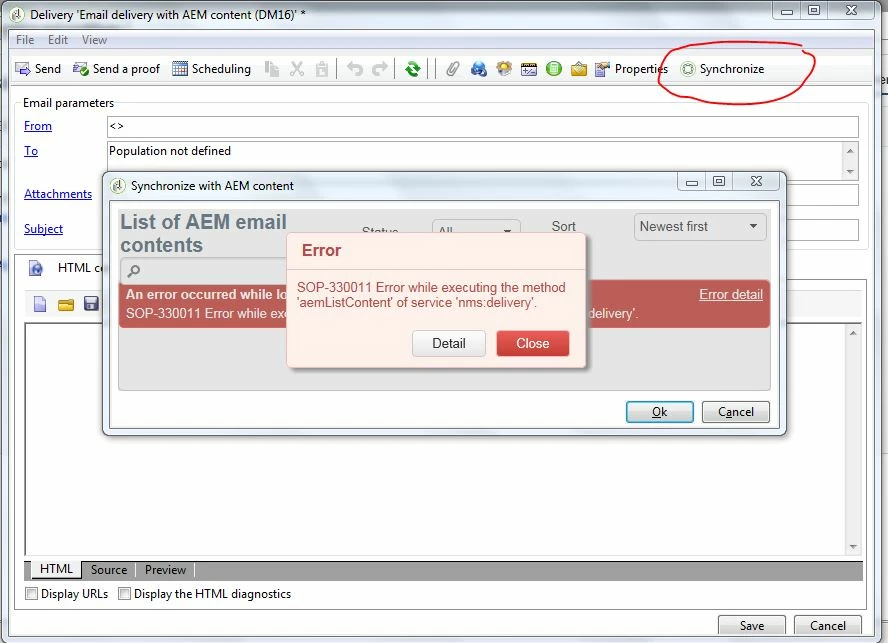
This post is no longer active and is closed to new replies. Need help? Start a new post to ask your question.

1 reply

kautuk_sahni
Community Manager
Community Manager
November 6, 2017

/content/campaignsTry Following:

1. Check the AEM "campaign-remote" user permissions

2. Make sure the AEM connection-url configured in the External Accounts is reachable from the machine.

    A switch from localhost to an IP-address solved this issue.

     Source:- Troubleshooting your Adobe Campaign Integration

3. Check the existence of path /content/campaigns

4. Make sure No firewall blocking access between AEM and ACS.

~kautuk

Kautuk Sahni
manovinayaka757
Level 3
November 13, 2017

Hi kautuksahni​,

As per the below post, Is campaign-api mandatory? By default I only find campaign-remote user ?

Should I create campaign-api user with the same set of permissions as campaign-remote user ?

AEM email content synchronization issues

Regards,

Mano

kautuk_sahni
Community Manager
Community Manager
November 13, 2017

FYI...

1. The campaign-remote user (default) needs to match the external account on Adobe Campaign. That is, the campaign-remote user's name and password must match the one you set in Experience Manager.

2. If you are creating some new user in AEM, then make sure to give same rights as campaign-remote user and set its password. Username and password should be same as the external account on adobe-campaign.

3. You can use campaign-remote user as well (no need to create any new one) but make sure that the password of this user is set in AEM (As by default, it is not set)

4. For testing use, you can use admin user and password.

Kautuk Sahni