Calling a sling servlet from Coral3 based Select dialog field | Community
Skip to main content
Level 3
October 16, 2018

Calling a sling servlet from Coral3 based Select dialog field

  • October 16, 2018
  • 1 reply
  • 5355 views

Hi All,

We are in the process of converting classic UI dialogs to Touch UI compatible. Whereas few of our components are having select fields (dialog item options) which are getting populated from a servlet response (JSON)

For example, in our classic UI dialog we were calling the servlet as highlighted in the below snap:
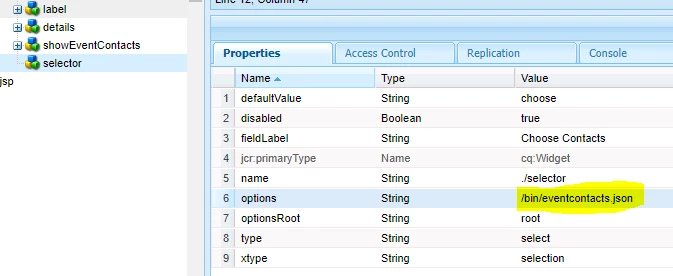
Is there any way to make use of the same servlet by calling it from some property? in Coral3 based touch UI select field? I have tried doing something like as follows, but looks like my servlet call is not happening as per logs:

<lineType

jcr:primaryType="nt:unstructured"

sling:resourceType="granite/ui/components/coral/foundation/form/select"

fieldLabel="Choose Contacts"

name="./selector">

<datasource

jcr:primaryType="nt:unstructured"

sling:resourceType="/bin/eventcontacts.json"/>

</lineType>

Yes, I have gone through various forums and found that there are multiple ways  to achieve this. For instance:

  1. Using WCMUsePojo as explained in the following article: Building Experience Manager Components using Granite/Coral Resource Types
  2. Or even by creating a JS and calling my servlet via  ajax call under "dialog-ready" and binding the response to dom elements

My question is: Is it not feasible to call a  servlet directly from my dialog properties in case of Touch UI Coral3? or am I missing anything?

Thanks in advance for any pointers!

-Dinesh kumar L.

This post is no longer active and is closed to new replies. Need help? Start a new post to ask your question.

1 reply

smacdonald2008
Level 10
October 16, 2018

To populate a Granite/Coral Select field dynamically - you use a DataSource object. The use of WCMUsePojo is one way to create the DataSource object:

countries.put("in", "India");

countries.put("us", "United States");

countries.put("aus", "Australia");

countries.put("pak", "Pakistan");

countries.put("sri", "Srilanka");


@SuppressWarnings("unchecked")


//Creating the Datasource Object for populating the drop-down control.

DataSource ds = new SimpleDataSource(new TransformIterator(countries.keySet().iterator(), new Transformer() {


@Override


//Transforms the input object into output object

public Object transform(Object o) {

String country = (String) o;


//Allocating memory to Map

ValueMap vm = new ValueMapDecorator(new HashMap<String, Object>());


//Populate the Map

vm.put("value", country);

vm.put("text", countries.get(country));


return new ValueMapResource(resolver, new ResourceMetadata(), "nt:unstructured", vm);

No need to create a Serlvet - your Select field can be populated via a custom resource type as shown in the doc -

Building Experience Manager Components using Granite/Coral Resource Types

Notice the datasource node is a custom resource type:

sling:resourceType (String) - /apps/Lab2018/components/datasource/mylist/mylist.html (this value points to the JCR node where the HTL script is located. The HTL gets the DataSource object defined in the HtlDataSourceExample Java class. )

Level 3
October 16, 2018

Hi Smacdonald,

Thanks for your quick reply. Yes I have gone through the reference URL which you shared. Is there anyway the below kind of property can help in achieving the same?

I tried the above, but it did not work for me in Coral3. Reason why I am looking for the above approach is, we have almost 15+ such servlets in total across components. If it works, then I dont have to do lot of coding during my Classic to Touch UI dialog conversion activity.

smacdonald2008
Level 10
October 16, 2018

Since the creation of granite - the best practice to populate a Select field dynamically is to use a DataSource object.

We have older community article - 6.2 - that shows how to use a JSP to perform this too: Adobe Experience Manager Help | Using Granite DataSource objects to populate Experience Manager 6.2 Touch UI Select obje…

A 6.3 article - Adobe Experience Manager Help | Using an WCMUsePojo class to populate an Experience Manager Touch UI Select Field

Both show use of com.adobe.granite.ui.components.ds.DataSource object

A Servlet was used in Classic UI - but for Touch UI - it would be best practice to convert to use DataSource.