Caching on AEM Cloud publish adobeaemcloud.com domain | Community
Skip to main content
NageshRaja
November 27, 2024
Solved

Caching on AEM Cloud publish adobeaemcloud.com domain

  • November 27, 2024
  • 3 replies
  • 1925 views

Hey guys,


I am having an issue when I try to access the publish domain https://publish-p00001-e000002.adobeaemcloud.com/content/appName/en/shopping-cart.html

The changes pushed from the author are only visible in publish domain URL when I try to access through the query parameters.


Checking the logs I see the below -

  1. aemdispatcher logs - 
    [27/Nov/2024:07:06:44 +0000] [I] [cm-p00001-e00002-aem-publish-749967f856-nbzdf] "GET /content/appName/en/shopping-cart.html" - 11ms [publishfarm-marks/-] [actionhit] publish-p00001-e00002.adobeaemcloud.com
    The request with no query params is being served from dispatcher even after having the cache cleared.
    [27/Nov/2024:07:07:15 +0000] [I] [cm-p00001-e00002-e00002-publish-749967f856-nbzdf] "GET /content/appName/en/shopping-cart.html?nocache=trueCL" 200 326ms [publishfarm-marks/0] [actionnone] publish-p00001-e00002.adobeaemcloud.com

  2. httpd error logs -
    Wed Nov 27 07:06:44.810984 2024 [dispatcher:debug] [pid 627:tid 764] [cm-p00001-e00002-aem-publish-749967f856-nbzdf] checking [/content/appName/en/shopping-cart.html]
    Wed Nov 27 07:06:44.811002 2024 [dispatcher:debug] [pid 627:tid 764] [cm-p00001-e00002-aem-publish-749967f856-nbzdf] never flushed [/mnt/var/www/html/content/appName/.stat] -> use cache [/mnt/var/www/html/content/appName/en/shopping-cart.html]
    Wed Nov 27 07:06:44.811007 2024 [dispatcher:debug] [pid 627:tid 764] [cm-p00001-e00002-aem-publish-749967f856-nbzdf] cache-action for [/content/appName/en/shopping-cart.html]: DELIVER
    Wed Nov 27 07:06:44.811009 2024 [dispatcher:debug] [pid 627:tid 764] [cm-p00001-e00002-aem-publish-749967f856-nbzdf] request declined
    Wed Nov 27 07:06:44.811058 2024 [dispatcher:debug] [pid 627:tid 764] [cm-p00001-e00002-aem-publish-749967f856-nbzdf] response.headers[Content-Type] = "text/html;charset=utf-8"
    Wed Nov 27 07:06:44.811064 2024 [dispatcher:debug] [pid 627:tid 764] [cm-p00001-e00002-aem-publish-749967f856-nbzdf] response.headers[X-Content-Type-Options] = "nosniff"

Why would the logs show the /content/appName/.stat as never flushed when we flushed a child page underneath it?

Is it because of the statfiles level? Its currently set to "2". Do we need to increase it to 3 or 4? How to determine that based on the current node hierarchy?

/statfileslevel "2"



This post is no longer active and is closed to new replies. Need help? Start a new post to ask your question.
Best answer by Rohan_Garg

@nageshraja - I have one observation based on the host files you sent over and the default one you mentioned above- 

You don't have any ServerAlias set to localhost. Even in AEMaaCS the publisher will clear the cache by calling /dispatcher/invalidate.cache API with localhost (As both dispatcher and publisher share the same runtime in Kubernetes container)

I would suggest you create a new host and make sure it only has the ServerAlias set to localhost. You don't need any rewrites in this. Just a bare minimum skeleton of the vhost should do.

If you check the wknd codebase for instance you will notice that both default.vhost and wknd.vhost have ServerAlias set to "*" thereby allowing the cache invalidation.
In your codebase there is no * set to ServerAlias which is understandable but none set to "localhost" too thereby causing no vhost to serve the invalidation request from publisher to dispatcher.
Can you please try this and let me know if this works for you?

If not, then please share your exact dispatcher configuration for one tenant at least.


Best Regards,
Rohan Garg

3 replies

daniel-strmecki
Community Advisor and Adobe Champion
November 27, 2024

Hi @nageshraja,

There is definietly a problem with your Dispatcher cache not being flushed. Can you confirm that you defined the statfilelevel in the invalidation.farm? As that is the farm used for Dispatcher flush/invalidation requests.

The statfilelevel starts from your DOCROOT, so it looks fine. In the aemdispatcher logs, you should see a HIT or MISS for each request you make. That is how you know if the HTML is served from Dispatcher cache or not.

I suggest you look at the logs of your cache invalidation requests. Also, I suggest you debug the issue on a local Dispatcher instance.


Good luck,

Daniel

NageshRaja
November 27, 2024

hey @daniel-strmecki - I do see hit and miss requests - the requests with query params are reported as [actionhit] while those without are reported as [actionmiss]

I am getting validator issues in my current dispatcher folder - mostly symlinks are not present at enabled vhosts - they are an exact replica of the available vhosts.

daniel-strmecki
Community Advisor and Adobe Champion
November 27, 2024

Hi @nageshraja,

it should be vice versa, requests with query params should be a MISS. Here is a shell script for you to fix symlinks:

cd .. project_root=$(pwd) cd dispatcher/src/conf.d/enabled_vhosts enabled_hosts=$(ls *.vhost) for host in $enabled_hosts; do rm $host ln -s ../available_vhosts/$host $host done cd $project_root cd dispatcher/src/conf.dispatcher.d/enabled_farms enabled_farms=$(ls *.farm) for farm in $enabled_farms; do rm $farm ln -s ../available_farms/$farm $farm done


Hope this helps,

Daniel

aanchal-sikka
Community Advisor
Community Advisor
November 27, 2024

@nageshraja 


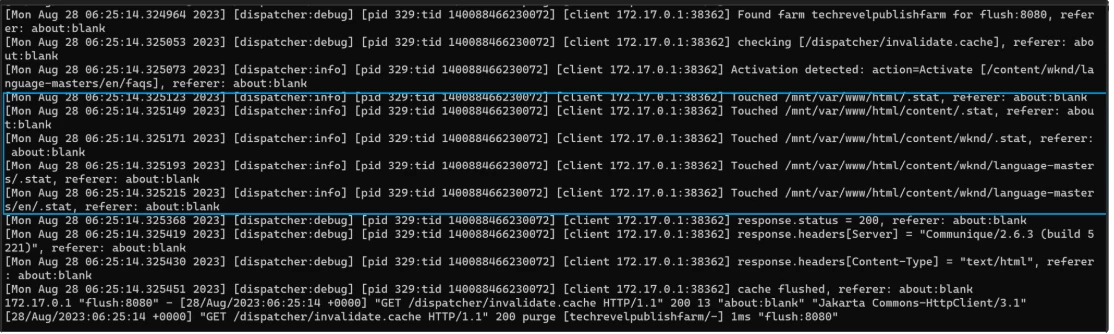
Please enable debug logs on the dispatcher. Publish the child page and validate dispatcher logs. The details on how the logs should look like are available on link

For reference, copying the relevant logs here as well:


With statfilelevel 2, the .stat file would have been created on:

docroot

/content

/content/appName


And any publish on Child-page should touch all .stat files along this path. For better understanding, refer to link


Aanchal Sikka
NageshRaja
November 27, 2024

thanks for replying @aanchal-sikka , however referring to your screenshot I see the logs "Touched /mnt/var.." logged as Info and not Debug.
We have already defined the log level as debug and still not getting the logs you mentioned -


Define DISP_LOG_LEVEL debug
Rohan_Garg
Community Advisor
Community Advisor
December 11, 2024

Hey @nageshraja,
The stat file level is set adequately. Can you share the vhost config and cache rules?

NageshRaja
December 12, 2024

default aem_publish.vhost - there are other brand specific vhosts as well
Sent that to you in inbox masking the brands - please check

# Collect any enviromental variables that are set in /etc/sysconfig/httpd
# Collect the dispatchers number
PassEnv DISP_ID
<VirtualHost *:80>
ServerName publish
# Put names of which domains are used for your published site/content here
ServerAlias ${PUBLISH_DEFAULT_HOSTNAME}
# Use a doc root that matches what's in the /etc/httpd/conf/publish-farm.any
DocumentRoot ${DOCROOT}
# Add header breadcrumbs for help in troubleshooting
<IfModule mod_headers.c>
Header always add X-Vhost "publish"
Header merge X-Frame-Options SAMEORIGIN "expr=%{resp:X-Frame-Options}!='SAMEORIGIN'"
Header merge X-Content-Type-Options nosniff "expr=%{resp:X-Content-Type-Options}!='nosniff'"
# Make sure proxies don't deliver the wrong content
Header append Vary User-Agent env=!dont-vary
</IfModule>
<Directory />
# Update /etc/sysconfig/httpd with setting the PUBLISH_WHITELIST_ENABLED from 0 or 1 to enable or disable ip restriction rules
<IfModule disp_apache2.c>
# Some items cache with the wrong mime type
# Use this option to use the name to auto-detect mime types when cached improperly
ModMimeUsePathInfo On
# Use this option to avoid cache poisioning
# Sling will return /content/image.jpg as well as /content/image.jpg/ but apache can't search /content/image.jpg/ as a file
# Apache will treat that like a directory. This assures the last slash is never stored in cache
DirectorySlash Off
# Enable the dispatcher file handler for apache to fetch files from AEM
SetHandler dispatcher-handler
</IfModule>
Options FollowSymLinks
AllowOverride None
# Insert filter
SetOutputFilter DEFLATE
# Don't compress images
SetEnvIfNoCase Request_URI \
\.(?:gif|jpe?g|png)$ no-gzip dont-vary
</Directory>
<Directory "${DOCROOT}">
AllowOverride None
Require all granted
</Directory>
<IfModule disp_apache2.c>
# Enabled to allow rewrites to take affect and not be ignored by the dispatcher module
DispatcherUseProcessedURL 1
# Default setting to allow all errors to come from the aem instance
DispatcherPassError 0
</IfModule>
<IfModule mod_rewrite.c>
ReWriteEngine on
# LogLevel warn rewrite:info
# Global rewrite include
# Update /etc/sysconfig/httpd with setting the PUBLISH_FORCE_SSL from 0 or 1 to enable or disable enforcing SSL
<If "${PUBLISH_FORCE_SSL} == 1">
</If>
</IfModule>
</VirtualHost>
Rohan_Garg
Community Advisor
Rohan_GargCommunity AdvisorAccepted solution
Community Advisor
December 13, 2024

@nageshraja - I have one observation based on the host files you sent over and the default one you mentioned above- 

You don't have any ServerAlias set to localhost. Even in AEMaaCS the publisher will clear the cache by calling /dispatcher/invalidate.cache API with localhost (As both dispatcher and publisher share the same runtime in Kubernetes container)

I would suggest you create a new host and make sure it only has the ServerAlias set to localhost. You don't need any rewrites in this. Just a bare minimum skeleton of the vhost should do.

If you check the wknd codebase for instance you will notice that both default.vhost and wknd.vhost have ServerAlias set to "*" thereby allowing the cache invalidation.
In your codebase there is no * set to ServerAlias which is understandable but none set to "localhost" too thereby causing no vhost to serve the invalidation request from publisher to dispatcher.
Can you please try this and let me know if this works for you?

If not, then please share your exact dispatcher configuration for one tenant at least.


Best Regards,
Rohan Garg