Byline cannot be resolved to a type using WKND tutorial | Community
Skip to main content
matth39107775
Level 2
September 3, 2019
Solved

Byline cannot be resolved to a type using WKND tutorial

  • September 3, 2019
  • 10 replies
  • 10252 views

I've been following along the WKND tutorial here

5 - Custom Component

The initial steps with creating the byline component without any of the actual logic works, but after I added the Byline class I get
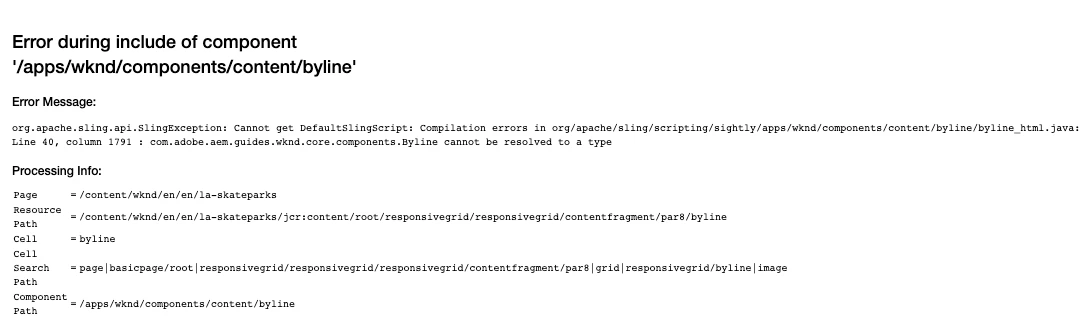
I saw someone who was having a similar issue here

Re: Error while deploying custom AEM component

But in their case it's saying that it resolves to a package. I do not have that error. Mine just says 'Cannot get DefaultSlingScript'

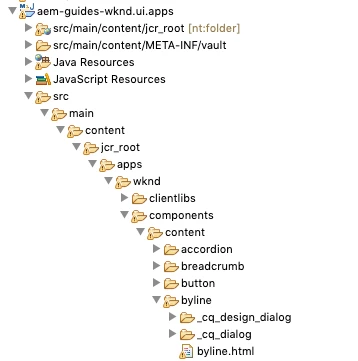
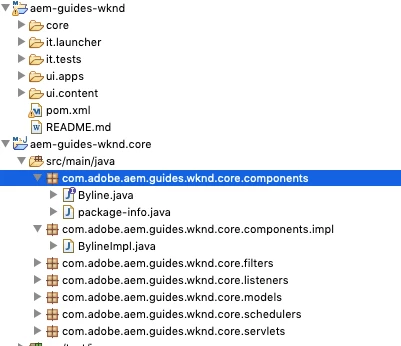
Here's how I have everything positioned in eclipse
And my byline.html code is

<div data-sly-use.byline="com.adobe.aem.guides.wknd.core.components.Byline"

    data-sly-use.placeholderTemplate="core/wcm/components/commons/v1/templates.html"

    data-sly-test.hasContent="${!byline.empty}"

    class="cmp-byline">

    <div class="cmp-byline__image"

         data-sly-resource="${ '.' @ resourceType = 'core/wcm/components/image/v2/image' }">

    </div>

        <h2 class="cmp-byline__name">${byline.name}</h2>

        <p class="cmp-byline__occupations">${byline.occupations @ join=','}</p>

</div>

<sly data-sly-call="${placeholderTemplate.placeholder @ isEmpty=!hasContent}"></sly>

Is there anything I'm missing? What could possibly cause something like this?

This post is no longer active and is closed to new replies. Need help? Start a new post to ask your question.
Best answer by chrisatsirius

I found the fix here and I applied it to my wknd, and the byline issue went away.

How to fix packages cannot be resolved issue in AEM archetype project - YouTube

Hope it helps.

10 replies

matth39107775
Level 2
September 3, 2019

Looking at the bundles I see that the core bundle doesn't include the byline component

I also I was using

mvn -PautoInstallPackage -Padobe-public clean install

At the root of my project.

matth39107775
Level 2
September 3, 2019

Redid the bundle install of core using

in the core folder. Now it appears in the exported packages of the bundle but now I get a new error

No use provider could resolve identifier com.adobe.aem.guides.wknd.core.components.Byline

Adobe Employee
September 4, 2019

Try recompiling all your JSP pages [1] to see if that would help.

[1] http://<host>:<port>/system/console/slingjsp

matth39107775
Level 2
September 4, 2019

I get "The requested page was not found. If you are not forwarded in 3 seconds to the Web Console, please click here"

When visiting that page. I'm using 6.5. I could be wrong but from my research that seems to only apply up to version 6.3

matth39107775
Level 2
September 4, 2019

It seems that option was removed in 6.5 but I followed option 2 on How to force a recompilation of all Sling scripts jsps, java, and sightly in AEM 6.4

and I still received the same error

Adobe Employee
September 4, 2019

For a recompile, you can try to use the steps from KB at How to force a recompilation of all Sling scripts jsps, java, and sightly in AEM 6.4

Otherwise, you should compare your code with the one from the WKND GitHub: GitHub - adobe/aem-guides-wknd: Tutorial Code companion for Getting Started Developing with AEM Sites WKND Tutorial

matth39107775
Level 2
September 4, 2019

I'm trying to recompile everything using those steps but I don't see where in the web console system/console/bundles

where I can do

  • For classes and Slightly access [1] and click Recompile all JSPs.
  • For clientlibs access [2], click Invalidate Caches then click Rebuild Libraries.

I don't know where those actual options are

I also I went to that repo and copy and pasted all the code for each file relating to the byline component to make sure there weren't any differences

matth39107775
Level 2
September 4, 2019

Okay maybe it was referring to this page http://localhost:4502/libs/granite/ui/content/dumplibs.rebuild.html

If that's the case I have followed every instruction on that page to rebuild the cache and got the same error. Using both the file system method and the web console method.

chrisatsirius
chrisatsiriusAccepted solution
Level 2
September 6, 2019

I found the fix here and I applied it to my wknd, and the byline issue went away.

How to fix packages cannot be resolved issue in AEM archetype project - YouTube

Hope it helps.

January 10, 2020

I had the same error for WKND tutorial.

Open the terminal or command line. Go to the aem-guides-wknd directory. Run 

mvn -PautoInstallPackage -Padobe-public clean install


It worked for me.