Bundles going in installed state after service pack install | Community
Skip to main content
Level 2
April 10, 2021

Bundles going in installed state after service pack install

  • April 10, 2021
  • 6 replies
  • 3529 views

Hi,

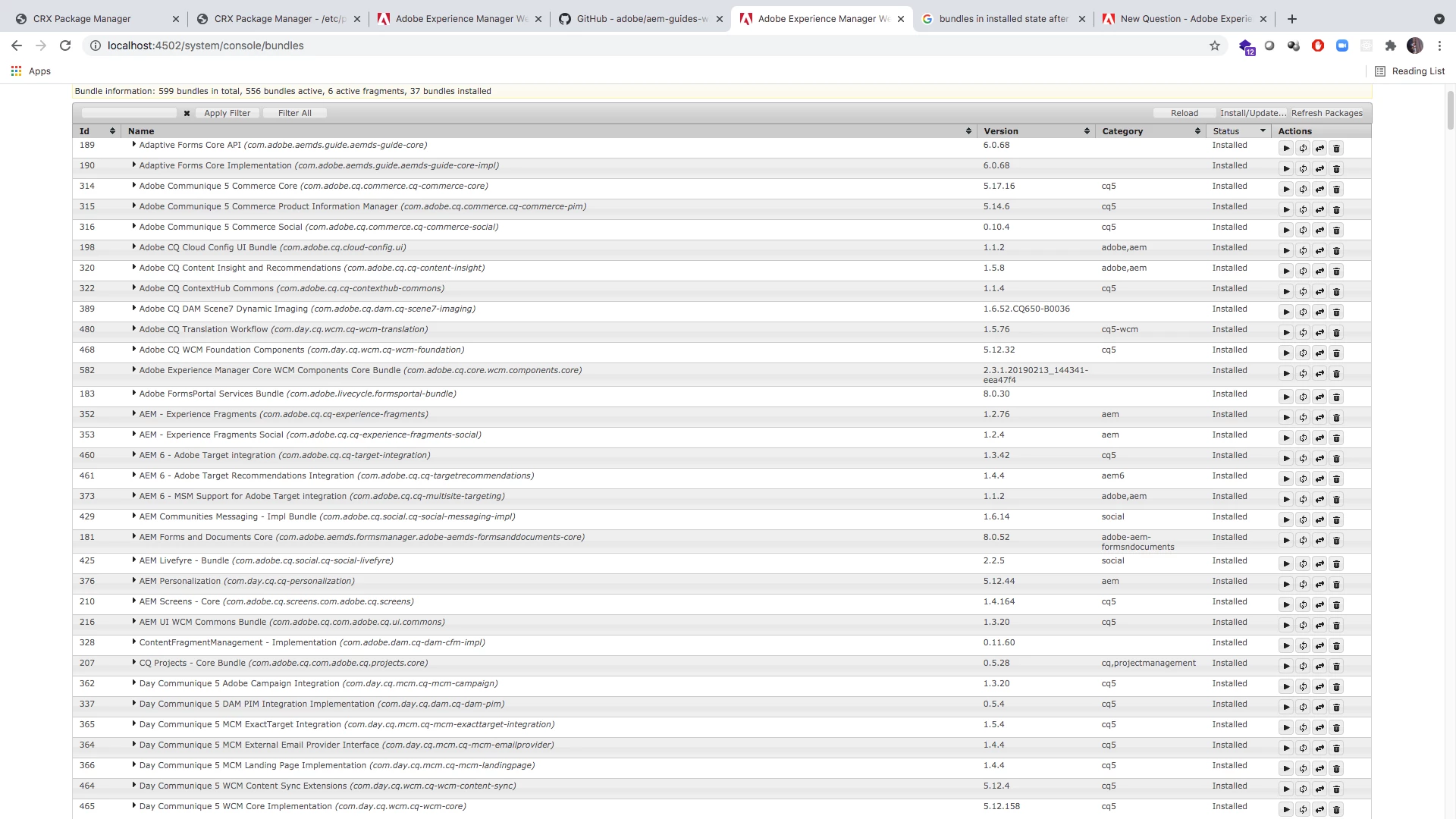
I installed service pack 8 on a fresh AEM 6.5 instance in my mac machine. 37 bundles go into Install state which were previously active before service pack. I tried multiple times by setting up fresh instance again but its the same thing. What could be the solution?
This post is no longer active and is closed to new replies. Need help? Start a new post to ask your question.

6 replies

Ravi_Pampana
Community Advisor
Community Advisor
April 10, 2021

Hi,


Can you check by expanding the bundles and see whether there are any unresolved bundles which has version conflicts ? Also, check whether the uber jar was updated to the correct AEM version. 

sjb99Author
Level 2
April 10, 2021
Thanks for responding. Where do I correct the uber jar? Because I'm not installing my project. It's just the service pack which I installed. In few bundles there is some version mismatch and is highlighted in red. But what do I do to resolve it? It's a complete fresh installation and only Adobe given package is installed. Same thing happening with SP7 too
sjb99Author
Level 2
April 10, 2021

@ravi_pampana Thanks for responding. Where do I correct the uber jar? Because I'm not installing my project. It's just the service pack which I installed. In few bundles there is some version mismatch and is highlighted in red. But why is showing such error? It's a complete fresh installation and only Adobe given package is installed. Same thing happening with SP7 too

joerghoh
Adobe Employee
Adobe Employee
April 11, 2021

Have you restarted the instance? IIRC that's what Adobe mandates.

sjb99Author
Level 2
April 11, 2021

Hi @joerghoh , yes I restarted it multiple times. even tried setting up fresh instance again and restarted it multiple times but same issue after install SP8 or even SP7 for that matter.

sjb99Author
Level 2
April 12, 2021

@ravi_pampana @joerghoh Hi, thank you for the responses. I'm using JDK 11.0.10 which I downloaded from Adobe. This is a fresh installation where I'm installing on plain AEM 6.5 instance. Literally opening the cq jar for the first time, once its up and all bundles are fine, I restart it and I install SP8 and restart it again after the package is installed after 45 mins or so. I even started waiting that long for better results but the behavior is same. Could this be due to my Mac version? I'm using Mac 10.12.6 (Sierra). Please find the error log. So many unsresolved bundles due to some mismatch. This is a fresh installation, so I don't understand how mismatch can come up. Please help.

13.04.2021 01:40:38.405 *ERROR* [FelixDispatchQueue] com.day.cq.mcm.cq-mcm-emailprovider FrameworkEvent ERROR (org.osgi.framework.BundleException: Unable to resolve com.day.cq.mcm.cq-mcm-emailprovider [364](R 364.0): missing requirement [com.day.cq.mcm.cq-mcm-emailprovider [364](R 364.0)] osgi.wiring.package; (osgi.wiring.package=com.day.cq.wcm.foundation.forms) [caused by: Unable to resolve com.day.cq.wcm.cq-wcm-foundation [468](R 468.1): missing requirement [com.day.cq.wcm.cq-wcm-foundation [468](R 468.1)] osgi.wiring.package; (&(osgi.wiring.package=com.adobe.cq.wcm.ui.components.container.service)(version>=1.0.0)(!(version>=2.0.0)))] Unresolved requirements: [[com.day.cq.mcm.cq-mcm-emailprovider [364](R 364.0)] osgi.wiring.package; (osgi.wiring.package=com.day.cq.wcm.foundation.forms)])
org.osgi.framework.BundleException: Unable to resolve com.day.cq.mcm.cq-mcm-emailprovider [364](R 364.0): missing requirement [com.day.cq.mcm.cq-mcm-emailprovider [364](R 364.0)] osgi.wiring.package; (osgi.wiring.package=com.day.cq.wcm.foundation.forms) [caused by: Unable to resolve com.day.cq.wcm.cq-wcm-foundation [468](R 468.1): missing requirement [com.day.cq.wcm.cq-wcm-foundation [468](R 468.1)] osgi.wiring.package; (&(osgi.wiring.package=com.adobe.cq.wcm.ui.components.container.service)(version>=1.0.0)(!(version>=2.0.0)))] Unresolved requirements: [[com.day.cq.mcm.cq-mcm-emailprovider [364](R 364.0)] osgi.wiring.package; (osgi.wiring.package=com.day.cq.wcm.foundation.forms)]
	at org.apache.felix.framework.Felix.resolveBundleRevision(Felix.java:4368)
	at org.apache.felix.framework.Felix.startBundle(Felix.java:2281)
	at org.apache.felix.framework.Felix.setActiveStartLevel(Felix.java:1539)
	at org.apache.felix.framework.FrameworkStartLevelImpl.run(FrameworkStartLevelImpl.java:308)
	at java.base/java.lang.Thread.run(Thread.java:834)

sjb99Author
Level 2
April 14, 2021

hi @joerghoh @kautuk_sahni any help or pointers regarding this please? Tried everything with different java versions also

joerghoh
Adobe Employee
Adobe Employee
April 15, 2021

Can you try to start bundles manually and see if that unblocks this situation? IIRC I had this behaviour sometimes (and it's definitely not planned to behave like this). 

ravir73578276
Level 3
October 23, 2022

Hy @sjb99 , were you able to fix this issue? I am also facing similar issue on my centos virtual machine. If yes, please provide the RCA.