Bundle is in installed state | Community
Skip to main content
November 21, 2022
Solved

Bundle is in installed state

  • November 21, 2022
  • 2 replies
  • 853 views

Hi Community Members,

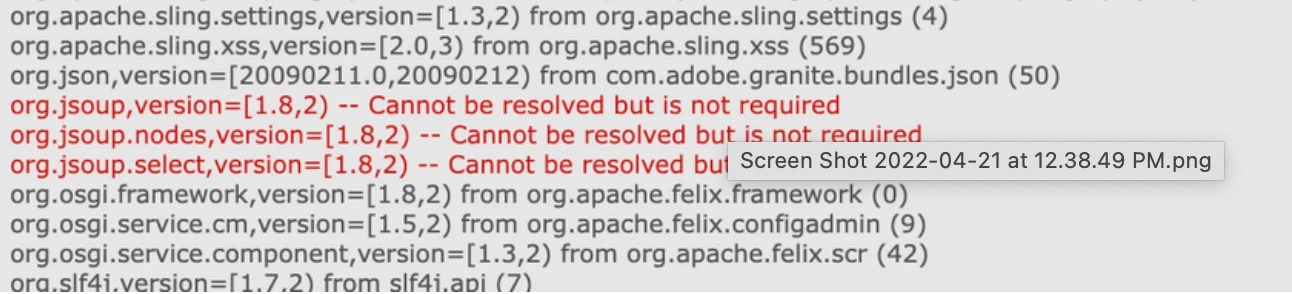
We have upgraded to Service Pack 6.5.14 recently and found that bundle is not getting Active. below are few errors we are facing even after having jsoup dependency.
This post is no longer active and is closed to new replies. Need help? Start a new post to ask your question.
Best answer by SantoshSai

Hi @jenn_faya ,

Even after you have included dependency - You have to add the jsoup jar manually to AEM as well. See the below or more details please check here: https://experienceleaguecommunities.adobe.com/t5/adobe-experience-manager/jsoup-jar-does-not-install...

Hope that helps!
Regards,

Santosh

2 replies

SantoshSai
Community Advisor
SantoshSaiCommunity AdvisorAccepted solution
Community Advisor
November 21, 2022

Hi @jenn_faya ,

Even after you have included dependency - You have to add the jsoup jar manually to AEM as well. See the below or more details please check here: https://experienceleaguecommunities.adobe.com/t5/adobe-experience-manager/jsoup-jar-does-not-install...

Hope that helps!
Regards,

Santosh

Santosh Sai
Community Advisor
November 22, 2022

Hi @jenn_faya 

You can always install bundle manually but that's not a recommended way and also apache felix console is not accessible on AMS or AEM Cloud so manually installing a bundle is not an option going forward. So all external dependencies must be installed via code deployment.

To install the jsoup bundle via code deployment you need to do

1. add jsoup dependency in your parent pom.xml

<dependency>
    <groupId>org.jsoup</groupId>
    <artifactId>jsoup</artifactId>
    <version>1.8.2</version>
</dependency>

2. In your project.all module's pom.xml embed the jsoup dependency using filevault-package-maven-plugin

<embedded>
    <groupId>org.jsoup</groupId>
    <artifactId>jsoup</artifactId>
    <type>jar</type>
    <target>/apps/your_project/install</target>
</embedded>

3. In your project.all module's pom.xml add jsoup dependency same as added in parent pom.xml

<dependency>
     <groupId>org.jsoup</groupId>
    <artifactId>jsoup</artifactId>
</dependency>

4. update your all module's filter.xml with below filter entry

<filter root="/apps/your_project/install"/>